
Splitting Your TV Antenna Cable: A Step-by-step Guide
Are you tired of having only one device connected to your TV antenna? Do you want to split the signal to multiple devices without calling a technician? Look no further! In this article, we will guide you through the process of splitting your TV antenna cable using partitores and derivatori.
What Are Partitori And Derivatori?
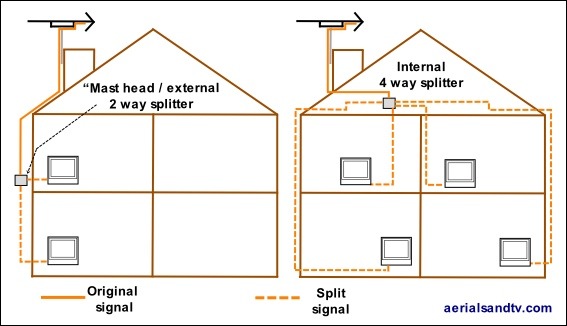
Before we dive into the step-by-step guide, let’s first understand what partitori and derivatori are. These devices are used to distribute and split the signal from your TV antenna to multiple devices. Partitori (or divisional) serve to restart the signal equally, while derivatori serve to distribute the signal on several uses splitting of a level of sign enough elevated.
Choosing Between Derivatori And Partitori
When deciding between derivatori and partitori, consider the following:
- Derivatori are suitable for distributing the signal to multiple devices, but they may not provide the best quality.
- Partitori are better suited for restarting the signal equally, which is ideal for splitting the cable between two decoders or TVs.
Step-by-step Guide: Splitting Your TV Antenna Cable With Derivatori And Partitori
Here’s a step-by-step guide to splitting your TV antenna cable using derivatori and partitori:
- Acquire The Necessary Material: Buy a derivatore (or partitore) and two cables for antennas.
- Connect The Cable to The Derivatore or Partitore: Attach the cable to the input terminal of the derivatore or partitore, then connect the output terminals to your devices.
- Split The Signal: Use a splitter to split the signal from the TV antenna into multiple signals for each device.
- Connect The Devices: Connect each device to its respective signal output.
Manually Splitting Your TV Antenna Cable
If you’re comfortable working with cables and electronic devices, you can manually split your TV antenna cable by:
- Acquiring a Cable Splitter: Buy a cable splitter that matches your TV antenna cable type.
- Cutting The Cable: Use wire cutters to cut the TV antenna cable into two equal parts.
- Attaching Connectors: Attach connectors to each end of the split cables, then connect them to your devices.
Tips And Precautions
- When splitting your TV antenna cable manually, be careful not to damage the cable or compromise its quality.
- If you’re unsure about any step, consult a professional technician for assistance.
Conclusion
Splitting your TV antenna cable is a straightforward process that can save you money by avoiding technician fees. By following this guide, you’ll be able to split your signal and connect multiple devices without any issues.
Frequently Asked Questions (FAQs)
Q: Can I use a derivatore or partitore with an old TV antenna?
A: Yes, but make sure the device is compatible with your TV antenna type.
Q: How do I choose between a derivatore and a partitore?
A: Consider the number of devices you need to connect and the quality of signal required.
Q: Can I split my TV antenna cable manually without damaging it?
A: Yes, but be careful not to compromise the quality of the signal.
Q: What are some alternatives to splitting my TV antenna cable?
A: You can use a booster or an amplifier to increase the signal strength and reach multiple devices.
Q: How do I maintain my split TV antenna cable system?
A: Regularly inspect your cables for signs of wear and tear, and clean them when necessary to ensure optimal performance.
Q: Can I connect more than two devices to my split TV antenna cable system?
A: Yes, but you may need additional equipment like booster or amplifier to increase the signal strength.
Q: Is it possible to connect a splitter directly to a TV antenna without using a derivatore or partitore?
A: No, this can compromise the quality of the signal and cause reception problems.


