
Changing Your Smartphone’s Ringtone: A Step-by-step Guide
Are you tired of the same old ringtone on your Android smartphone? Do you want to change it but don’t know where to start? Look no further! In this article, we will guide you through the process of changing your smartphone’s ringtone using various apps and websites.
Why Change Your Ringtone?
Changing your ringtone can be a great way to personalize your phone and make it stand out. With so many different types of ringtones available, you’re sure to find one that suits your style. Plus, changing your ringtone can be a fun way to mix things up and keep your phone feeling fresh.
Using Zedge: A Popular Ringtone App
One popular app for changing your smartphone’s ringtone is ZEDGE. This app offers a vast library of ringtones in various categories, including music, sound effects, and even video backgrounds. With ZEDGE, you can browse through the different categories, select a ringtone that suits your taste, and download it directly to your phone.
How to Use Zedge: A Step-by-step Guide
Here’s how to use ZEDGE to change your smartphone’s ringtone:
- Download And Install Zedge: First, you’ll need to download and install the ZEDGE app from the Google Play Store or another alternative store.
- Browse Through Categories: Once the app is installed, browse through the different categories of ringtones available on ZEDGE.
- Select a Ringtone: Choose a ringtone that suits your taste by selecting it from the list.
- Download The Ringtone: Click on the “Get Ringtone” button to download the selected ringtone directly to your phone.
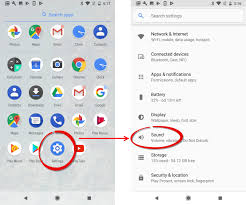
- Set The Ringtone: Once the ringtone is downloaded, go to your phone’s settings and select the new ringtone as your default.
Other Alternatives: Audiko Ringtones And Tones 7
In addition to ZEDGE, there are other apps available that offer a wide range of ringtones. Two such alternatives are Audiko Ringtones and Tones 7.
- Audiko Ringtones: This app offers a vast library of ringtones in various categories, including music, sound effects, and even video backgrounds.
- Tones 7: This app is exclusively available as a website accessible through any web browser. It deals with a service endowed with a good catalogue of the which can download really tanti types of suonerie in format MP3.
How to Use Audiko Ringtones: A Step-by-step Guide
Here’s how to use Audiko Ringtones to change your smartphone’s ringtone:
- Download And Install Audiko: First, you’ll need to download and install the Audiko app from the Google Play Store or another alternative store.
- Browse Through Categories: Once the app is installed, browse through the different categories of ringtones available on Audiko.
- Select a Ringtone: Choose a ringtone that suits your taste by selecting it from the list.
- Download The Ringtone: Click on the “Get Ringtone” button to download the selected ringtone directly to your phone.
- Set The Ringtone: Once the ringtone is downloaded, go to your phone’s settings and select the new ringtone as your default.
How to Use Tones 7: A Step-by-step Guide
Here’s how to use Tones 7 to change your smartphone’s ringtone:
- Access The Website: Access the Tones 7 website using any web browser.
- Browse Through Categories: Browse through the different categories of ringtones available on Tones 7.
- Select a Ringtone: Choose a ringtone that suits your taste by selecting it from the list.
- Download The Ringtone: Click on the “Download MP3 Ringtone” button to download the selected ringtone directly to your phone.
Mp3 Ringtones: A Guide
If you’ve downloaded an MP3 ringtone, here’s a guide on how to set it as your default ringtone:
- Save The File: Save the MP3 file to the internal memory of your smartphone.
- Set The Ringtone: Go to your phone’s settings and select the new ringtone as your default.
Conclusion
Changing your smartphone’s ringtone can be a fun way to personalize your phone and make it stand out. With various apps and websites available, you’re sure to find one that suits your style. Remember to follow these simple steps to change your ringtone using ZEDGE, Audiko Ringtones, or Tones 7.
Faqs
- Q: How do I Change my Smartphone’s Ringtone?
A: To change your smartphone’s ringtone, you can use various apps such as ZEDGE, Audiko Ringtones, or Tones 7. - Q: What Types of Ringtones Are Available on These Apps?
A: These apps offer a wide range of ringtones in various categories, including music, sound effects, and even video backgrounds. - Q: How do I Set an Mp3 Ringtone as my Default?
A: To set an MP3 ringtone as your default, save the file to the internal memory of your smartphone and go to your phone’s settings to select the new ringtone. - Q: Are These Apps Available For Free?
A: Yes, these apps are available for free download from the Google Play Store or another alternative store.
References
- [1] ZEDGE – Ringtone App
- [2] Audiko Ringtones – Ringtone App
- [3] Tones 7 – Website
- [4] How to Use MP3 Ringtones on Android Phones


