
Removing Your Phone Number From Tiktok: A Step-by-step Guide
Are you tired of having your phone number associated with your TikTok account? Do you want to maintain some level of anonymity on the platform? Look no further! In this article, we will guide you through the process of removing your phone number from TikTok, both on Android and iPhone devices.
Why Remove Your Phone Number From Tiktok?
Before we dive into the step-by-step instructions, let’s understand why you might want to remove your phone number from TikTok in the first place. Here are a few reasons:
- Anonymity: By removing your phone number, you can maintain some level of anonymity on the platform.
- Spam Protection: If you’ve been receiving unwanted calls or messages related to your TikTok account, removing your phone number might help protect you from these issues.
- Personal Preference: Some users simply prefer not to share their phone numbers with social media platforms.
Removing Your Phone Number on Android
To remove your phone number from TikTok on an Android device, follow these steps:
- Open the TikTok app and go to your profile page.
- Tap the three horizontal lines (≡) on the top-right corner of the screen.
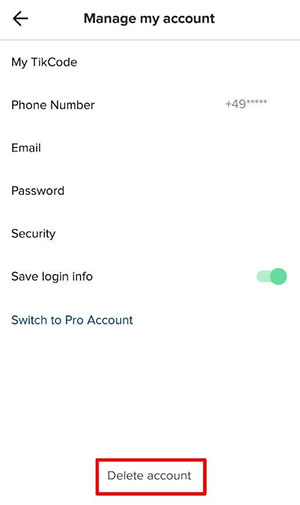
- Select “Account” from the menu.
- Tap on “Number of phone”.
- Enter the code received via SMS in the “Forward code” field.
- If you have a secondary number, enter it in the “New number” field. Otherwise, tap “Delete account”.
- Confirm your decision to delete the account by tapping “Delete”.
Removing Your Phone Number on Iphone
The process of removing your phone number from TikTok on an iPhone is similar to that on Android:
- Open the TikTok app and go to your profile page.
- Tap the three dots (…) on the top-right corner of the screen.
- Select “Settings” from the menu.
- Tap on “Account”.
- Enter the code received via SMS in the “Forward code” field.
- If you have a secondary number, enter it in the “New number” field. Otherwise, tap “Delete account”.
- Confirm your decision to delete the account by tapping “Delete”.
What Happens After You Remove Your Phone Number From Tiktok?
After removing your phone number from TikTok, you will no longer be able to access the platform with that specific number. If you try to log in using the same number, you’ll receive an error message.
However, if you’ve deleted your account and recreated a new one without using the old phone number, you can still access the platform normally.
Conclusion
Removing your phone number from TikTok is a relatively simple process that can be completed on both Android and iPhone devices. By following these step-by-step instructions, you can maintain some level of anonymity on the platform or protect yourself from unwanted calls and messages related to your TikTok account.
If you have any further questions or concerns about removing your phone number from TikTok, feel free to ask in the comments section below!
Frequently Asked Questions (FAQs)
Q: What Happens if I Remove my Phone Number From Tiktok?
A: If you remove your phone number from TikTok, you will no longer be able to access the platform with that specific number. However, if you’ve deleted your account and recreated a new one without using the old phone number, you can still access the platform normally.
Q: Can I Still Use Tiktok After Removing my Phone Number?
A: Yes, you can still use TikTok even after removing your phone number from the app. Simply recreate a new account with a different phone number or use an alternative method of registration (such as logging in via Facebook or Google).
Q: Is it Safe to Remove my Phone Number From Tiktok?
A: Removing your phone number from TikTok can be a safe and secure process, especially if you’ve set up a secondary number or used an alternative method of registration. However, make sure to follow the correct steps outlined in this article to avoid any potential issues.
Q: Can I Recover my Account After Removing my Phone Number From Tiktok?
A: If you remove your phone number from TikTok and later want to recover your account, it may be possible to do so by contacting TikTok’s customer support team. However, the process of recovery may vary depending on the specific circumstances.
Q: What if I’m Experiencing Issues With Unwanted Calls or Messages Related to my Tiktok Account?
A: If you’re receiving unwanted calls or messages related to your TikTok account, removing your phone number from the app might help protect you from these issues. However, this is not a foolproof solution and may require additional measures to ensure complete protection.
References
- Tiktok Help Center: Visit the official TikTok Help Center for more information on managing your account settings.
- Android Authority: Learn about the latest Android features and updates on Android Authority.
- Imore: Stay up-to-date with the latest iPhone news, reviews, and tutorials on iMore.


