
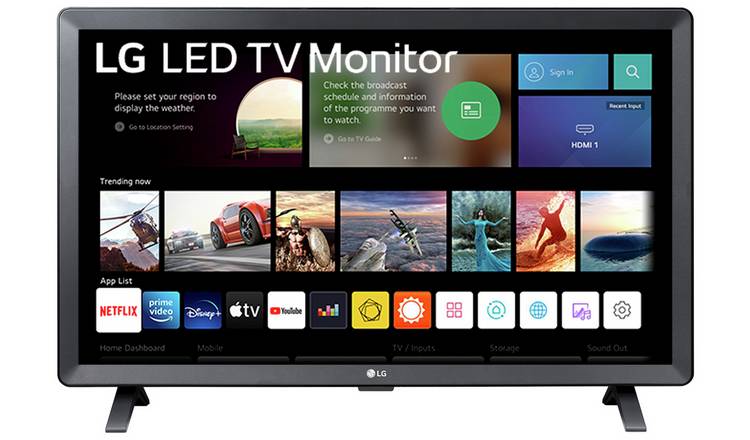
The Ultimate Guide to Identifying a Smart TV
Are you one of those people who’s always been fascinated by technology and its wonders? If yes, then you must be aware that the world of smart TVs has revolutionized the way we watch our favorite shows or movies on the big screen. However, with so many options available in the market, it can get quite confusing to determine whether a TV is smart or not.
In this article, we will guide you through the various ways to identify a smart TV and make an informed decision while purchasing one. Whether you’re a tech-savvy individual or just someone who’s curious about technology, this guide has got everything covered for you!
What is a Smart Tv?
Before we dive into the details, let’s first understand what a smart TV is. A smart TV is essentially a television that can connect to the internet and run various applications (or apps). These TVs usually come with built-in Wi-Fi connectivity, allowing users to access a wide range of content, including streaming services like Netflix, Amazon Prime Video, Hulu, and more.
How to Identify a Smart Tv:
Here are some easy ways to identify whether a TV is smart or not:
Check The Remote Control:
The first step in identifying a smart TV is to check its remote control. Look for any specific buttons or icons that seem out of the ordinary compared to traditional remotes.
-
Smart TV Buttons: Smart TVs usually come with a variety of buttons, including a “Home” button (usually represented by an icon of a house), an “App” button (which might have icons and different names), a “Voice Control” button (usually identified by an icon resembling a microphone), and more.
-
Basic TV Buttons: On the other hand, basic TVs typically only have a few buttons, such as power, volume up/down, channel up/down, etc.
Look For Internet Connectivity:
Another way to determine if a TV is smart is to check its internet connectivity. Smart TVs usually come with built-in Wi-Fi or Ethernet connectivity options.
- Wi-fi And Ethernet: If the TV has Wi-Fi or Ethernet ports, it’s likely a smart TV. However, be aware that some older smart TVs might not have these features.
Check The Operating System:
Smart TVs run on specific operating systems designed for TVs. Some popular OSes include Android TV, WebOS, and Tizen OS.
- Popular Os: Look out for brands like Samsung (Tizen OS), LG (WebOS), Sony, Philips, and others that use these operating systems.
Verify The Apps And Stores:
One of the most definitive ways to check if a TV is smart is by verifying its apps and stores. Smart TVs usually come with pre-installed apps for popular streaming services like Netflix, Hulu, Amazon Prime Video, etc.
- Store: Check if there’s a dedicated app store where you can download more apps or update existing ones. This will confirm that the TV has internet connectivity and supports app updates.
Check The Technical Specifications:
Always check the TV’s technical specifications before making a purchase. The box or manual might have specific details about the operating system, Wi-Fi, Ethernet, Bluetooth, and other features.
- Technical Details: Look for phrases like “Connected TV,” “Smart TV,” or other similar descriptions on the packaging or in the manual. Some brands even provide brief information about the type of operating system used by their TVs.
Verify Online:
If you’re shopping online, check the website’s description and reviews to get more details about the TV’s smart features.
- Website Details: Pay attention to any specific mentions of connectivity options, apps, or OS on the product page. Also, read through customer reviews to see if anyone has mentioned anything regarding the TV’s smarts.
Conclusion:
In conclusion, identifying a smart TV involves checking its remote control buttons, internet connectivity, operating system, pre-installed apps and stores, technical specifications, and verifying online details before making a purchase. By following these steps, you’ll be able to make an informed decision while buying a new TV for yourself.
Frequently Asked Questions:
Here are some frequently asked questions related to smart TVs:
Q: What is The Primary Difference Between a Basic TV And a Smart Tv?
A: A basic TV is essentially a traditional television without any internet connectivity or app capabilities, whereas a smart TV has built-in Wi-Fi connectivity and supports various apps.
Q: How do I Connect my Smart TV to The Internet?
A: You can connect your smart TV to the internet using either Wi-Fi or Ethernet. Ensure that you have a stable internet connection for seamless streaming.
Q: Can I Update The Operating System of my Smart Tv?
A: Yes, most smart TVs allow users to update their OS and apps. However, be aware that some older models might not receive updates due to compatibility issues with newer software versions.
Q: What Are Some Popular App Stores Available on Smart Tvs?
A: The two most prominent app stores for smart TVs are the Google Play Store (on Android TVs) and the WebOS app store (exclusive to LG TVs).
Q: Can I Stream Content From my Phone or Computer Directly Onto my Smart Tv?
A: Yes, with the right setup, you can mirror your phone or computer screen onto your smart TV using features like Chromecast, AirPlay, or mirroring apps.
Q: Are All Smart Tvs Created Equal?
A: Unfortunately, no. While all smart TVs share some similarities, each brand and model has its unique features, strengths, and limitations. Be sure to research thoroughly before making a purchase.


