
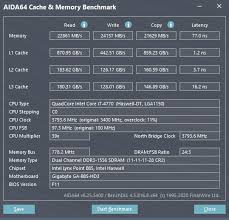
Benchmarking Your Pc: A Comprehensive Guide
Are you curious about your computer’s performance? Do you want to know if it can handle demanding tasks like video editing or gaming? Look no further! In this article, we’ll explore the world of benchmarking and show you how to test your PC’s capabilities using various software tools.
What is Benchmarking?
Benchmarking is a process that measures a computer’s performance in specific areas, such as CPU processing power, memory capacity, graphics rendering speed, and hard drive read/write speeds. By running benchmark tests, you can get an idea of how well your computer will perform under various conditions.
Why is Benchmarking Important?
Benchmarking is essential for several reasons:
- Identifying Performance Bottlenecks: Benchmarking helps identify areas where your PC’s performance is lacking, allowing you to address these issues and optimize your system.
- Comparing Performance Across Different Systems: By running benchmark tests on multiple PCs, you can compare their performance and make informed decisions when purchasing or upgrading a computer.
- Optimizing Software Performance: Some software applications are designed to take advantage of specific hardware configurations. Benchmarking helps ensure that these applications run optimally on your PC.
Best Free Benchmarking Software
Here are some top-notch free benchmarking tools you can use:
- Geekbench: A popular, cross-platform benchmarking tool that tests CPU and GPU performance.
- Cinebench: A free tool that evaluates CPU and graphics rendering capabilities.
- Novabench: A user-friendly software that assesses CPU, GPU, memory, and hard drive performance.
Other Noteworthy Benchmarking Tools
While not entirely free, these tools are worth mentioning:
- Passmark Performancetest: A comprehensive benchmarking tool for Windows users.
- HD Tune: A utility that tests hard drive read/write speeds and evaluates overall disk performance.
- Blackmagic Disk Speed Test: A macOS-exclusive app that measures disc speed and evaluates storage performance.
Benchmarking Your PC
Now that you know the importance of benchmarking, let’s dive into how to use these tools:
- Choose a Suitable Benchmarking Software: Select one or more tools from our list, depending on your specific needs.
- Follow Installation Instructions: Download and install the chosen tool(s) according to their respective guides.
- Run Benchmark Tests: Launch the software and follow its prompts to run the necessary tests.
- Analyze Results: Review the output data to determine your PC’s performance in various areas.
Conclusion
Benchmarking is a valuable process that helps you evaluate your computer’s capabilities, identify potential issues, and optimize system performance. By using these free and low-cost tools, you can make informed decisions about upgrading or purchasing new hardware, ensuring your PC runs smoothly and efficiently.
Faqs
Here are some frequently asked questions related to benchmarking:
- What is The Purpose of Benchmarking?
Benchmarking helps identify performance bottlenecks, compare system performance across different configurations, and optimize software performance. - Which Software Tools Can I Use For Benchmarking?
Choose from popular free tools like Geekbench, Cinebench, Novabench, PassMark PerformanceTest, HD Tune, Blackmagic Disk Speed Test, or other commercial alternatives. - How do I Install And Run a Benchmarking Tool?
Follow the software’s installation instructions and launch the program according to its prompts. - What Can I Expect From Benchmarking Results?
Review output data to determine your PC’s performance in various areas, such as CPU processing power, memory capacity, graphics rendering speed, and hard drive read/write speeds.
Conclusion
Benchmarking is an essential process for understanding your computer’s capabilities. By using the tools outlined above, you can evaluate your system’s performance and make informed decisions about upgrades or new hardware purchases.


