
Unlocking Instagram’s Hidden Features: A Comprehensive Guide
Are you tired of missing out on new features on Instagram? Do you want to get the most out of your social media experience? Look no further! In this article, we’ll show you how to update messages on Instagram, become a beta tester, switch to a professional account, and even change accounts. We’ll also cover how to update the app itself, ensuring you’re always running the latest version.
The Benefits of Updating Messages on Instagram
Before we dive into the nitty-gritty, let’s talk about why updating messages on Instagram is so important. By doing so, you’ll gain access to new features and functionalities that might not be available on your account yet. This means you can enjoy exclusive content, test new features before they’re rolled out to everyone else, and even earn rewards for being a loyal user.
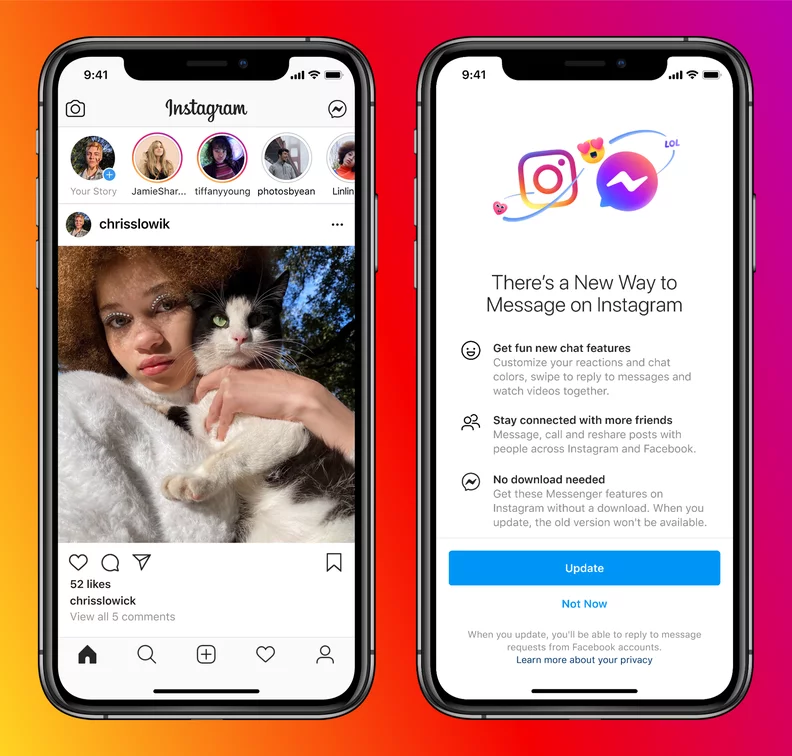
How to Update Messages on Instagram
Now that we’ve piqued your interest, let’s get down to business! To update messages on Instagram, follow these simple steps:
- Check The Availability of Updates: Log in to your account and see if there are any new features available.
- Wait For The Rollout: Sometimes, updates are rolled out gradually, so be patient and wait for them to become available on your account.
- Update The App: Make sure you’re running the latest version of the Instagram app.
Become a Beta Tester
Want to get access to new features before anyone else? Become a beta tester! By doing so, you’ll gain early access to new features, test them out, and even earn rewards for providing feedback. Here’s how:
- Download The Beta App: For Android users, download the Instagram beta app from the Play Store.
- Join The Beta Program: Follow the instructions to join the beta testing program.
- Test And Provide Feedback: Use the beta app to test new features, and don’t forget to provide feedback to help improve them.
Switch to a Professional Account
Are you a business owner or influencer looking to take your Instagram game to the next level? Switching to a professional account is a great way to access exclusive features and tools. Here’s how:
- Go to Settings: Log in to your account and go to Settings.
- Switch to a Professional Account: Follow the instructions to switch to a professional account.
- Access Exclusive Features: Enjoy access to new features, such as Insights, which provides detailed statistics about your profile.
Change Accounts
Maybe you have multiple accounts or want to try out a different type of account. Don’t worry; changing accounts is easy!
- Log in to The App: Open the Instagram app and log in to your account.
- Go to Settings: Go to Settings and scroll down to Account.
- Change Account: Follow the instructions to change accounts.
Update The App
Want to ensure you’re running the latest version of the Instagram app? Here’s how:
- Open The App Store: Open the app store on your device (Google Play or Apple App Store).
- Search For Instagram: Search for the Instagram app.
- Update The App: If an update is available, tap the “Update” button to install it.
Conclusion
Updating messages on Instagram is just one of many ways to get the most out of your social media experience. By following these simple steps and tips, you’ll be able to access new features, test them out, and even earn rewards for being a loyal user. Remember to always update the app itself to ensure you’re running the latest version.
Frequently Asked Questions (FAQs)
- Q: How do I Become a Beta Tester?
A: To become a beta tester, download the Instagram beta app from the Play Store and follow the instructions to join the beta testing program. - Q: What Are The Benefits of Switching to a Professional Account?
A: Switching to a professional account provides access to exclusive features, such as Insights, which offers detailed statistics about your profile. - Q: How do I Change Accounts?
A: To change accounts, log in to the app, go to Settings, and follow the instructions to switch accounts. - Q: Why Should I Update The App?
A: Updating the app ensures you’re running the latest version, which may include new features, bug fixes, or performance improvements. - Q: Can I Still Use my Existing Account as a Professional Account?
A: Yes, you can switch to a professional account without losing access to your existing account. - Q: How do I Provide Feedback on The Beta App?
A: Use the contact form within the beta app to provide feedback and suggestions for improving new features.
Bonus Tip
Want to stay up-to-date with the latest Instagram news and tips? Follow our social media accounts or sign up for our newsletter to receive exclusive content!


