
How to Amplify Your Wi-fi Sign: A Comprehensive Guide
Are you tired of weak Wi-Fi signals that make it difficult to browse the internet or stream your favorite shows? Do you find yourself constantly moving around the house to get a better connection? You’re not alone! Many people struggle with poor Wi-Fi reception, but fortunately, there are several solutions to amplify your signal. In this article, we’ll explore various methods to boost your Wi-Fi strength and ensure a stable internet connection throughout your home.
Choosing The Right Frequency Band
The first step in amplifying your Wi-Fi sign is to choose the right frequency band for your router. Most modern routers support both 2.4 GHz and 5 GHz frequency bands. While 5 GHz offers faster speeds, it has a shorter range than 2.4 GHz. If you have a large home or many physical obstacles in the way, consider using the 2.4 GHz band to get a stronger signal.
How to Change Channels on Your Router
Another method to improve your Wi-Fi signal is by changing channels on your router. Just like how radio stations switch between frequencies to avoid interference, you can do the same with your router’s channels. This process is usually done in the router’s settings menu and can make a significant difference in your internet speed.
Updating Your Router’s Firmware
Outdated firmware can also affect your Wi-Fi signal strength. Updating your router’s firmware is relatively easy and can resolve many issues related to poor internet speeds. Make sure to check for any available updates on your router’s manufacturer website or through the settings menu.
Rearranging Your Router’s Position
The position of your router plays a significant role in determining the quality of your Wi-Fi signal. Try moving your router to a central location, away from physical obstacles and other electronic devices that may interfere with its signal. This simple tweak can make a big difference in your internet speeds.
How to Use Range Extenders to Amplify Your Wi-fi Sign
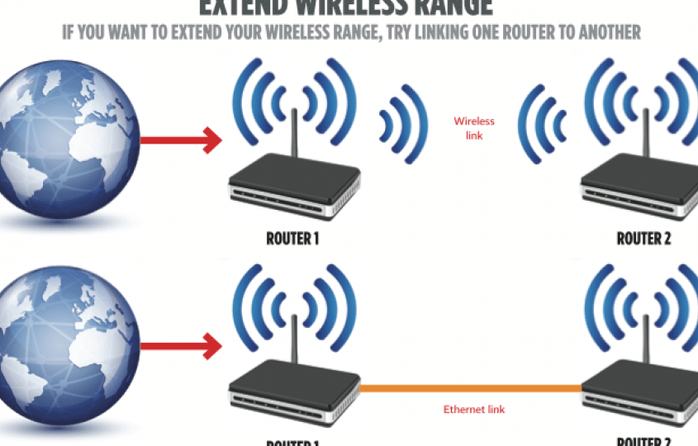
Range extenders are external devices that repeat your Wi-Fi signal, allowing you to cover a wider area without the need for cables or extensive wiring. These devices come in various forms and sizes, including plug-in devices, wall-mounted units, and mesh networks.
Using Powerline Adapters to Amplify Your Wi-fi Sign
Powerline adapters use your home’s electrical wiring to create a network connection between devices. They’re an excellent solution for areas with poor Wi-Fi coverage or where running cables is impractical. These adapters are relatively easy to set up and can provide a stable internet connection.
Using Your Computer as a Wi-fi Repeater
If you don’t have any external devices, you can use your computer as a makeshift repeater to amplify your Wi-Fi signal. This method involves setting up your computer’s operating system to rebroadcast the signal, making it available to other devices on your network.
Using Creative Materials to Boost Your Wi-fi Sign
If none of the above solutions appeal to you, consider using creative materials to boost your Wi-Fi sign. From copper pipes to PVC tubes, there are many DIY projects that can help extend your Wi-Fi range without breaking the bank.
How to Use Wireless Cameras With Stronger Signals
Wireless cameras often struggle with weak signals, but by setting up a separate network or extending the signal using an adapter, you can ensure clearer video feeds from anywhere in your home.
Conclusion
Amplifying your Wi-Fi sign is easier than you think. By choosing the right frequency band, changing channels on your router, updating firmware, rearranging your router’s position, and exploring various external devices like range extenders, powerline adapters, or using creative materials to boost the signal, you can ensure a stable internet connection throughout your home.
Frequently Asked Questions (FAQs)
- What is The Best Way to Amplify my Wi-fi Sign?
The best method depends on your specific situation and requirements. Consider experimenting with different solutions to find what works best for you. - Can I Use a Range Extender as a Primary Router?
While range extenders can work well as a repeater, they’re not typically designed as primary routers. Use them in conjunction with your existing setup or consult the manufacturer’s guidelines. - How do I Ensure my Wi-fi Signal is Strong Throughout my Home?
To achieve optimal coverage, position your router centrally and avoid physical obstacles like walls, mirrors, or windows. Regularly check for firmware updates and consider investing in a high-quality range extender or powerline adapter. - Can I Use an Old Laptop as a Makeshift Repeater?
Yes! Old laptops can be repurposed to rebroadcast your Wi-Fi signal, but make sure it’s properly configured on the router settings menu first.
By following these guidelines and experimenting with different methods, you’ll be able to boost your Wi-Fi sign and enjoy a stable internet connection throughout your home.


