
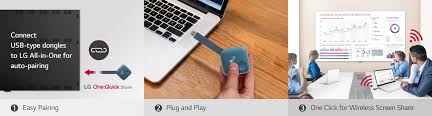
Screen Share on LG Tv: How it Functions
Are you curious about how to share your smartphone’s or tablet’s screen on your LG Smart TV? Look no further! In this article, we will guide you through the process of Screen Sharing on your LG TV.
What is Screen Sharing on LG Tv?
Screen Sharing on LG TV allows you to share the content of your smartphone, tablet, or PC directly onto your television. This feature uses wireless technology to connect your device to your TV, making it easy to watch movies, play games, or browse the internet on a larger screen.
Benefits of Screen Sharing on LG TV
Screen Sharing on LG TV offers several benefits, including:
- Convenience: Share your content wirelessly without the need for cables.
- Easy setup: Connect your device to your TV with ease using the Screen Sharing app.
- High-quality video: Enjoy high-definition video streaming up to 1080p and 5.1 Surround sound.
Compatibility of LG Tvs With Screen Sharing
Not all LG TVs support Screen Sharing. However, most modern LG Smart TVs come equipped with this feature. To check if your TV supports Screen Sharing, refer to the specifications provided by the manufacturer or visit the official LG website for more information.
How to Set Up Screen Sharing on LG TV With Android Devices
To set up Screen Sharing on your LG TV using an Android device:
- Download and install the Screen Share app from the Google Play Store.
- Launch the app and select the screen sharing option.
- On your LG TV, navigate to the Screen Share app and select the “Connect” option.
- Follow the prompts to pair your device with your TV.
How to Set Up Screen Sharing on LG TV With Windows PC
To set up Screen Sharing on your LG TV using a Windows PC:
- Launch the Screen Share app on your TV.
- On your PC, navigate to the Start menu and select the “Settings” icon.
- Click on the “Connect to monitor wireless” option.
- Follow the prompts to pair your device with your TV.
Troubleshooting Tips For Screen Sharing
If you encounter any issues while setting up Screen Sharing on your LG TV:
- Ensure that both devices are connected to the same network.
- Restart both devices if necessary.
- Check the specifications of your TV and device to ensure compatibility.
Conclusion
Screen Sharing on LG TV is a convenient feature that allows you to share content wirelessly between your smartphone, tablet, or PC and your television. By following the steps outlined in this article, you can easily set up Screen Sharing on your LG TV and enjoy high-quality video streaming.
Frequently Asked Questions (FAQs)
- Q: What Devices Are Compatible With Screen Sharing on LG Tv?
A: Android devices running 4.2 Or higher, Windows PCs running Windows 8.1 Or higher, and select LG TVs. - Q: How do I Set up Screen Sharing on my LG Tv?
A: Download and install the Screen Share app from the Google Play Store or Microsoft Store, then follow the prompts to pair your device with your TV. - Q: What is The Maximum Resolution Supported by Screen Sharing on LG Tv?
A: Up to 1080p and 5.1 Surround sound. - Q: Can I Use Screen Sharing on my Mac or Apple Devices?
A: Unfortunately, no. Only compatible Android devices and Windows PCs support Screen Sharing on LG TV.
Troubleshooting Tips For Common Issues
- Issue: Connection problems between device and TV.
- Solution: Restart both devices and ensure they are connected to the same network.
- Issue: Poor video quality or choppy streaming.
- Solution: Check the resolution of your content and ensure it is compatible with your TV’s screen sharing capabilities.
- Issue: Difficulty setting up Screen Sharing on my LG TV.
- Solution: Refer to the user manual or contact an authorized LG service provider for assistance.
Additional Tips
- Tip: Always check the specifications of your TV and device to ensure compatibility before attempting to set up Screen Sharing.
- Tip: Regularly update both devices with the latest software updates to ensure optimal performance.
- Tip: Experiment with different content formats, such as video files or images, to find what works best for you.
Conclusion
Screen Sharing on LG TV is a convenient and easy-to-use feature that allows you to share content wirelessly between your smartphone, tablet, or PC and your television. By following the steps outlined in this article and troubleshooting common issues, you can enjoy high-quality video streaming and enhanced entertainment experiences with Screen Sharing on your LG TV.


