
How to Conceal Icons on Your Desktop: A Step-by-step Guide
Are you tired of having a cluttered desktop? Do you want to keep your workspace organized and focused? Concealing icons on your desktop is a great way to achieve this, and in this article, we will guide you through the process.
Why Conceal Icons on Your Desktop?
Concealing icons on your desktop can be beneficial for several reasons. Firstly, it helps to declutter your workspace, making it easier to focus on specific tasks or projects. Secondly, concealing icons can improve productivity by reducing distractions and minimizing visual clutter. Lastly, concealing icons can also help protect sensitive data by hiding access to certain applications or files.
How to Conceal Icons on Windows
If you use a Windows operating system, there are several ways to conceal icons on your desktop:
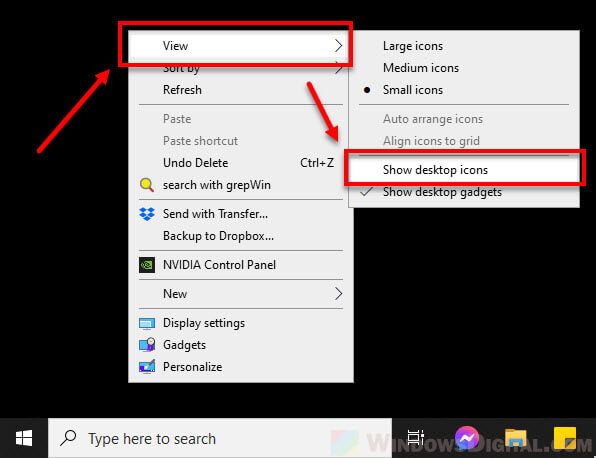
Conceal All Icons
- Right-click on an empty area of the desktop.
- Select “Personalize” from the context menu.
- In the Personalization window, select “Lock screen and background” from the left-hand menu.
- Click on the “Desktop icon settings” button.
- Uncheck the box next to “Show desktop icons.”
Conceal Specific Icons
- Right-click on an icon you want to conceal.
- Select “Properties” from the context menu.
- In the Properties window, click on the “General” tab.
- Check the box next to “Hidden.”
- Click “Apply” and then “OK.”
How to Conceal Icons on Macos
If you use a macOS operating system, there are also several ways to conceal icons on your desktop:
Conceal All Icons
- Open Terminal.
- Type
defaults write com.Apple.Finder CreateDesktop falseand press Enter. - Type
killall Finderand press Enter.
Conceal Specific Icons
- Open the Terminal.
- Type
chflags hidden /path/to/iconand press Enter. - Replace “/path/to/icon” with the actual path to the icon you want to conceal.
How to Conceal Icons on Android, Samsung, Huawei, And Iphone
If you use an Android device, a Samsung phone, a Huawei smartphone, or an iPhone, there are also ways to conceal icons:
Conceal Icons on Android
- Long press on the icon you want to conceal.
- Drag it to the top of the screen.
- Release your finger.
Conceal Icons on Samsung
- Long press on the icon you want to conceal.
- Tap “Stir up” from the context menu.
- Confirm that you want to hide the icon.
Conceal Icons on Huawei
- Long press on the icon you want to conceal.
- Tap “Stir up” from the context menu.
- Confirm that you want to hide the icon.
Conceal Icons on Iphone
- Press and hold on the icon you want to conceal.
- Tap “Stir up” from the context menu.
- Select “Stir up Home Screen”.
Programs to Conceal Desktop Icons
If you find it too tedious to conceal icons manually, there are programs that can help:
Autohidedesktopicons
- Download and install AutoHideDesktopIcons on your Windows computer.
- Configure the program to hide icons after a certain period of inactivity.
Conclusion
Concealing icons on your desktop is a simple yet effective way to declutter your workspace, improve productivity, and protect sensitive data. Whether you use a Windows, macOS, Android, Samsung, Huawei, or iPhone device, we have provided step-by-step guides on how to conceal icons. Additionally, there are programs available that can automate the process for you.
Frequently Asked Questions
- How do I Unhide Concealed Icons?
To unhide concealed icons, follow the steps outlined in this article. - Can I Conceal Specific Icons on my Desktop?
Yes, you can conceal specific icons by following the steps outlined in this article. - Will Concealing Icons Affect my Productivity?
Concealing icons can actually improve your productivity by reducing distractions and minimizing visual clutter. - How do I Conceal Icons on my Android Device?
To conceal icons on your Android device, follow the steps outlined in this article. - Can I Use a Program to Conceal Desktop Icons?
Yes, there are programs available that can help you conceal desktop icons automatically. - Will Concealing Icons Affect my Ability to Access Files or Applications?
Concealing icons will not affect your ability to access files or applications; it simply hides the icons from view. - How do I Unhide Concealed Icons on Macos?
To unhide concealed icons on macOS, follow the steps outlined in this article. - Can I Conceal Icons on my Iphone or Ipad?
Yes, you can conceal icons on your iPhone or iPad by following the steps outlined in this article.
Note: This article is for informational purposes only and does not constitute professional advice. If you are unsure about how to conceal icons on your device, it’s always best to consult with a professional.


