
Removing Energetic Saving Apple Watch: A Step-by-step Guide
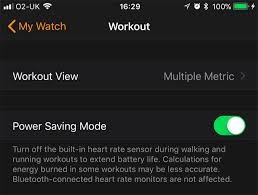
As a proud owner of an Apple Watch, you may have encountered some issues with notifications and functionality when the energetic saving feature is active. In this article, we will guide you through the process of removing energetic saving Apple Watch and restoring its full functionality.
What is Energetic Saving on Apple Watch?
Energetic saving is a feature introduced by Apple to reduce the energetic consumption of the Apple Watch. When activated, it limits the use of sensors and Wi-Fi connection, delays notifications, and deactivates certain functionalities such as heart rate monitoring and oxygen level measurement.
How to Remove Energetic Saving on Apple Watch
Removing energetic saving on Apple Watch is a straightforward process that can be done manually or automatically. Here are the steps:
Method 1: Manual Deactivation
- Open the Apple Watch app on your iPhone.
- Tap on the “Settings” option.
- Scroll down and tap on “Battery”.
- Move the slider next to “Energetic Saving” from “ON” to “OFF”.
Method 2: Automatic Deactivation
When the battery level drops below 10%, Apple Watch will automatically suggest deactivating energetic saving to prolong battery life.
How to Re-enable Energetic Saving on Apple Watch
If you want to re-activate energetic saving, follow these steps:
- Open the Apple Watch app on your iPhone.
- Tap on the “Settings” option.
- Scroll down and tap on “Battery”.
- Move the slider next to “Energetic Saving” from “OFF” to “ON”.
What is Always Active on Apple Watch?
Always active, also known as Always On, is a feature introduced by Apple that allows you to keep your Apple Watch screen always on, even when the arm is down. This feature reduces battery life but provides helpful information such as time and notifications.
How to Enable or Disable Always Active on Apple Watch
To enable or disable Always active, follow these steps:
- Open the Apple Watch app on your iPhone.
- Tap on the “Settings” option.
- Scroll down and tap on “Monitor and Luminosity”.
- Move the slider next to “Always Active” from “OFF” to “ON” to enable it.
Troubleshooting Tips
If you encounter issues with energetic saving or Always active, follow these tips:
- Check your Apple Watch battery level.
- Restart your Apple Watch by pressing and holding the side button until the logo appears.
- Contact Apple support for further assistance.
Conclusion
Removing energetic saving on Apple Watch is a simple process that can be done manually or automatically. By following this guide, you should be able to restore your Apple Watch’s full functionality and enjoy its features without any issues.
Frequently Asked Questions (FAQs)
- What Happens When I Remove Energetic Saving on Apple Watch?
When you remove energetic saving, your Apple Watch will return to its normal state, and all functionalities will be restored. - Can I Re-enable Energetic Saving on Apple Watch?
Yes, you can re-activate energetic saving by following the steps outlined in this guide. - What is Always Active on Apple Watch?
Always active is a feature that keeps your Apple Watch screen always on, even when the arm is down. - How do I Enable or Disable Always Active on Apple Watch?
To enable or disable Always active, follow the steps outlined in this guide. - What if my Apple Watch Has Issues With Energetic Saving or Always Active?
If you encounter any issues, contact Apple support for further assistance. - Can I Remove Energetic Saving From my Apple Watch Remotely?
No, energetic saving can only be removed manually by following the steps outlined in this guide. - Will Removing Energetic Saving Affect my Apple Watch’s Battery Life?
Removing energetic saving may not significantly impact your Apple Watch’s battery life, but it will return to its normal state. - Can I Enable Always Active on an Older Apple Watch Model?
Always active is only available on Apple Watch 5 and later models.
I hope this guide has been helpful in resolving any issues you were experiencing with energetic saving on your Apple Watch. If you have any further questions or concerns, feel free to ask!


