
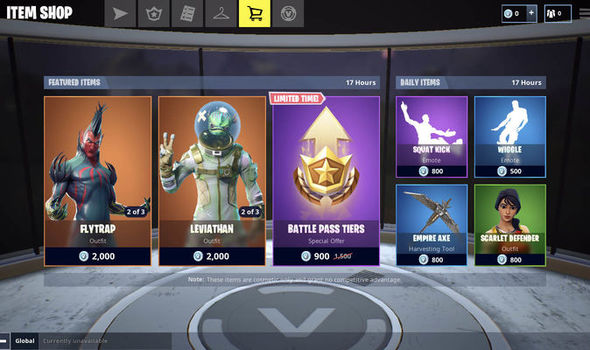
How to Shop on Fortnite Ps4: A Step-by-step Guide
Are you tired of playing Fortnite on your PS4 without the perfect skin? Do you want to show off your style in-game? Look no further! In this article, we’ll guide you through the process of shopping on Fortnite PS4, so you can acquire the skins and accessories you desire.
Understanding The Shop
Before we dive into the shopping process, it’s essential to understand how the shop works. The shop is accessible from the main menu, and it offers a wide range of skins, emotes, and other cosmetic items. These items can be purchased using V-Bucks, the in-game currency.
Acquiring V-bucks
To shop on Fortnite PS4, you’ll need to acquire V-Bucks. There are several ways to do this:
- Purchase V-bucks: You can buy V-Bucks directly from the game using your credit card or other payment methods.
- Earn V-bucks: You can earn V-Bucks by playing the game and participating in events.
- Gift Cards: You can also use gift cards to purchase V-Bucks.
Shopping For Skins
Now that you have V-Bucks, it’s time to shop for skins. Here’s how:
- Access The Shop: From the main menu, select the “Shop” option.
- Browse Skins: Browse through the various skin categories and find the one that suits your style.
- Purchase Skins: Select the skin you want to purchase and confirm the transaction.
Other Shopping Options
In addition to purchasing skins, there are other shopping options available on Fortnite PS4:
- Gift Cards: You can use gift cards to purchase V-Bucks or other cosmetic items.
- Promotional Codes: You can also use promotional codes to get free V-Bucks or other rewards.
Shopping For The Pass Battle
The Pass Battle is a feature that allows you to access exclusive rewards and content. Here’s how to shop for the Pass Battle:
- Access The Shop: From the main menu, select the “Shop” option.
- Select The Pass Battle: Select the Pass Battle option and confirm the transaction.
Shopping Without Credit Card
If you don’t have a credit card or other payment methods, there are still ways to shop on Fortnite PS4:
- Gift Cards: You can use gift cards to purchase V-Bucks or other cosmetic items.
- Promotional Codes: You can also use promotional codes to get free V-Bucks or other rewards.
Shopping For The Crew
The Crew is a subscription service that offers exclusive rewards and content. Here’s how to shop for the Crew:
- Access The Shop: From the main menu, select the “Shop” option.
- Select The Crew: Select the Crew option and confirm the transaction.
Shopping Without Card
If you don’t have a card or other payment methods, there are still ways to shop on Fortnite PS4:
- Gift Cards: You can use gift cards to purchase V-Bucks or other cosmetic items.
- Promotional Codes: You can also use promotional codes to get free V-Bucks or other rewards.
Conclusion
Shopping on Fortnite PS4 is a fun and easy process. With this guide, you should be able to acquire the skins and accessories you desire without any issues.
Frequently Asked Questions
Here are some frequently asked questions about shopping on Fortnite PS4:
- Q: How do I Shop on Fortnite Ps4?
A: To shop on Fortnite PS4, access the Shop from the main menu and browse through the various skin categories. - Q: How do I Acquire V-bucks?
A: You can acquire V-Bucks by purchasing them directly from the game or earning them by playing the game and participating in events. - Q: Can I Use Gift Cards to Shop on Fortnite Ps4?
A: Yes, you can use gift cards to purchase V-Bucks or other cosmetic items. - Q: How do I Shop For The Pass Battle?
A: To shop for the Pass Battle, access the Shop from the main menu and select the Pass Battle option. - Q: Can I Shop on Fortnite Ps4 Without a Card?
A: Yes, you can use gift cards or promotional codes to shop on Fortnite PS4 without a card.
Conclusion
Shopping on Fortnite PS4 is a fun and easy process. With this guide, you should be able to acquire the skins and accessories you desire without any issues. If you have any further questions, feel free to ask!


