
Unlocking The Power of Dynamic Island: Top Apps to Enhance Your Iphone Experience
Are you one of the lucky ones who has upgraded to the latest iPhone? Congratulations! You’re now part of a select group that gets to enjoy the innovative Dynamic Island feature on their device. But, what exactly is Dynamic Island, and how can you maximize its potential? In this article, we’ll delve into the world of Dynamic Island and explore some exciting apps that will take your iPhone experience to the next level.
What is Dynamic Island?
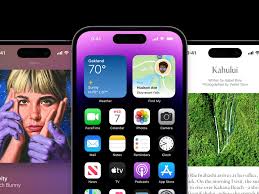
For those new to the concept, Dynamic Island is a feature on the latest iPhones that replaces the traditional notch with a more interactive and dynamic bar. This black bar can be customized to show various information, such as battery life, notifications, or even control elements for specific apps.
Benefits of Using Dynamic Island Apps
Using apps that integrate with Dynamic Island offers numerous benefits, including:
- Enhanced user experience: By providing quick access to essential features and info, these apps make your iPhone more intuitive and enjoyable to use.
- Increased productivity: Many apps can be controlled directly from the Dynamic Island, saving you time and effort in navigating through menus and settings.
- Customization options: With various apps available, you can personalize your iPhone’s home screen and Dynamic Island to suit your preferences.
Top Apps For Dynamic Island
Now that we’ve covered the basics, let’s dive into some fantastic apps that will revolutionize your iPhone experience:
1. Onewidget – Lock Screen Widget
- Description: OneWidget is a free app available on the App Store that allows you to insert your favorite apps directly into the Dynamic Island.
- Key Features:
- Add multiple widgets to the Dynamic Island
- Customize the appearance of your clock and calendar
- Personalize your icons, fonts, and menu screens
2. Shoot The Island – A Pinball Game
- Description: Shoot The Island is a fun pinball game that integrates seamlessly with the Dynamic Island.
- Key Features:
- Two gameplay modes: HIT BALL and PIN BALL
- Customize your ball and background to suit your style
3. Pixel Pals – A Virtual Pet Companion
- Description: Pixel Pals is an adorable app that lets you care for a virtual pet, with the ability to customize its appearance and interactions.
- Key Features:
- Choose from various pets and customize their appearances
- Interact with your pet through the Dynamic Island
4. Scorespot – Football Results
- Description: Scorespot is an excellent app for football fans, providing live scores and updates on the sport.
- Key Features:
- Live score updates and notifications
- Customizable layouts to suit your preferences
5. Pestle: Recipe Organizer
- Description: Pestle is a useful recipe organizer that lets you save and access your favorite recipes directly from the Dynamic Island.
- Key Features:
- Save recipes from various sources
- Organize and customize your recipes with ease
6. Focuspomo Tomato: Study Timer
- Description: FocusPomo Tomato is a productivity app that helps you stay focused and concentrated using a tomato timer.
- Key Features:
- Set customizable timers for study sessions
- Stay on track with the help of the Dynamic Island
7. Dynamic Spot – Android Version
- Description: Dynamic Spot is an app available on the Google Play Store that brings the Dynamic Island experience to Android devices.
- Key Features:
- Customize your Dynamic Island settings
- Access various features and info directly from the bar
8. Dynamic Island – A Second App
- Description: This second app, also called Dynamic Island, is a free download available on the Google Play Store that provides an alternative way to access dynamic content.
- Key Features:
- Customize your Dynamic Island settings
- Access various features and info directly from the bar
Conclusion
Dynamic Island is more than just a feature – it’s a game-changer for iPhone users. By integrating with these top apps, you can enhance your overall experience, increase productivity, and customize your home screen to suit your preferences.
Whether you’re looking for a fun pinball game or a productive recipe organizer, there’s an app out there that will revolutionize your iPhone experience. So, what are you waiting for? Dive into the world of Dynamic Island apps today and unlock a new level of convenience and enjoyment!
Frequently Asked Questions (FAQs)
Q: What is Dynamic Island?
A: Dynamic Island is a feature on the latest iPhones that replaces the traditional notch with a more interactive and dynamic bar.
Q: How do I customize my Dynamic Island?
A: You can customize your Dynamic Island by using various apps, such as OneWidget or Pixel Pals, to insert widgets or virtual pets directly into the bar.
Q: Can I use Dynamic Island on Android devices?
A: Yes, there are apps available on the Google Play Store that bring the Dynamic Island experience to Android devices.
Q: What are some top apps for Dynamic Island?
A: Some of the top apps include OneWidget, Shoot The Island, Pixel Pals, Scorespot, Pestle, FocusPomo Tomato, Dynamic Spot, and Dynamic Island (the second app).
Q: How can I stay focused and productive with my iPhone?
A: You can use apps like FocusPomo Tomato to set customizable timers for study sessions and stay on track.
Q: Can I personalize my icons, fonts, and menu screens using Dynamic Island apps?
A: Yes, many apps available allow you to customize your icons, fonts, and menu screens to suit your preferences.


