
Unlocking The Secrets of Digital Footprints on Android Devices
Are you tired of worrying about your digital footprint being accessed without your permission? Do you want to know how to contact the digital footprint on your Android device, just in case someone else gets their hands on it? You’re not alone! Many of us have concerns about our online security and safety. In this article, we’ll delve into the world of digital footprints and show you how to protect yours.
What is a Digital Footprint?
A digital footprint refers to the data left behind by your interactions with your Android device, including browsing history, app usage, and other personal information. While it’s essential to have some level of access control, it’s equally important to understand how to contact your digital footprint in case of an emergency.
How to Contact Your Digital Footprint on Android
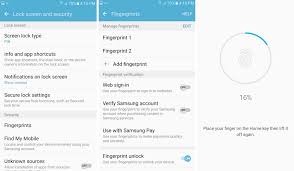
To unlock the secrets of your digital footprint on Android, follow these simple steps:
- Locate The Reader: Find the reader located at the back or side frame (usually integrated into the power button) or under the display. This is where you’ll find the digital footprint.
- Open Settings: Access the Settings app, recognizable by its gear icon.
- Go to Safety And Privacy: Navigate to Safety and privacy > Block device: Toggle on “Unblock with face and fingerprint” and enter your PIN or unlock sequence.
- Add Digital Footprint: Select “Add footprint” and follow the prompts to record your digital footprint.
Contacting Your Digital Footprint on Samsung
If you own a Samsung smartphone, follow these steps:
- Open Settings: Access the Settings app, recognizable by its gear icon.
- Go to Safety And Privacy: Navigate to Safety and privacy > Screen lock: Toggle on “Digital footprints” and enter your PIN or unlock sequence.
- Add Digital Footprint: Select “Add digital footprint” and follow the prompts to record your digital footprint.
Contacting Your Digital Footprint on Xiaomi
If you possess a Xiaomi smartphone, follow these steps:
- Open Settings: Access the Settings app, recognizable by its gear icon.
- Go to Password And Safety: Navigate to Password and safety > Unlock using fingerprint: Enter your PIN or unlock sequence.
- Add Digital Footprint: Select “Add footprint” and follow the prompts to record your digital footprint.
Contacting Your Digital Footprint on Huawei
If you own a Huawei smartphone, follow these steps:
- Open Settings: Access the Settings app, recognizable by its gear icon.
- Go to Data Biometrici And Password: Navigate to Data biometrici and password > ID fingerprint: Enter your PIN or unlock sequence.
- Add Digital Footprint: Select “New footprint” and follow the prompts to record your digital footprint.
Protecting Your Whatsapp Conversations
Want to keep your WhatsApp conversations private? Follow these steps:
- Open Whatsapp: Access the WhatsApp app.
- Go to Settings: Navigate to Settings > Account > Privacy.
- Block With Digital Footprint: Toggle on “Unblock with digital footprint” and confirm the operation by placing your fingerprint on the reader.
Protecting Your Instagram Account
Want to keep your Instagram account secure? Follow these steps:
- Open Instagram: Access the Instagram app.
- Go to Settings: Navigate to Settings > App.
- Block App: Toggle on “Active” and set a PIN or password to protect access.
Unlocking The Secrets of Your Gallery
Want to keep your gallery photos private? Follow these steps:
- Open Gallery: Access the Gallery app.
- Go to Settings: Navigate to Settings > Block app.
- Add Block App: Select “Active” and set a PIN or password to protect access.
Conclusion
In conclusion, understanding how to contact your digital footprint on Android devices is crucial for maintaining online security and safety. By following the steps outlined in this article, you can ensure that your personal data remains protected. Remember, it’s always better to be safe than sorry!
Frequently Asked Questions (FAQs)
- Q: What is a Digital Footprint?
A: A digital footprint refers to the data left behind by your interactions with your Android device. - Q: How do I Contact my Digital Footprint on Android?
A: To unlock the secrets of your digital footprint on Android, follow the steps outlined in this article. - Q: Can I Block Access to Whatsapp Using a Digital Footprint?
A: Yes! Follow the steps outlined in this article to protect your WhatsApp conversations. - Q: How do I Keep my Instagram Account Secure?
A: To protect your Instagram account, follow the steps outlined in this article. - Q: Can I Block Access to my Gallery Photos Using a Digital Footprint?
A: Yes! Follow the steps outlined in this article to protect your gallery photos.


