
Recovering Your Google Password: A Step-by-step Guide
Are you struggling to remember your Google password? Do you want to regain access to your Google account without compromising your security? You’ve come to the right place! In this comprehensive guide, we’ll walk you through the simple steps to recover your Google password on both PC and smartphone.
Understanding The Importance of Password Recovery
Before we dive into the nitty-gritty details, let’s quickly touch upon why recovering your Google password is crucial. Your Google account is a central hub for various services like Gmail, Google Drive, YouTube, and more. If you forget or lose access to your password, it can lead to difficulties in accessing these services, potentially causing inconvenience and even disrupting your work or personal life.
Recovering Your Google Password on PC
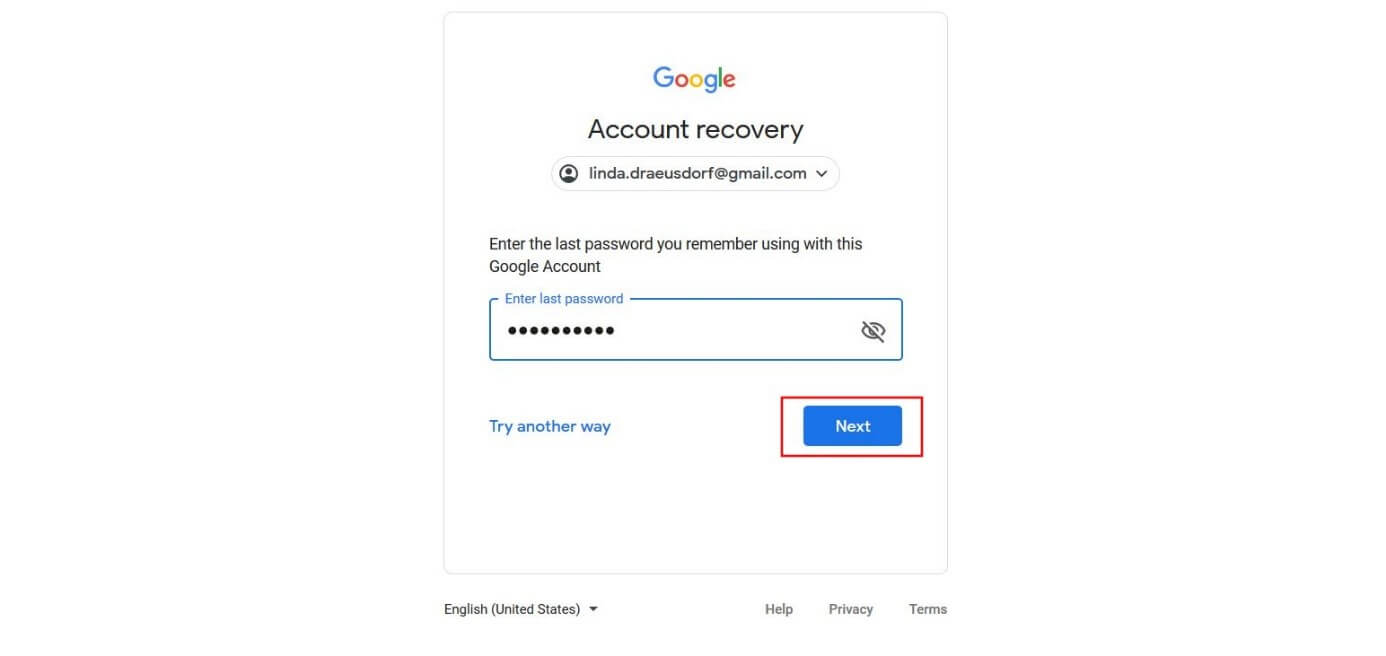
To recover your Google password on a PC, follow these straightforward steps:
- Visit The Google Account Recovery Page: Open a web browser on your PC and navigate to the Google account recovery page.
- Enter Your Email Address: Type in the email address associated with your Google account.
- Click on “Forgot Password”: Click on the “Forgot password?” link.
- Choose a Recovery Method: Select an option for recovering your password, such as using another device or receiving a code via SMS.
- Follow On-screen Instructions: Follow the prompts to complete the recovery process.
Recovering Your Google Password on Smartphone
To recover your Google password on a smartphone, follow these similar steps:
- Open The Google Account App: Open the Google account app on your Android or iOS device.
- Tap on “Forgot Password”: Tap on the “Forgot password?” option.
- Choose a Recovery Method: Select an option for recovering your password, such as using another device or receiving a code via SMS.
- Follow On-screen Instructions: Follow the prompts to complete the recovery process.
Recovering Your Google Password Without Changing It
If you want to recover your Google password without changing it, follow these steps:
- Check if You Have Saved Credentials: Check if you have saved your credentials in a browser or password manager.
- Use Browser-saved Credentials: If available, use the browser-saved credentials to access your account.
- Recover Password Using Browser-saved Credentials: Follow the prompts to recover your password using the browser-saved credentials.
Recovering Your Google Password For Specific Services
If you’re having trouble recovering your Google password for specific services like Google Play, Google Drive, or Google Classroom, follow these steps:
- Visit The Service’s Recovery Page: Visit the recovery page for the specific service.
- Follow On-screen Instructions: Follow the prompts to complete the recovery process.
Tips And Best Practices
To avoid any inconvenience when recovering your Google password, keep the following tips in mind:
- Use a password manager to securely save your credentials.
- Make sure you have access to a working email address or phone number associated with your account.
- Keep your browser up-to-date and follow best practices for password security.
Conclusion
Recovering your Google password is a straightforward process that can be completed on both PC and smartphone. By following the simple steps outlined in this guide, you’ll be able to regain access to your Google account without compromising your security. Remember to keep your credentials safe and secure by using a password manager or browser-saved credentials.
Frequently Asked Questions (FAQs)
- What if I Forgot my Google Password?
To recover your Google password, visit the Google account recovery page and follow the prompts. - Can I Recover my Google Password Without Changing It?
Yes, you can recover your Google password without changing it by using browser-saved credentials or a password manager. - How do I Recover my Google Password For Specific Services Like Google Play or Google Drive?
Visit the recovery page for the specific service and follow the prompts to complete the recovery process. - What if I’m Having Trouble Recovering my Google Password?
Contact Google support or visit their help center for assistance. -
How Can I Prevent Forgetting my Google Password in The Future?
Use a password manager or browser-saved credentials to securely save your credentials and avoid any inconvenience. -
Is it Safe to Use Browser-saved Credentials to Recover my Google Password?
Yes, using browser-saved credentials is a secure way to recover your Google password, provided you have access to the correct credentials. -
Can I Use a Different Method to Recover my Google Password, Such as Using an Authenticator App?
Yes, you can use an authenticator app or other recovery methods to regain access to your Google account. -
How Long Does it Take to Recover my Google Password?
The time it takes to recover your Google password varies depending on the method used and any additional verification steps required.


