
The Ultimate Guide to Visualizations on Instagram: A Step-by-step Tutorial
As an avid user of Instagram, you’re probably familiar with the platform’s vast array of features and tools. But have you ever wondered how to see visualizations on Instagram? In this article, we’ll take a deep dive into the world of Instagram visualizations and provide you with a comprehensive guide on how to access them.
Understanding Visualizations on Instagram
Visualizations on Instagram refer to the views or impressions that your posts, stories, and reels receive. These metrics are essential for any social media user, as they help you gauge the success of your content and make data-driven decisions to improve it.
Seeing Visualizations on Instagram: A Step-by-step Guide
To see visualizations on Instagram, follow these steps:
- Open Your Instagram Account: Log in to your Instagram account using your device or computer.
- Access Your Profile: Tap or click on the profile icon at the bottom right corner of the screen (on mobile) or top right corner (on desktop).
- Click on The Three Horizontal Lines: On mobile, tap on the three horizontal lines at the top left corner of the screen. On desktop, click on the three dots at the top right corner.
- Select Your Profile: From the dropdown menu, select your profile name.
- Access Insights: Tap or click on the “Insights” tab.
Visualizations on Instagram: What You Need to Know
Here are some essential things you need to know about visualizations on Instagram:
- Video Visualizations: To see video visualizations, tap on the video icon at the bottom of your profile page.
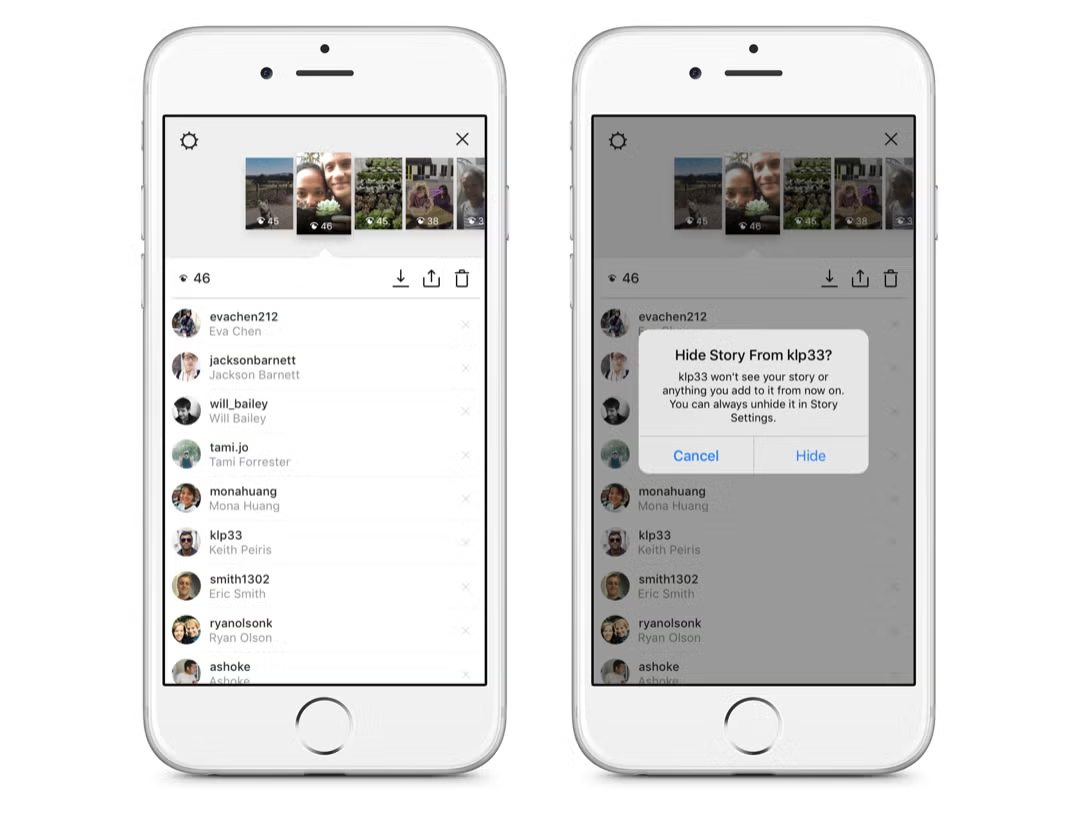
- Story Visualizations: Tap on the story icon at the top right corner of the screen to access story visualizations.
- Reel Visualizations: Swipe right or click on the reel icon to view reel visualizations.
Visualizing Posts, Stories, And Reels
To visualize posts, stories, and reels, follow these steps:
- Open Your Instagram Account: Log in to your Instagram account using your device or computer.
- Access Your Profile: Tap or click on the profile icon at the bottom right corner of the screen (on mobile) or top right corner (on desktop).
- Click on a Post, Story, or Reel: Choose a post, story, or reel you’d like to visualize.
Visualizations on Instagram: Tips And Tricks
Here are some tips and tricks for visualizing posts, stories, and reels:
- Use Insights: Regularly check your insights tab to stay updated on your content’s performance.
- Monitor Your Audience: Keep an eye on who is viewing your content and adjust your strategy accordingly.
- Experiment With Different Formats: Try different formats like stories, reels, or live streams to see which ones work best for you.
Visualizing Followers And Accounts
To visualize followers and accounts, follow these steps:
- Open Your Instagram Account: Log in to your Instagram account using your device or computer.
- Access Your Profile: Tap or click on the profile icon at the bottom right corner of the screen (on mobile) or top right corner (on desktop).
- Click on The “Followers” Tab: Choose the followers tab from the menu.
Common Questions About Visualizations on Instagram
Here are some common questions about visualizations on Instagram:
- What is The Purpose of Visualizations on Instagram?
- To see visualizations on Instagram, follow these steps: Open your Instagram account, access your profile, click on a post, story, or reel, and view its insights.
- How Can I See Visualizations For my Stories And Reels?
- Tap on the three horizontal lines at the top left corner of the screen (on mobile) or top right corner (on desktop), select your profile name, access Insights, and tap on a post, story, or reel to view its insights.
- What Should I do With my Visualizations?
- Regularly check your insights tab to stay updated on your content’s performance. Monitor your audience and adjust your strategy accordingly.
Conclusion
Visualizations on Instagram are essential for any social media user who wants to gauge the success of their content and make data-driven decisions to improve it. By following these steps and tips, you can unlock the full potential of Instagram’s visualizations feature.


