
How to Add Music to Your Instagram Reel: A Step-by-step Guide
Are you tired of having a silent Instagram Reel? Do you want to make your videos more engaging and enjoyable? Adding music to your Reel is a great way to do just that! In this article, we will guide you through the process of adding music to your Instagram Reel on both Android and iOS devices.
What is an Instagram Reel?
An Instagram Reel is a short video that can be up to 60 seconds long. It’s a popular feature on Instagram that allows users to create and share videos with their followers. Reels can include music, effects, and other features to make them more engaging and entertaining.
Why Add Music to Your Reel?
Adding music to your Reel can enhance the viewing experience for your audience. Music can evoke emotions, set the tone, and even convey a message. It’s an effective way to connect with your viewers and make your content more memorable.
How to Add Music to Your Instagram Reel on Android: A Step-by-step Guide
To add music to your Instagram Reel on Android, follow these steps:
- Open The Instagram App: First, open the Instagram app on your Android device.
- Create a New Reel: Tap the “+” icon in the top-right corner of the screen to create a new Reel.
- Record or Upload a Video: Record a video using the camera or upload one from your gallery.
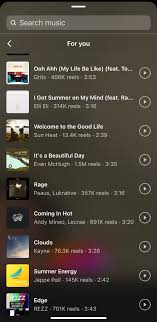
- Add Music: Tap the “Add” button and select “Audio” from the menu. Choose a song from your library or search for one on Instagram.
- Edit The Audio: Use the editing tools to trim, split, or adjust the audio as needed.
- Share Your Reel: Once you’re happy with your edited Reel, share it with your followers.
How to Add Music to Your Instagram Reel on Ios: A Step-by-step Guide
To add music to your Instagram Reel on iOS, follow these steps:
- Open The Instagram App: First, open the Instagram app on your iOS device.
- Create a New Reel: Tap the “+” icon in the top-right corner of the screen to create a new Reel.
- Record or Upload a Video: Record a video using the camera or upload one from your gallery.
- Add Music: Tap the “Add” button and select “Music” from the menu. Choose a song from your library or search for one on Instagram.
- Edit The Audio: Use the editing tools to trim, split, or adjust the audio as needed.
- Share Your Reel: Once you’re happy with your edited Reel, share it with your followers.
Tips And Tricks
- Use music that complements the tone of your Reel.
- Experiment with different genres and styles to find the perfect fit for your content.
- Keep the audio levels consistent throughout your Reel.
- Don’t overdo it – too much music can be distracting and overpowering.
Alternative Apps to Add Music to Your Instagram Reel
If you want to add more advanced editing features or use a different app, consider using:
- Canva: A popular graphic design app that also offers video editing features, including the ability to add music.
- Inshot: A powerful video editor that allows you to add music, effects, and other features to your Reels.
Conclusion
Adding music to your Instagram Reel is a simple yet effective way to enhance the viewing experience for your audience. By following these step-by-step guides, you can easily add music to your Reel on both Android and iOS devices. Remember to choose music that complements the tone of your content, experiment with different styles, and keep the audio levels consistent.
Frequently Asked Questions
- Q: Can I Use Any Song For my Instagram Reel?
A: Yes, you can use any song that is available on Instagram’s music library or in your own library. - Q: How do I Edit The Audio in my Reel?
A: You can trim, split, or adjust the audio as needed using the editing tools within the app. - Q: Can I Add Multiple Songs to my Reel?
A: Yes, you can add multiple songs to your Reel by using the “Add” button and selecting “Audio” from the menu. - Q: How do I Share my Edited Reel With my Followers?
A: Once you’re happy with your edited Reel, tap the “Share” button to share it with your followers.
We hope this article has been helpful in teaching you how to add music to your Instagram Reel!


