
How to Modify Photos on Your Iphone: A Step-by-step Guide
Are you tired of sharing blurry or poorly edited photos with your friends and family? Look no further! In this article, we’ll show you how to modify photos on your iPhone using various apps and techniques.
Why Modify Photos on Your Iphone?
Before we dive into the tutorial, let’s quickly discuss why modifying photos is essential. With the rise of social media platforms like Instagram, Facebook, and TikTok, it’s become increasingly important to share high-quality photos that grab attention. Modifying photos can help you achieve this goal by:
- Enhancing image quality
- Adding filters and effects
- Removing blemishes and imperfections
- Making adjustments to brightness, contrast, and color balance
Modifying Photos on Your Iphone Using The Built-in Photo App
The first step in modifying photos on your iPhone is to use the built-in Photo app. Here’s how:
- Open The Photo App: Find the Photo icon on your home screen and tap it.
- Select a Photo: Choose the photo you want to modify from your library or camera roll.
- Tap Edit: Tap the “Edit” button in the top-right corner of the screen.
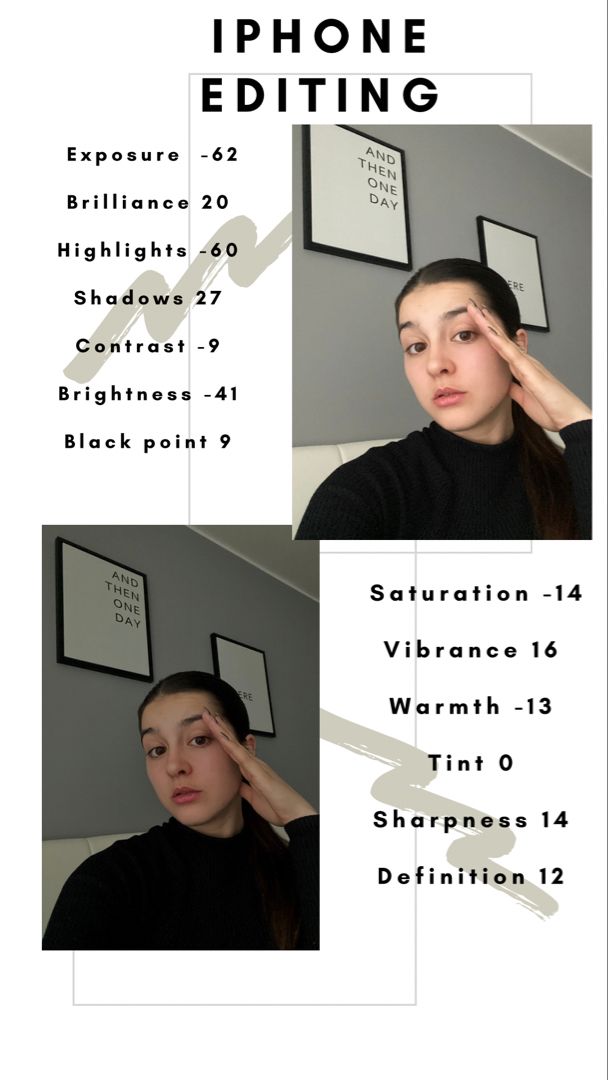
- Adjust Parameters: Use the tools provided by the app to adjust parameters such as exposure, contrast, and color balance.
Snapseed: A Powerful Photo Editing App
If you want more advanced editing features, consider using Snapseed, a popular photo editing app developed by Google. Here’s how:
- Download And Install Snapseed: Search for Snapseed in the App Store and download it.
- Open Snapseed: Launch the app and tap the “+” button to select the photo you want to modify.
- Choose an Instrument: Select from various instruments such as exposure, contrast, color balance, and more.
- Apply Filters And Effects: Browse through filters and effects to enhance your image.
Other Apps For Modifying Photos on Your Iphone
If Snapseed doesn’t meet your needs, there are other apps available that can help you modify photos on your iPhone. Some popular options include:
- Pixlr: A free app with advanced editing features.
- VSCO: A popular app with filters and effects.
- Adobe Photoshop Express: A powerful photo editing app developed by Adobe.
How to Modify Blurred Photos on Your Iphone
If you have a blurred photo, don’t worry! You can modify it using the built-in camera app or other third-party apps. Here’s how:
- Use The Camera App: Open the camera app and select the “Portraits” option.
- Choose an Effect: Select from various effects such as blur, bokeh, and more.
How to Modify Photos on Your Iphone For Tiktok
If you want to share your modified photos on TikTok, here’s what you need to do:
- Use The Camera App: Open the camera app and select the “Portraits” option.
- Choose an Effect: Select from various effects such as blur, bokeh, and more.
- Modify The Photo: Use the built-in Photo app or other third-party apps to modify the photo.
How to Save Photos in Pdf Format on Your Iphone
If you want to save your modified photos in PDF format, here’s how:
- Open The Photos App: Select a photo from your library or camera roll.
- Tap Share: Tap the share button and select “Print” from the list of options.
- Choose a Printer: Select the “Save as PDF” option.
Conclusion
Modifying photos on your iPhone is easier than ever! With this guide, you should be able to use various apps and techniques to enhance image quality, add filters and effects, and remove blemishes and imperfections. Happy snapping!
Faqs
- Q: How do I Modify a Photo on my Iphone?
A: You can modify photos using the built-in Photo app or third-party apps like Snapseed. - Q: What Are Some Advanced Editing Features Available on my Iphone?
A: Apps like Snapseed, Pixlr, and VSCO offer advanced editing features such as exposure, contrast, color balance, and more. - Q: How do I Save Photos in Pdf Format on my Iphone?
A: You can use the built-in Photos app or other third-party apps to save photos in PDF format. - Q: Can I Modify Blurred Photos on my Iphone?
A: Yes, you can modify blurred photos using the camera app or other third-party apps. - Q: How do I Share Modified Photos on Tiktok?
A: You can use the built-in Photo app or other third-party apps to modify photos and then share them on TikTok. - Q: What Are Some Popular Apps For Modifying Photos on my Iphone?
A: Apps like Snapseed, Pixlr, VSCO, and Adobe Photoshop Express are popular options for modifying photos on your iPhone. - Q: How do I Access Advanced Editing Features on my Iphone?
A: You can access advanced editing features by downloading and installing third-party apps from the App Store. - Q: Can I Modify Photos in Post-production?
A: Yes, you can modify photos using various techniques such as adjusting parameters like exposure, contrast, and color balance.


