
How to Create QR Codes: A Step-by-step Guide
Are you tired of manually sharing links, phone numbers, or other information with others? Do you want to make it easy for people to access your website, social media profiles, or contact information with just a quick scan? Look no further than QR codes! In this article, we’ll show you how to create QR codes using various online services and mobile apps.
What Are QR Codes?
QR codes (Quick Response codes) are two-dimensional barcodes that can store a wide range of information, such as website URLs, text messages, phone numbers, and more. They’re widely used in marketing, advertising, and everyday life to make it easy for people to access specific content or services.
Why Use QR Codes?
QR codes offer several benefits over traditional methods of sharing information:
- Easy Access: Scanning a QR code is quicker and easier than typing a URL or phone number.
- Increased Engagement: QR codes can encourage users to interact with your brand, website, or social media profiles.
- Streamlined Process: QR codes simplify the process of sharing information, reducing errors and increasing efficiency.
How to Create QR Codes Online
There are several online services that allow you to create QR codes without requiring any technical expertise. Here are a few popular options:
- Uqr.Me
- QR Stuff
- Goqr
- Unitag QR Tails Generator
These services offer a range of features, including the ability to create dynamic QR codes, customize designs, and track scans.
Creating QR Codes With Uqr.Me
UQR.Me is one of the most popular online QR code generators, used by over 350,000 companies and institutions worldwide. Here’s how to create a QR code with uQR.Me:
- Sign up: Register for an account on uQR.Me.
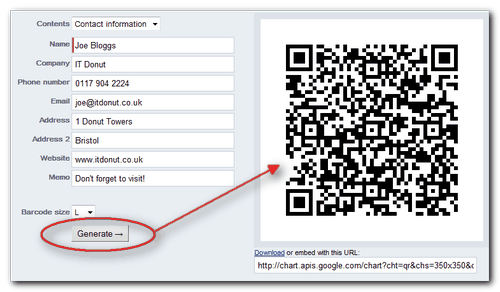
- Choose Your Content: Select the type of information you want to encode in your QR code (e.G., Website URL, text message, phone number).
- Customize Your Design: Personalize your QR code with a custom background image or color scheme.
- Download And Share: Save and share your QR code with others.
Creating QR Codes With Mobile Apps
In addition to online services, there are several mobile apps that allow you to create QR codes directly on your smartphone or tablet. Some popular options include:
- QR Reader (Android/iOS)
- Generator of Codes QR (Android)
- Reader QR And Reader Barcodes (Android)
These apps offer a range of features, including the ability to generate QR codes, read existing ones, and customize designs.
Creating QR Codes With Instagram
You can also create QR codes directly within the Instagram app:
- Open Instagram: Launch the Instagram app on your mobile device.
- Tap Your Profile Picture: Select your profile picture from the top-left corner of the screen.
- Tap The Menu Icon: Tap the three horizontal lines in the top-right corner of the screen.
- Select “Code Qr”: Choose the “Code QR” option from the menu.
Creating QR Codes With Whatsapp
You can also create QR codes within the WhatsApp app:
- Open Whatsapp: Launch the WhatsApp app on your mobile device.
- Tap Settings: Tap the three vertical dots in the top-right corner of the screen.
- Select “QR Code”: Choose the “QR code” option from the menu.
Creating QR Codes With Spotify
You can create special codes within the Spotify app:
- Open Spotify: Launch the Spotify app on your mobile device.
- Tap Your Profile Picture: Select your profile picture from the top-left corner of the screen.
- Tap The Menu Icon: Tap the three horizontal lines in the top-right corner of the screen.
- Select “Code Qr”: Choose the “Code QR” option from the menu.
Conclusion
QR codes are a powerful tool for sharing information and engaging with your audience. By using online services or mobile apps, you can create customized QR codes that suit your needs. Remember to always check the terms of service and privacy policies before using any online tools or apps.
Faqs
- What is The Purpose of QR Codes?
QR codes are used to store information such as website URLs, text messages, phone numbers, and more. - How do I Create a QR Code?
You can create a QR code using online services like uQR.Me or mobile apps like QR Reader (Android/iOS). - What Are The Benefits of Using QR Codes?
QR codes offer easy access to information, increased engagement, and streamlined processes. - Can I Customize my QR Code Design?
Yes, many online services and mobile apps allow you to customize your QR code design with custom backgrounds, colors, and more. - How do I Track QR Code Scans?
Some online services like uQR.Me offer tracking features that allow you to monitor QR code scans. - Are QR Codes Safe to Use?
Yes, QR codes are a safe and secure way to share information, as long as you use reputable online services or apps. - Can I Create Dynamic QR Codes?
Yes, some online services like uQR.Me allow you to create dynamic QR codes that can be updated at any time without generating a new code. - How do I Integrate QR Codes With Social Media Platforms?
You can integrate QR codes with social media platforms by creating custom QR codes that link to your social media profiles or website URLs.


