
How to Delete Tiktok: A Step-by-step Guide
Are you tired of using TikTok or want to delete your account? Look no further! In this article, we will guide you through the process of deleting a TikTok video, closing an account, and uninstalling the app.
Why Delete Tiktok?
Before we dive into the steps, let’s quickly discuss why someone might want to delete their TikTok account. Perhaps you’re tired of the constant notifications, or maybe you simply don’t use the app anymore. Whatever your reason, deleting your account is a straightforward process that we’ll walk you through.
Deleting a Tiktok Video
If you only want to delete one video from your account, follow these steps:
- Open Tiktok: Launch the app and sign in to your account.
- Access Your Profile: Tap on the Me tab at the bottom of the screen and select your profile picture or username.
- Find The Video: Scroll through your videos until you find the one you want to delete.
- Tap The Three Dots: Tap the three dots located in the top-right corner of the video.
- Select Delete: From the menu that appears, tap on Delete.
- Confirm Deletion: A confirmation message will appear. Tap on Delete again to confirm.
Deleting a Tiktok Account
If you want to delete your entire account, follow these steps:
On Android
- Open Tiktok: Launch the app and sign in to your account.
- Tap on The Three Lines: Tap on the three lines located at the bottom-right corner of the screen.
- Select Me: From the menu that appears, tap on Me.
- Access Your Profile: Scroll down and select your profile picture or username.
- Tap on Edit Profile: Tap on the Edit Profile button.
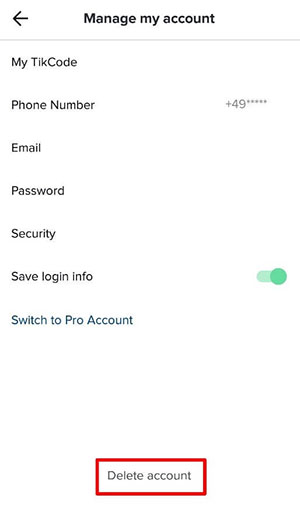
- Scroll Down: Scroll down to the bottom of the page and find the Delete Account option.
- Type in Your Password: Enter your password to confirm that you want to delete your account.
On Ios/ipados
- Open Tiktok: Launch the app and sign in to your account.
- Tap on The Three Dots: Tap on the three dots located at the top-right corner of the screen.
- Select Me: From the menu that appears, tap on Me.
- Access Your Profile: Scroll down and select your profile picture or username.
- Tap on Edit Profile: Tap on the Edit Profile button.
- Scroll Down: Scroll down to the bottom of the page and find the Delete Account option.
- Type in Your Password: Enter your password to confirm that you want to delete your account.
Uninstalling Tiktok
Once you’ve deleted your account, you can uninstall the app from your device:
On Android
- Go to Settings: Go to your device’s settings menu.
- Select Apps/applications: From the menu, select Apps or Applications.
- Find Tiktok: Scroll through the list of installed apps until you find TikTok.
- Tap on Uninstall: Tap on the Uninstall button.
On Ios/ipados
- Go to Settings: Go to your device’s settings menu.
- Select General: From the menu, select General.
- Select Iphone Storage or Ipad Storage: This will show you a list of installed apps.
- Find Tiktok: Scroll through the list until you find TikTok.
- Tap on Delete App: Tap on the Delete App button.
Deleting Notifications
If you only want to delete notifications, follow these steps:
On Android
- Go to Settings: Go to your device’s settings menu.
- Select Apps/applications: From the menu, select Apps or Applications.
- Find Tiktok: Scroll through the list of installed apps until you find TikTok.
- Tap on Notifications: Tap on the Notifications option.
- Disable Notifications: Toggle off the switch to disable notifications.
On Ios/ipados
- Go to Settings: Go to your device’s settings menu.
- Select Notifications: From the menu, select Notifications.
- Find Tiktok: Scroll through the list until you find TikTok.
- Tap on Disable Notifications: Tap on the toggle switch to disable notifications.
Conclusion
Deleting a TikTok video, account, or uninstalling the app is a straightforward process that we’ve outlined in this article. Remember to follow these steps carefully to avoid losing any important data. If you have any further questions or concerns, feel free to ask!


