
How to Get a Digital Signature: A Step-by-step Guide
Are you looking to learn about digital signatures? Do you want to know how to obtain one that meets your needs? Look no further! In this article, we will guide you through the process of getting a digital signature, from understanding the different types available to acquiring and activating a kit.
What is a Digital Signature?
A digital signature is an electronic instrument that gives legal courage to documents in electronic format. It can be used to validate digital documents, communicate with the Public Administration, and computerize communications between companies and citizens.
Types of Digital Signatures
There are four types of digital signatures:
- Facile Electronic Signature: This type of signature does not have legal courage because it is not possible to verify its authenticity.
- Advanced Electronic Signature: This type of signature has some legal courage, but only in specific cases where stipulated contracted immovable.
- Qualified Electronic Signature: This type of signature has more advanced features and requires a special kit released by certified entities.
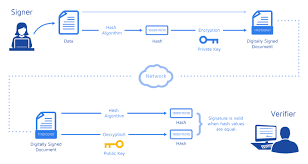
- Digital Electronic Signature: This type of signature has full legal courage and uses systems with asymmetric cryptography.
Choosing The Right Kit
When selecting a digital signature kit, consider your needs and budget. Kits can include various devices such as smart cards, readers, drivers, software, and storage for documents. USB tokens are cheaper but do not include software or drivers.
Acquiring a Digital Signature Kit
To acquire a digital signature kit:
- Choose an Entity Certifier: Select a certified entity to purchase your kit from.
- Create an Account: Register on the entity’s website and complete the shopping process, providing payment information and uploading identification documents.
- Check Your Identity: Verify your identity through various methods, such as in-person checks with an official public, centers of dispatch or postal offices, at home with a postman, online via webcam, or other means.
Activating The Kit
Once you have acquired and activated your kit:
- Download Drivers And Software: Install necessary software to apply and verify signatures.
- Apply Digital Signature: Sign digital documents using the provided software.
Using Your Digital Signature
To use your digital signature:
- Choose Document Format: Select the output format for signed documents (e.G., P7M, PDF, or XML).
- Sign Documents: Apply digital signatures to electronic documents.
- Verify Signed Documents: Confirm the authenticity and integrity of digitally signed documents.
Conclusion
In conclusion, acquiring a digital signature is a straightforward process that involves selecting a suitable kit, verifying your identity, activating the kit, and applying digital signatures to electronic documents. With this guide, you are now equipped to choose the right type of digital signature for your needs.
Frequently Asked Questions (FAQs)
- Q: What is The Cost of Acquiring a Digital Signature Kit?
A: The cost varies depending on the entity certifier and the type of kit chosen. - Q: How do I Verify my Identity to Acquire a Digital Signature Kit?
A: You can choose from various methods, such as in-person checks or online verification via webcam. - Q: What is The Difference Between Facile And Advanced Electronic Signatures?
A: Facile electronic signatures lack legal courage, while advanced electronic signatures have some legal courage in specific cases. - Q: Can I Use a Digital Signature to Sign Documents Digitally Without Using a Kit?
A: Yes, remote digital signature kits allow you to sign documents electronically without physical devices. - Q: How do I Apply And Verify Digital Signatures?
A: Use the provided software and follow instructions for signing and verifying digital signatures. - Q: What is The Output Format For Digitally Signed Documents?
A: Choose from formats such as P7M, PDF, or XML. - Q: Can I Use a Digital Signature to Sign Documents in Electronic Format Only?
A: Yes, digital signatures can be used to validate and verify electronic documents. - Q: How do I Keep my Digital Signature Kit Secure?
A: Follow best practices for securing your device and software to maintain the integrity of your digital signature.
Remember, understanding and using a digital signature is an essential step in ensuring the authenticity and integrity of electronic documents.


