
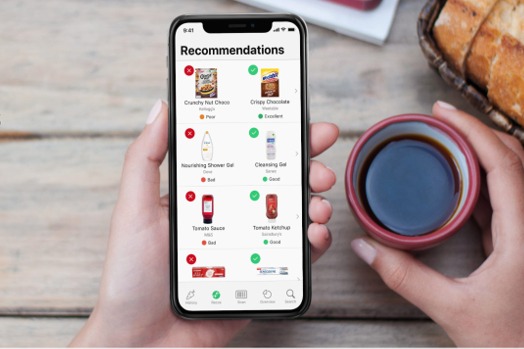
The Ultimate Guide to Assessing Alimentary Products: Top Apps to Try
In today’s fast-paced world, it’s easy to get caught up in the hustle and bustle of daily life and neglect our dietary habits. With the rise of processed foods and sugary drinks, it’s become increasingly challenging to make informed choices about what we eat. However, with the help of innovative apps, you can now easily assess alimentary products and make healthier choices.
Why is it Essential to Assess Alimentary Products?
Assessing alimentary products is crucial for maintaining a healthy lifestyle. Consuming foods that are high in sugar, salt, and unhealthy fats can lead to various health problems, such as obesity, diabetes, and heart disease. Moreover, some foods may contain allergens or trigger food intolerances, which can have severe consequences if left untreated.
The Top Apps to Assess Alimentary Products
Fortunately, there are several apps available that can help you assess alimentary products and make informed choices about your diet. Here are the top picks:
1. Yuka (Android/iOS/iPadOS)
Available for free
Yuka is an independent entity that examines products based on their labels and provides a report on their quality, highlighting risks and alternatives of better quality.
How to Use Yuka:
- Download the app from the store.
- Access or create a profile using email and password or Facebook account.
- Scan the bar code of a product.
- Wait for the outcome, which will display the ingredients at risk, nutritional courages, and a score of 0 to 100.
2. Edo (Android/iOS/iPadOS)
Available for free
Edo is another app that allows you to scan products and assess their quality. You can access additional features by subscribing to the premium plan.
How to Use Edo:
- Download the app from the store.
- Register or access your Facebook account.
- Scan a product’s bar code.
- View an evaluation of the product, including ingredients and nutritional courages.
- Explore alternative products and recipes.
3. Lifesum (Android/iOS/iPadOS)
Available for free
Lifesum is a unique app that helps you monitor your calorie intake and balance your diet. You can access premium features by subscribing to the plan.
How to Use Lifesum:
- Download the app from the store.
- Register or access your Google, Facebook, or Apple account.
- Define your weight goals and objectives.
- View a synthesis of your daily calorie intake and receive tips on how to maintain a balanced diet.
- Explore diets, recipes, and exercises tailored to your needs.
Other Apps
In addition to the above apps, there are several other options available, such as:
- OpenFoodFacts (Android/iOS/iPadOS) – scans bar codes to provide information about food products.
- Yazio (Android/iOS/iPadOS) – helps you track calorie intake and achieve your weight goals.
- MyRealFood (Android/iOS/iPadOS) – allows you to scan bar codes and access recipes using specific ingredients.
Why Should You Use These Apps?
Using these apps can greatly benefit your health and well-being. By assessing alimentary products, you can:
- Make informed choices about what you eat.
- Avoid foods high in sugar, salt, and unhealthy fats.
- Identify allergens or trigger food intolerances.
- Achieve a balanced diet and maintain a healthy weight.
Conclusion:
In conclusion, assessing alimentary products is essential for maintaining a healthy lifestyle. The apps mentioned above provide a valuable resource for making informed choices about what you eat. By using these tools, you can avoid unhealthy foods, achieve a balanced diet, and improve your overall well-being.
Faqs:
- What Are The Benefits of Using Yuka?
Yuka helps you assess alimentary products based on their labels, providing a report on their quality and highlighting risks and alternatives. - How Does Edo Work?
Edo scans bar codes to evaluate product quality, allowing you to view ingredients, nutritional courages, and alternative products. - What is The Purpose of Lifesum?
Lifesum helps you monitor your calorie intake and balance your diet, providing tips on how to maintain a healthy weight. - Are These Apps Available For Free?
Yes, most of the mentioned apps are available for free; however, some premium features require subscription or payment. - Can I Access Recipes Using These Apps?
Yes, many of these apps provide recipe suggestions based on specific ingredients and dietary needs. - How Can I Ensure The Accuracy of Product Information?
While these apps strive to provide accurate information, it’s essential to verify data with other reliable sources, such as food manufacturers or health professionals. - Can I Use Multiple Apps Simultaneously?
Yes, you can use multiple apps to access a broader range of features and resources. - What is The Recommended Approach For Using These Apps?
To get the most out of these apps, it’s essential to register or access your account, explore available features, and regularly update your profile with new information.
By embracing these innovative tools, you can take control of your dietary habits and make informed choices about what you eat.


