
How to Speed Up Videos on Your Smartphone or Pc: A Comprehensive Guide
Are you tired of watching videos that seem to drag on forever? Do you wish there was a way to speed them up without sacrificing quality? Look no further! In this article, we will explore the various options available for speeding up videos on your smartphone or PC.
Why Speed Up Videos?
Before we dive into the nitty-gritty, let’s talk about why you might want to speed up videos in the first place. There are several reasons:
- You’re short on time and don’t have the luxury of watching videos at their natural pace.
- You’re trying to learn a new skill or watch educational content, but the video is too long.
- You simply prefer faster-paced videos.
Options For Speeding Up Videos on Your Smartphone
There are several apps available that allow you to speed up videos on your smartphone. Here are some of the most popular options:
- Youcut (Android): This app offers a range of editing tools, including the ability to speed up or slow down videos. It’s free to download and use.
- Imovie (iOS/iPadOS): If you have an Apple device, iMovie is a great option for speeding up videos. It’s free to download and use.
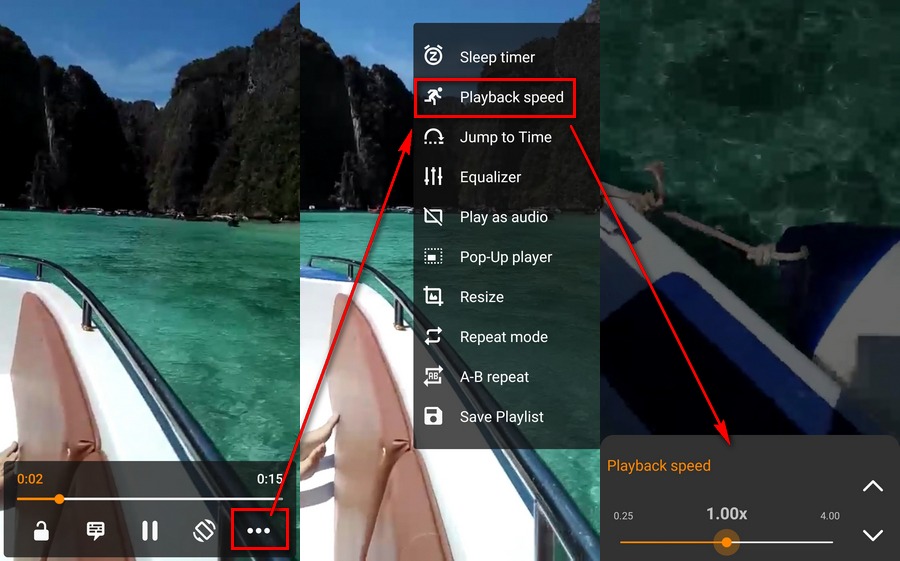
- Vlc (Android/iOS/iPadOS): VLC is a popular media player that can also be used to speed up videos. It’s free to download and use.
Options For Speeding Up Videos on Your PC
If you prefer to use your PC, there are several options available for speeding up videos:
- Avidemux (Windows/macOS/Linux): This free video editor allows you to transfer permanent modifications to the frame of the filmed.
- Vlc (Windows/macOS/Linux): VLC is a popular media player that can also be used to speed up videos.
- Davinci Resolve (Windows/macOS/Linux): This professional-grade video editor offers advanced features, including the ability to speed up videos.
Speeding Up Videos Online
If you don’t want to download any software or apps, there are several online options available for speeding up videos:
- Clipchamp: This online video editor allows you to create and edit videos, including speeding them up.
- Google Chrome Extensions: There are several extensions available that can be used to speed up videos in Google Chrome.
Regulatory of Speed Video Extension
This extension for Google Chrome allows you to modify the speed of videos in real-time. It’s free to download and use.
Conclusion
In conclusion, there are many options available for speeding up videos on your smartphone or PC. Whether you prefer to use apps, software, or online services, there’s a solution out there for you. Just remember to always check the quality of the video before speeding it up, as this can affect the overall experience.
Frequently Asked Questions
- Q: How do I speed up videos on my smartphone?
A: You can use apps like YouCut, iMovie, or VLC to speed up videos on your smartphone. - Q: Can I speed up videos on my PC?
A: Yes, you can use software like Avidemux, VLC, or DaVinci Resolve to speed up videos on your PC. - Q: Are there any online options for speeding up videos?
A: Yes, you can use services like Clipchamp or Google Chrome Extensions to speed up videos online. - Q: How do I know if the video quality will be affected by speeding it up?
A: The quality of the video may be affected by speeding it up, so be sure to check before making any changes.


