
How to Block Unwanted Calls on Your Mobile Phone
Are you tired of receiving unwanted calls on your mobile phone? Do you wish there was a way to block these pesky numbers and have some peace and quiet? Well, you’re in luck! In this article, we’ll show you how to block unwanted calls on your mobile phone using various methods.
What Are Unwanted Calls?
Unwanted calls, also known as spam or nuisance calls, are calls that you don’t want to receive. They can be from telemarketers, scammers, or even friends and family members who just won’t take no for an answer. Whatever the reason, these calls can be frustrating and disrupt your daily routine.
Methods to Block Unwanted Calls
There are several ways to block unwanted calls on your mobile phone, depending on your device and operating system. Here are some of the most effective methods:
Blocking Unwanted Calls on Android Devices
If you have an Android device, you can use the built-in “Call Blocker” feature to block unwanted calls. To do this:
- Open the Phone app.
- Tap on the three dots (⋯) in the top right corner.
- Select “Settings”.
- Scroll down and tap on “Blocked numbers”.
- Add the number you want to block by tapping on the “+” icon.
Alternatively, you can use a third-party app like Truecaller or Should I Answer to block unwanted calls.
Blocking Unwanted Calls on Samsung Devices
If you have a Samsung device, you can use the built-in “Call Blocker” feature to block unwanted calls. To do this:
- Open the Phone app.
- Tap on the three dots (⋯) in the top right corner.
- Select “Settings”.
- Scroll down and tap on “Blocked numbers”.
- Add the number you want to block by tapping on the “+” icon.
Blocking Unwanted Calls on Huawei Devices
If you have a HUAWEI device, you can use the built-in “Call Blocker” feature to block unwanted calls. To do this:
- Open the Phone app.
- Tap on the three dots (⋯) in the top right corner.
- Select “Settings”.
- Scroll down and tap on “Blocked numbers”.
- Add the number you want to block by tapping on the “+” icon.
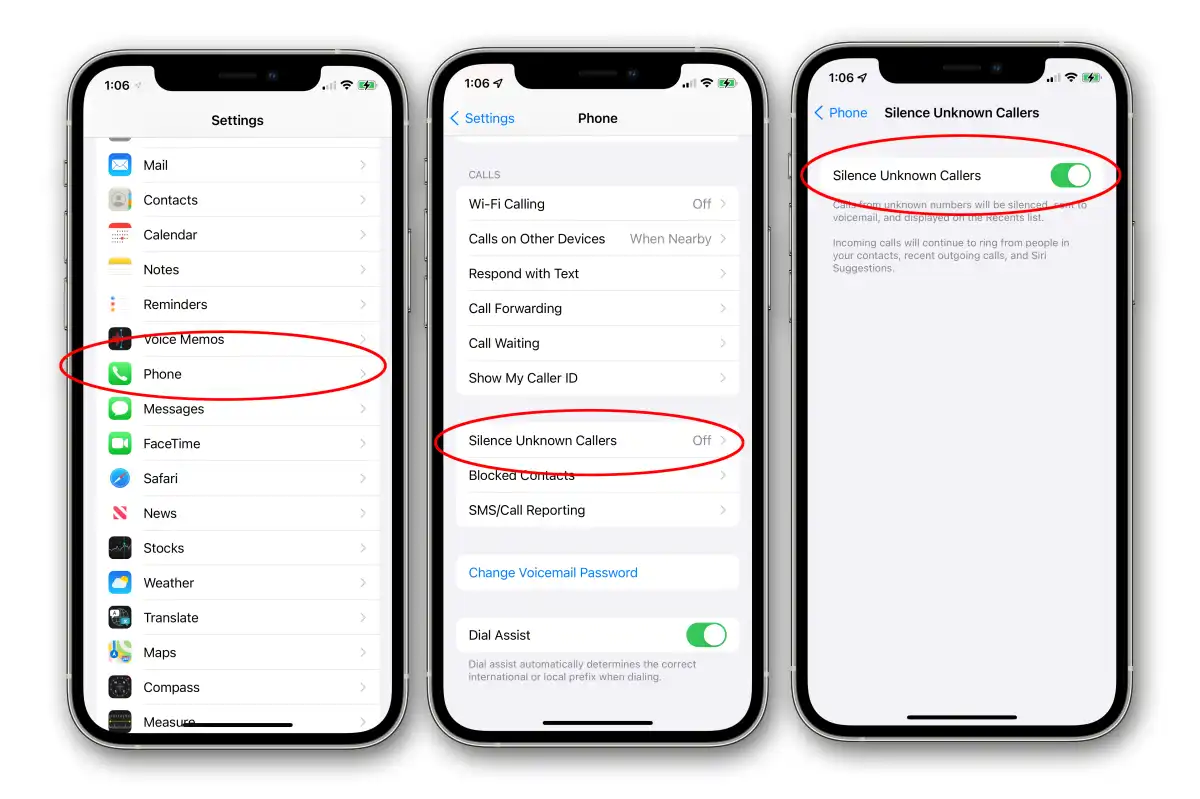
Blocking Unwanted Calls on Iphone Devices
If you have an iPhone device, you can use the built-in “Call Blocker” feature to block unwanted calls. To do this:
- Open the Phone app.
- Tap on the three dots (⋯) in the top right corner.
- Select “Settings”.
- Scroll down and tap on “Blocked contacts”.
- Add the number you want to block by tapping on the “+” icon.
Blocking Unwanted Calls Using Third-party Apps
If your device doesn’t have a built-in call blocker feature, or if you want an extra layer of protection, you can use third-party apps like Truecaller, Should I Answer, or Hiya: Block and ID caller. These apps can help block unwanted calls and even identify scam numbers.
Blocking Unwanted Calls on Landline Phones
If you’re having trouble blocking unwanted calls on your landline phone, don’t worry! You can still take steps to prevent these calls from disrupting your daily routine. Here are some tips:
- Check your phone’s manual for a built-in call blocker feature.
- Contact your phone provider to see if they offer a call-blocking service.
- Consider using a voicemail service that can block unwanted calls.
Conclusion
Blocking unwanted calls on your mobile phone is easier than you think! With these methods, you can say goodbye to pesky telemarketers and scammers. Remember, your peace and quiet are worth it!
Frequently Asked Questions (FAQs)
- What Are The Most Effective Ways to Block Unwanted Calls?
The most effective ways to block unwanted calls include using built-in call blocker features on Android devices, Samsung devices, HUAWEI devices, and iPhone devices. You can also use third-party apps like Truecaller or Should I Answer.
- How do I Add a Number to The Blocked List on my Mobile Phone?
To add a number to the blocked list on your mobile phone:
- On Android devices: Tap on the three dots (⋯) in the top right corner, select “Settings”, and then tap on “Blocked numbers”.
- On Samsung devices: Tap on the three dots (⋯) in the top right corner, select “Settings”, and then tap on “Blocked numbers”.
- On HUAWEI devices: Tap on the three dots (⋯) in the top right corner, select “Settings”, and then tap on “Blocked numbers”.
-
On iPhone devices: Tap on the three dots (⋯) in the top right corner, select “Settings”, and then tap on “Blocked contacts”.
-
Can I Block Unwanted Calls on my Landline Phone?
Yes, you can block unwanted calls on your landline phone by checking your phone’s manual for a built-in call blocker feature or contacting your phone provider to see if they offer a call-blocking service.
- What Are Some Popular Third-party Apps For Blocking Unwanted Calls?
Some popular third-party apps for blocking unwanted calls include Truecaller, Should I Answer, and Hiya: Block and ID caller.
- Is There Any Cost Associated With Using These Methods to Block Unwanted Calls?
Most of the methods mentioned in this article are free or come with your phone provider’s package. However, some third-party apps may charge a subscription fee for their services.


