
How to Capsize Resolution Monitor: A Step-by-step Guide
Are you tired of having a low-resolution monitor on your PC, smartphone, tablet, or TV? Do you want to enhance your visual experience without breaking the bank? Look no further! In this article, we will guide you through the process of capsizing resolution monitor on various devices.
Why Capsize Resolution Monitor?
Capising resolution monitor is a simple and effective way to improve your visual experience. By increasing the resolution, you can:
- Enhance image clarity
- Reduce eye strain
- Improve overall performance
How to Capsize Resolution Monitor on PC (Windows)
If you’re using Windows 10, follow these steps:
- Right-click on an empty space on your desktop and select “Settings”.
- Click on the “Display” tab.
- Scroll down to the “Resolution” section.
- Select the desired resolution from the dropdown menu.
- Click on the “Apply” button to save the changes.
If you want to modify the font size, follow these additional steps:
- Right-click on an empty space on your desktop and select “Settings”.
- Click on the “Display” tab.
- Scroll down to the “Scaling” section.
- Select the desired scaling percentage from the dropdown menu.
- Click on the “Apply” button to save the changes.
How to Capsize Resolution Monitor on Mac
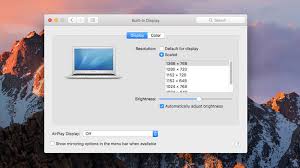
If you’re using a Mac, follow these steps:
- Go to System Preferences > Displays.
- Click on the “Display” tab.
- Select the desired resolution from the dropdown menu.
- Click on the “Apply” button to save the changes.
To modify the font size, follow these additional steps:
- Go to System Preferences > Displays.
- Click on the “Display” tab.
- Select the desired scaling percentage from the dropdown menu.
- Click on the “Apply” button to save the changes.
How to Capsize Resolution Monitor on Android
If you’re using an Android device, follow these steps:
- Go to Settings > Display and luminosity > Resolution monitor.
- Select the desired resolution from the list.
- If available, disable the intelligent Resolution option.
- Choose a resolution that suits your needs.
To modify the font size, follow these additional steps:
- Go to Settings > Display and luminosity > Dimensions text.
- Adjust the lever to regulate the font size.
How to Capsize Resolution Monitor on Iphone And Ipad
Unfortunately, it is not possible to capsize the resolution monitor on an iPhone or iPad. However, you can modify the font size by:
- Going to Settings > Display and luminosity > Dimension text.
- Adjusting the bar to regulate the font size.
How to Capsize Resolution Monitor on TV (Samsung)
If you have a Samsung TV, follow these steps:
- Read our tutorial on how to resize the monitor of your TV Samsung.
- Follow the instructions provided in the article to adjust the resolution and ratio.
Conclusion
Capsizing resolution monitor is a simple and effective way to improve your visual experience on various devices. Whether you’re using a PC, Mac, Android device, or iPhone, we hope this guide has been helpful in walking you through the process. Remember to always follow the manufacturer’s instructions for specific settings and requirements.
Frequently Asked Questions (FAQs)
- What is Capsizing Resolution Monitor?
Capsizing resolution monitor refers to the process of adjusting the display resolution on your device. - Why Should I Capsize Resolution Monitor?
To enhance image clarity, reduce eye strain, and improve overall performance. - How do I Capsize Resolution Monitor on Windows 10?
Follow these steps: Right-click on an empty space on your desktop and select “Settings”. Click on the “Display” tab and select the desired resolution from the dropdown menu. - How do I Capsize Resolution Monitor on Mac?
Follow these steps: Go to System Preferences > Displays. Click on the “Display” tab and select the desired resolution from the dropdown menu. - Can I Capsize Resolution Monitor on Android?
Yes, but not all devices support this feature. Check if your device has a setting for adjusting display resolution. - How do I Modify Font Size on Windows 10?
Follow these additional steps: Right-click on an empty space on your desktop and select “Settings”. Click on the “Display” tab and adjust the scaling percentage from the dropdown menu. - Can I Capsize Resolution Monitor on Iphone or Ipad?
Unfortunately, no. However, you can modify font size by adjusting the bar in Settings > Display and luminosity > Dimension text. - How do I Capsize Resolution Monitor on TV (Samsung)?
Follow our tutorial on how to resize the monitor of your TV Samsung.


