
How to Open Crdownload Files: A Step-by-step Guide
Are you tired of seeing crdownload files on your device, only to be unable to open them? You’re not alone! In this article, we’ll show you how to open crdownload files on Windows, Mac, Android, and iPhone.
What is a Crdownload File?
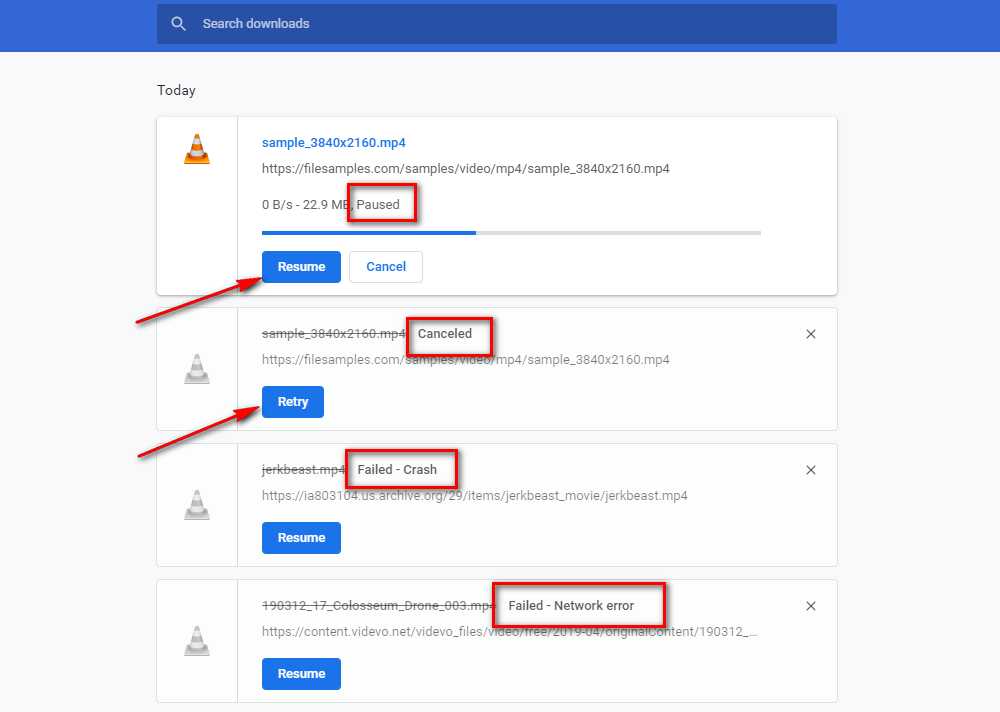
A crdownload file is a temporary file that Google Chrome creates when you start downloading a file, but the download doesn’t complete successfully. This can happen due to various reasons such as a slow internet connection or server issues. As a result, the file remains in a partially downloaded state with the extension crdownload.
Why Can’t I Open Crdownload Files?
Unfortunately, crdownload files cannot be opened directly like regular files. They are essentially temporary placeholders for the actual file you were trying to download. Trying to open them will result in an error message or no response at all.
How to Open Crdownload Files on Windows
If you’re using a Windows PC and encounter a crdownload file, follow these steps:
- Open Google Chrome: First, open Google Chrome by double-clicking its icon.
- Go to The Download Section: Click on the three dots (⋯) in the top-right corner of the browser window and select “Download” from the dropdown menu.
- Find The Crdownload File: Navigate to the folder where your downloaded files are stored, usually C:\Users[YourUsername]\Downloads.
- Open The Crdownload File: Right-click on the crdownload file and select “Open with Google Chrome.” This will initiate a new download process for the file.
How to Open Crdownload Files on Mac
If you’re using a Mac and encounter a crdownload file, follow these steps:
- Open Google Chrome: First, open Google Chrome by clicking its icon in the dock.
- Go to The Download Section: Click on the three dots (⋯) in the top-right corner of the browser window and select “Download” from the dropdown menu.
- Find The Crdownload File: Navigate to the folder where your downloaded files are stored, usually ~/Downloads.
- Open The Crdownload File: Right-click on the crdownload file and select “Open with Google Chrome.” This will initiate a new download process for the file.
How to Open Crdownload Files on Android
If you’re using an Android device and encounter a crdownload file, follow these steps:
- Open Google Chrome: First, open Google Chrome by tapping its icon.
- Go to The Download Section: Tap the three dots (⋯) in the top-right corner of the browser window and select “Downloads” from the dropdown menu.
- Find The Crdownload File: Navigate to the folder where your downloaded files are stored, usually /sdcard/Download.
- Open The Crdownload File: Long-press on the crdownload file and select “Open with Google Chrome.” This will initiate a new download process for the file.
How to Open Crdownload Files on Iphone
If you’re using an iPhone or iPad and encounter a crdownload file, follow these steps:
- Open Google Chrome: First, open Google Chrome by tapping its icon.
- Go to The Download Section: Tap the three dots (⋯) in the top-right corner of the browser window and select “Downloads” from the dropdown menu.
- Find The Crdownload File: Navigate to the folder where your downloaded files are stored, usually /private/var/mobile/Containers/Data/Application.
- Open The Crdownload File: Unfortunately, crdownload files cannot be opened directly on an iPhone or iPad using Google Chrome. Try downloading the file again using another browser like Safari.
Conclusion
Opening crdownload files can be a bit tricky, but by following these steps, you should be able to successfully open them on your Windows, Mac, Android, or iPhone device. Remember that crdownload files are temporary placeholders for actual downloaded files, so it’s essential to check the file’s status and try downloading it again if necessary.
Faqs
- What is a Crdownload File?
A crdownload file is a temporary placeholder for an actual downloaded file created by Google Chrome when the download process fails. - Why Can’t I Open Crdownload Files Directly?
Crdownload files are incomplete or partially downloaded, so trying to open them directly will result in an error message or no response at all. - How do I Open Crdownload Files on Windows?
Open Google Chrome, go to the Download section, find the crdownload file, and right-click on it to initiate a new download process. - How do I Open Crdownload Files on Mac?
Open Google Chrome, go to the Download section, find the crdownload file, and right-click on it to initiate a new download process. - How do I Open Crdownload Files on Android?
Open Google Chrome, go to the Download section, find the crdownload file, and long-press on it to initiate a new download process.
I hope this article has helped you understand how to open crdownload files on various devices!


