
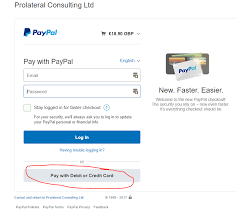
Paying With Paypal Without a Credit Card: A Comprehensive Guide
Are you wondering how to pay with PayPal without using a credit card? Look no further! In this article, we’ll explore the different ways you can use PayPal for online payments, physical shops, and more.
Understanding Paypal’s Inner Account
PayPal has an inner account, commonly known as the balance PayPal. This is where all your payments are stored, and you can transfer funds to other users or pay for online transactions using this balance.
Using Your Balance Paypal For Online Payments
When shopping online, you can use your balance PayPal as the default payment method. To do this:
- Log in to your PayPal account.
- Select the “Wallet” tab.
- Choose the “Balance PayPal” option.
- Confirm the payment by clicking on the “Confirm” button.
Adding a Common Account For Online Payments
You can also add a common account (such as a bank or postal account) to your PayPal account, which allows you to transfer funds directly into this account.
How to Forward Money With Paypal
Want to forward money from your balance PayPal to another user’s PayPal balance? Follow these steps:
- Log in to your PayPal account.
- Click on the “Forward” tab.
- Select the recipient and enter the amount you want to transfer.
- Choose the payment method (in this case, the common account).
- Confirm the transaction.
Paying With Paypal Without a Credit Card: Online Shops
You can also use your balance PayPal or a common account for online payments. To do this:
- Log in to your PayPal account.
- Select the “Wallet” tab.
- Choose the payment method (balance PayPal or common account).
- Confirm the transaction.
Paying With Paypal Without a Credit Card: Physical Shops
Using PayPal’s app, you can also pay for physical shop transactions using the balance PayPal or a common account. To do this:
- Open the PayPal app.
- Select the “Wallet” tab.
- Choose the payment method (balance PayPal or common account).
- Scan the QR code displayed by the merchant.
- Confirm the transaction.
Modifying Your Payment Method
Want to change your default payment method? Follow these steps:
- Log in to your PayPal account.
- Select the “Wallet” tab.
- Choose the payment method (balance PayPal or common account).
- Confirm the changes.
Conclusion
In conclusion, using PayPal without a credit card is easy and convenient. You can use your balance PayPal, add a common account, or even forward money to another user’s PayPal balance. With these steps, you’ll be able to pay for online transactions and physical shop payments without needing a credit card.
Frequently Asked Questions (FAQs)
- Q: Can I Use my Balance Paypal as The Default Payment Method?
A: Yes, you can set your balance PayPal as the default payment method by following the steps outlined in this article. - Q: How do I Add a Common Account to my Paypal Account?
A: To add a common account, log in to your PayPal account and select the “Wallet” tab. Choose the “Common Account” option and follow the instructions. - Q: Can I Forward Money From my Balance Paypal to Another User’s Paypal Balance?
A: Yes, you can forward money by following the steps outlined in this article. - Q: How do I Pay With Paypal Without a Credit Card at an Online Shop?
A: To pay with PayPal at an online shop, select the “Wallet” tab and choose your preferred payment method (balance PayPal or common account). - Q: Can I Use Paypal’s App to Pay For Physical Shop Transactions?
A: Yes, you can use PayPal’s app to pay for physical shop transactions using the balance PayPal or a common account. - Q: How do I Modify my Default Payment Method?
A: To change your default payment method, log in to your PayPal account and select the “Wallet” tab. Choose the new payment method and confirm the changes. - Q: Can I Use Paypal’s App to Forward Money to Another User?
A: Yes, you can use PayPal’s app to forward money by following the steps outlined in this article. - Q: Is it Safe to Pay With Paypal Without a Credit Card?
A: Yes, paying with PayPal without a credit card is safe and secure. PayPal uses robust security measures to protect your transactions.
Table 1: Paypal Payment Methods
| Payment Method | Description |
|---|---|
| Balance PayPal | Your inner PayPal account balance |
| Common Account | A bank or postal account linked to your PayPal account |
Table 2: Paypal Transaction Options
| Option | Description |
|---|---|
| Online Payments | Paying for online transactions using your balance PayPal or common account |
| Physical Shop Payments | Using PayPal’s app to pay for physical shop transactions using the balance PayPal or a common account |
| Forwarding Money | Transferring funds from your balance PayPal to another user’s PayPal balance |
Note: The information provided in this article is accurate as of the knowledge cutoff date. However, please consult the official PayPal website for the most up-to-date information and terms.


