
How to Join Multiple Pdf Files Effortlessly
Are you tired of manually merging multiple PDF files into one? Do you wish there was an easier way to combine these documents without sacrificing their original quality? Look no further! In this comprehensive guide, we will walk you through the most efficient ways to join rows of PDF files on your PC and Mac.
Understanding The Problem
When working with multiple PDF files, it’s common to encounter issues when trying to merge them into a single document. This can lead to frustrating problems such as formatting inconsistencies, lost data, or even corrupted files. However, with the right tools and techniques, you can easily join rows of PDF files without compromising their quality.
Method 1: Using Pdfill Free Pdf Tools
For PC users, one of the most convenient solutions is to use PDFill Free PDF Tools. This software offers a suite of free tools for operating systems Windows that includes numerous features to create, modify, and convert PDF documents. To download this program on your computer, visit the official website, click on the “Download” button, and follow the instructions.
Once installed, open PDFill Free PDF Tools and select the “Merge PDF Files” option from the toolbar. Then, drag and drop the files you want to join into the designated area. You can also manually add files by clicking on the “Add” button. To arrange the documents as desired, use the “Move Up” and “Move Down” buttons.
Finally, click on the “Save As” button to export the merged PDF file. Name your document and choose a location to save it. With this method, you can easily join multiple PDF files without compromising their quality.
Method 2: Using Pdftk Builder
For PC users, another efficient solution is to use PDFTK Builder. This free software and open-source tool allows you to join, divide, and rotate PDF documents with ease. To download it on your computer, visit the official website and click on the “pdftkb_setup.Exe” link.
After installing PDFTK Builder, select the “Join Files” option from the toolbar and drag the files you want to merge into the designated area. Alternatively, manually add files by clicking on the “Add” button. To arrange the documents as desired, use the “Move Up” and “Move Down” buttons.
Finally, click on the “Save As” button to export the merged PDF file. Name your document and choose a location to save it.
Method 3: Using Foxit Pdf Reader
For PC users, you can also use Foxit PDF Reader, a free visualizer of PDF documents available for Windows, macOS, Linux, Android, iOS/iPadOS, and web browsers. Although joining multiple rows of PDF files is not possible with the free version, you can download the paid version, which offers more features.
Method 4: Using Adobe Acrobat Pro
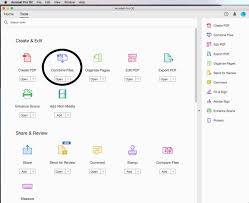
For PC users, Adobe Acrobat Pro is a powerful tool that allows you to open, visualize, and modify PDF documents in various ways. To use this software, visit the official website, click on the “Free Trial” button, and follow the instructions to download and install it.
Once installed, select the “Combine Files” option from the toolbar and add the files you want to merge into the designated area. To arrange the documents as desired, use the “Move Up” and “Move Down” buttons.
Finally, click on the “Save As” button to export the merged PDF file. Name your document and choose a location to save it.
Method 5: Using Anteprima
For Mac users, you can use Anteprima, an application included in macOS that allows you to visualize and modify PDF documents. To join multiple rows of PDF files using this method:
- Open the first PDF file by double-clicking on its icon.
- Select the “View” menu and then click on “Miniatures.”
- Drag the other PDF documents into the window.
- Rearrange the miniatures as desired and select the “Print” option from the “Rows” menu.
Method 6: Using Online Services
If you prefer to join rows of PDF files online, there are several convenient services available:
- Online2pdf: This free service allows you to join up to 20 documents with a maximum dimension of 100 MB each.
- Ilovepdf: This service offers various features, including joining multiple PDF files. It also has a premium subscription that unlocks additional functionality.
Method 7: Using Smallpdf
SmallPDF is another online service that allows you to join multiple rows of PDF files in one click. It’s free and doesn’t require registration or upload limits.
Method 8: Using Adobe Acrobat Online
For an even more convenient experience, you can use the Adobe Acrobat web version, which offers a simplified interface for joining multiple rows of PDF files.
Tips And Tricks
To ensure that your merged PDF file is compatible with various devices and software, consider using a layout that suits your needs. You may also want to password-protect your document for added security.
In conclusion, there are numerous ways to join multiple rows of PDF files efficiently, whether you’re using desktop software or online services. Choose the method that best suits your needs, and never sacrifice quality again!
Faqs
-
How do I Join Multiple Rows of Pdf Files on my Pc?
You can use software such as PDFill Free PDF Tools, PDFTK Builder, Foxit PDF Reader (with a paid subscription), or Adobe Acrobat Pro to merge your documents.
-
Can I Join Rows of Pdf Files Online?
Yes, there are various online services available, including Online2PDF, iLovePDF, SmallPDF, and Adobe Acrobat Online, which allow you to join multiple rows of PDF files with ease.
-
How do I Ensure That my Merged Pdf File is Compatible With Different Devices And Software?
Consider using a layout that suits your needs, and you may also want to password-protect your document for added security.
-
What Are The Benefits of Using Online Services to Join Rows of Pdf Files?
Online services offer convenience, ease of use, and accessibility from anywhere with an internet connection.
-
Can I Use a Free Service to Join Multiple Rows of Pdf Files?
Yes, many online services offer free options or trials that allow you to join multiple rows of PDF files without incurring costs.
-
How do I Protect my Merged Pdf File From Unauthorized Access?
Consider password-protecting your document and using encryption techniques to safeguard its contents.
-
Can I Use a Desktop Software to Join Multiple Rows of Pdf Files on my Mac?
Yes, you can use Anteprima or Adobe Acrobat Pro to merge your documents on a Mac.
-
What Are The System Requirements For Running Desktop Software to Join Multiple Rows of Pdf Files?
Check the system requirements for each software application to ensure compatibility with your computer’s specifications.


