
How to Augment Your Fov on Warzone: A Comprehensive Guide
Are you looking to take your gaming experience to the next level? Do you want to be able to see every nook and cranny of the battlefield in Call of Duty: Warzone? Look no further! In this article, we’ll show you how to augment your Field of View (FOV) on Warzone, giving you a competitive edge over your opponents.
What is Fov And Why is it Important?
FOV stands for Field of View, which refers to the amplitude of the visual field in a video game. In other words, it’s the area that you can see in front of you when playing a game. A higher FOV means that you can see more of your surroundings, which can be beneficial in fast-paced games like Warzone.
How to Augment Your Fov on PC
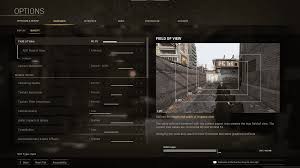
To augment your FOV on PC, follow these simple steps:
- Open The Options Menu: Click on the gear icon in the top-right corner of the screen.
- Go to The General Section: Select the “General” tab from the menu.
- Adjust The Fov Slider: Move the slider to your desired FOV value (between 60 and 120).
- Save Your Changes: Click on the “Apply” button to save your changes.
Tips For Adjusting Your Fov
- Start with a moderate FOV setting, such as 105 or 110.
- Experiment with different values to find what works best for you.
- Be aware that increasing your FOV can reduce your FPS (Frames Per Second), so adjust accordingly.
How to Augment Your Fov on Ps4
Unfortunately, the current version of Warzone on PS4 does not allow for direct FOV adjustment. However, there are some workarounds:
- Adjust The View Mode: Go to Settings > Options > General and select “Custom” as your view mode.
- Reduce The Screen Guides: Use the directional arrows to reduce the guides that appear on the screen.
The Benefits of Augmenting Your Fov
By increasing your FOV, you can:
- See more of the battlefield
- Identify enemies more easily
- Make quicker decisions in-game
Conclusion
Augmenting your FOV on Warzone is a simple process that can give you a competitive edge over other players. By following these steps and tips, you’ll be able to see every nook and cranny of the battlefield, making it easier to take down enemies and achieve victory.
Frequently Asked Questions (FAQs)
- What is Fov?
FOV stands for Field of View, which refers to the area that you can see in front of you when playing a game. - How do I Augment my Fov on Pc?
To augment your FOV on PC, open the Options Menu and go to the General Section. Adjust the FOV slider to your desired value (between 60 and 120). - Can I Augment my Fov on Ps4?
Unfortunately, the current version of Warzone on PS4 does not allow for direct FOV adjustment. However, you can adjust the view mode and reduce the screen guides. - What Are The Benefits of Augmenting my Fov?
By increasing your FOV, you can see more of the battlefield, identify enemies more easily, and make quicker decisions in-game.
I hope this guide has been helpful! If you have any further questions or need additional assistance, don’t hesitate to reach out.


