
How to Join Multiple Pdf Files Into One
Are you tired of having multiple PDF files that you need to access simultaneously? Look no further! In this article, we will guide you through the process of joining multiple PDF files into one using various methods.
Why Join Multiple Pdf Files?
Joining multiple PDF files can be useful in several situations:
- You have a collection of documents related to a specific project or topic and want to view them as a single file.
- You need to combine multiple contracts, agreements, or forms into one document for easier management.
- You’re working on a research paper or thesis and want to organize your sources into a single PDF file.
Methods to Join Multiple Pdf Files
There are several methods to join multiple PDF files, depending on your operating system and preferences. Here are some of the most popular options:
Method 1: Using Adobe Acrobat (Windows/Mac)
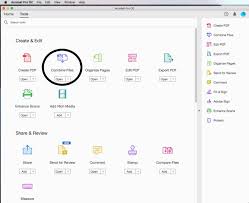
Adobe Acrobat is a powerful tool for creating, editing, and managing PDF files. You can use it to join multiple PDF files into one using the following steps:
- Open Adobe Acrobat and click on “Create” in the top navigation bar.
- Select “Combine Files” from the drop-down menu.
- Add the PDF files you want to combine by clicking on “Add File” or dragging and dropping them into the list.
- Rearrange the order of the files using the up and down arrows next to each file.
- Click on “Save” to save the combined PDF file.
Method 2: Using Adobe Acrobat (Mac)
Adobe Acrobat for Mac offers a similar experience to the Windows version:
- Open Trailer, which is part of the macOS suite of apps.
- Right-click (or control-click) on the PDF icon and select “Open with” from the context menu.
- Choose Adobe Acrobat as the application to open the file.
- Once in Acrobat, follow the same steps as above to combine your files.
Method 3: Using Online Services
There are several online services that allow you to join multiple PDF files into one without downloading any software. Some popular options include:
- Pdf Candy: A free online service that allows you to join up to 20 PDF files at a time.
- Ilovepdf: Another free online service that offers various tools for editing and converting PDFs, including combining multiple files.
- Online2pdf: A web-based platform that enables you to merge multiple PDF files into one.
Method 4: Using Mobile Apps (Android/iOS)
If you prefer using mobile apps, here are a few options:
- Pdf Merge (Android/iOS): A free app that allows you to join multiple PDF files into one on your smartphone or tablet.
- Ilovepdf (Android/iOS): The mobile version of the popular online service, offering various tools for editing and converting PDFs.
- Pdf Tools (Android): An app that provides a range of tools for managing PDF files, including combining multiple files.
Tips And Variations
When joining multiple PDF files, keep the following tips in mind:
- Make sure to save your combined file regularly to avoid losing any changes.
- Use clear and descriptive names for your combined files to help with organization.
- Consider compressing or encrypting your combined PDFs for security reasons.
Conclusion
Joining multiple PDF files is a straightforward process that can be accomplished using various methods. Whether you prefer using desktop software, online services, or mobile apps, there’s an option available to suit your needs and preferences. By following the steps outlined in this article, you’ll be able to combine your PDF files with ease.
Frequently Asked Questions (FAQs)
Here are some frequently asked questions related to joining multiple PDF files:
Q: Can I join more than 10 PDF files at a time?
A: Some online services and software may have limitations on the number of files you can join simultaneously. However, most options allow for combining multiple files.
Q: How do I ensure that my combined file is secure?
A: Consider encrypting or compressing your combined PDFs to protect sensitive information.
Q: Can I use this method to combine files from different sources (e.G., Google Drive and Dropbox)?
A: Yes, many online services and software allow you to upload files from various cloud storage platforms.


