
Getting Money With Paypal: A Step-by-step Guide
Are you wondering how to get money with PayPal? Look no further! In this article, we’ll guide you through the process of requesting payments using the popular online payment service.
Why Use Paypal?
PayPal is a convenient and secure way to send and receive payments online. With millions of users worldwide, it’s an ideal platform for businesses and individuals alike. By using PayPal, you can enjoy fast and hassle-free transactions, without the need for physical checks or bank transfers.
Understanding Commission Fees
Before we dive into the process of getting money with PayPal, let’s quickly discuss commission fees. As a user, you should be aware that PayPal charges various fees for sending and receiving payments. These fees vary depending on the type of transaction, the country of origin, and other factors. For example:
- Donations: A 3.4% Fee is applied to national donations, with an additional €0.35 Fixed charge per transaction.
- International Donations: An additional percentage-based fee is applied for international transactions, ranging from 1-1.99% Depending on the country of residence.
Receiving Money With Paypal
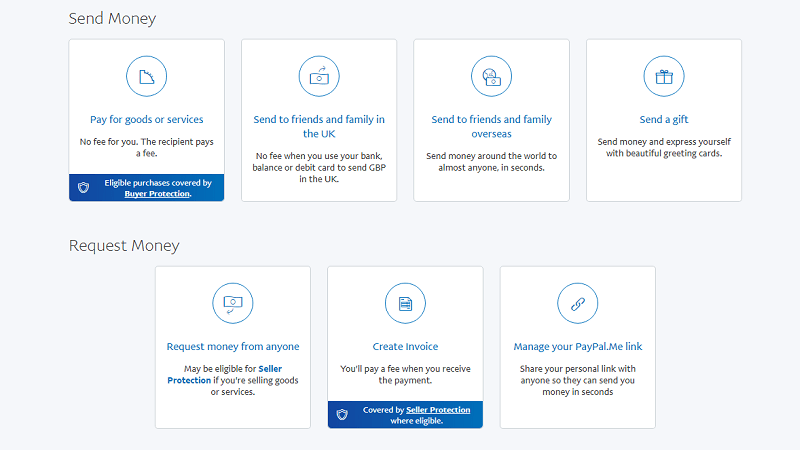
Now that we’ve covered commission fees, let’s focus on receiving money with PayPal. Here’s a step-by-step guide:
From Computer:
- Access your PayPal account by logging in to the website.
- Click on the “Request” button located on the top right corner of the screen.
- Enter the recipient’s email address or phone number associated with their PayPal account.
- Specify the amount you wish to receive and add a message if desired (optional).
- Review your request and click “Send” to initiate the payment process.
From Mobile App:
- Open the PayPal mobile app on your Android or iOS device.
- Log in to your account using your credentials.
- Tap on the “Request” button located in the menu.
- Enter the recipient’s email address or phone number associated with their PayPal account.
- Specify the amount you wish to receive and add a message if desired (optional).
- Review your request and tap “Send” to initiate the payment process.
Receiving Money From Abroad:
Getting money from abroad with PayPal is relatively straightforward. The process is similar to receiving money within your country of residence, but keep in mind that you may need to convert currencies due to exchange rate differences.
Additional Tips And Features
Here are some additional tips and features worth mentioning:
- Requesting Money From Multiple People: You can request money from up to 20 people at a time by selecting the “Add more” option during the payment process.
- Dividing Payments Among Recipients: If you need to divide payments among multiple recipients, simply select the “Divide the account” option and follow the prompts.
- Canceling or Modifying Requests: You can cancel or modify your requests at any time by accessing the “History” section of your PayPal account.
How to Cancel a Payment With Paypal
If you need to cancel a payment or request, refer to our dedicated guide on how to cancel payments using PayPal. This article provides detailed instructions and considerations for cancelling transactions, including refunding payments.
Sharing Your Personal Profile With Paypal
As we discussed earlier, sharing your personal profile can help simplify the process of getting donations or collecting funds. To share your profile, follow these steps:
- Access your PayPal account.
- Select the “Share” button located under your name.
- Choose the option to share your profile link via email or social media.
Conclusion
Getting money with PayPal is a straightforward and efficient process when you know how it works. By following this guide, you can request payments from others using either the PayPal website or mobile app. Remember to be aware of commission fees, especially for international transactions, and explore additional features like sharing your personal profile to simplify fundraising.
Frequently Asked Questions
Here are some answers to frequently asked questions about getting money with PayPal:
- Q: Can I Get Money From Abroad Using Paypal?
A: Yes, the process is similar to receiving money within your country of residence. - Q: What Fees do I Need to Pay For Sending And Receiving Payments?
A: Commission fees vary depending on transaction types, countries, and other factors; refer to our guide for details. - Q: Can I Request Money From Multiple People at Once?
A: Yes, you can add up to 20 recipients per request using the “Add more” option. - Q: How do I Cancel a Payment or Request?
A: Refer to our dedicated guide on how to cancel payments with PayPal. - Q: Can I Share my Personal Profile With Others For Easier Fundraising?
A: Yes, follow the steps outlined in our guide to share your profile and link it directly via email or social media.
By following this comprehensive guide, you’ll be well-equipped to get money with PayPal using either the website or mobile app. Don’t hesitate to reach out if you have further questions or concerns!


