
Assembling a PC For Gaming: A Comprehensive Guide
Are you ready to take your gaming experience to the next level? Assembling a PC for gaming can be a daunting task, but with this guide, you’ll have all the necessary information to build a powerful and efficient machine.
Components Fundamental to Assemble a PC For Gaming
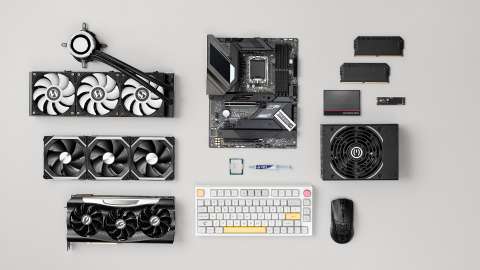
Before we dive into the nitty-gritty details, let’s take a look at the essential components needed to assemble a PC for gaming:
- Case: The outer casing of the PC that houses all the internal components.
- Motherboard: The main circuit board that connects and powers all the other components.
- Cpu (Processor): The brain of the operation, responsible for executing instructions and handling calculations.
- Ram (Memory): Temporary storage for data, essential for smooth gaming performance.
- Gpu (Graphics Card): Controls the graphics rendering, crucial for a seamless gaming experience.
- Storage: Holds your operating system, programs, and games, typically in the form of a hard drive or solid-state drive (SSD).
- Power Supply: Provides power to all the components, ensuring stable and efficient operation.
Case: The External Housing
The case is the outer casing that holds all the internal components together. It’s essential to choose a case that meets your gaming requirements:
- Size: A mid-tower or full-tower case provides ample space for a powerful system.
- Material: Steel, aluminum, or plastic cases are available, with steel being the most durable option.
- Cooling: Ensure proper airflow and heat dissipation to keep your components cool.
Some top-notch case options include:
- Corsair 4000D Airflow Case
- Empire Gaming Argb Mid-tower Case
Motherboard: The Main Circuit Board
The motherboard is the main circuit board that connects and powers all the other components. When choosing a motherboard, consider the following factors:
- Socket: Ensure it supports your chosen CPU.
- Ram Compatibility: Choose a motherboard with sufficient RAM slots for your needs.
- Storage Support: Consider SATA 3 ports, M.2 Slots, or USB 3.0 Support.
Recommended motherboards include:
- Asus Prime B760-plus D4
- Gigabyte B760m Gaming X
Cpu (Processor): The Brain of The Operation
The CPU is responsible for executing instructions and handling calculations. For gaming, a powerful processor is essential:
- Intel Core i5 or i7: Suitable for most modern games.
- Amd Ryzen 7 or 9: Offers competitive performance at a lower price point.
Recommended CPUs include:
- Intel Core I5-13500
- Intel Core I7-13700k
Ram (Memory): Temporary Storage
RAM is essential for smooth gaming performance, providing temporary storage for data. When choosing RAM, consider the following factors:
- Capacity: 16 GB or more recommended.
- Speed: DDR4 or DDR5 speeds, with higher speeds offering better performance.
Recommended RAM options include:
- Corsair Vengeance Lpx 16GB (2x8GB) Ddr4 3600
- Kingston Fury Beast 16GB (2x8GB) 3200 Ddr4
Gpu (Graphics Card): Controls Graphics Rendering
The GPU controls graphics rendering, crucial for a seamless gaming experience. For modern games, consider:
- Nvidia Geforce Rtx 4060 or Rtx 4090: Suitable for most modern games.
- Amd Radeon RX 6600 or RX 7900 XT: Offers competitive performance at a lower price point.
Recommended GPUs include:
- Gigabyte Nvidia Geforce Rtx 4060 Gaming OC
- Sapphire Nitro+ Radeon RX 7900 XT Vapor-x
Storage: Holds Your Operating System, Programs, And Games
Storage is essential for holding your operating system, programs, and games. Consider the following factors:
- Capacity: 500 GB or more recommended.
- Speed: SSDs offer faster loading times and responsiveness.
Recommended storage options include:
- Samsung 980 Pro M.2 Nvme Ssd
- Lexar Nm790 M.2 2280 Pcie Gen4x4 Nvme Ssd
Power Supply: Provides Power to All Components
A power supply provides power to all the components, ensuring stable and efficient operation. Consider the following factors:
- Capacity: 650 W or more recommended.
- Efficiency: Look for a power supply with an 80 PLUS Gold certification.
Recommended power supplies include:
- Cooler Master Mwe 750 Gold V2 Modular Power Supply
- Cooler Master GX Iii Gold 750 Psu
Monitor: Essential For Displaying Your Gaming Experience
A monitor is essential for displaying your gaming experience. Consider the following factors:
- Resolution: Choose a resolution that suits your needs, such as Full HD or 4K.
- Refresh Rate: A higher refresh rate offers smoother performance.
- Response Time: Look for a monitor with low response times to minimize ghosting.
Recommended monitors include:
- Aoc Gaming 24G2SPAE
- Samsung Odyssey G5 Curvo (1000R)
Accessories: Additional Components
Additional components can enhance your gaming experience. Consider the following:
- Mouse: Choose a mouse with adjustable DPI and customizable buttons.
- Keyboard: Opt for an ergonomic keyboard with programmable keys and macro capabilities.
Recommended accessories include:
- Logitech G502 Hero
- Trust Gaming Gxt 415 Zirox Bonnets
Conclusion: Assembling a PC For Gaming
Assembling a PC for gaming can be a complex process, but with this guide, you’ll have all the necessary information to build a powerful and efficient machine. Remember to choose components that meet your gaming requirements, consider factors such as size, material, cooling, socket, RAM compatibility, storage support, CPU performance, and GPU capabilities.
Faqs:
- What is The Best Cpu For Gaming?
The best CPU for gaming depends on your budget and needs, but Intel Core i5 or i7 and AMD Ryzen 7 or 9 are popular choices. - How Much Ram do I Need For Gaming?
16 GB or more of RAM is recommended for smooth gaming performance. - What is The Difference Between a Gpu And Cpu?
A GPU (Graphics Card) controls graphics rendering, while a CPU (Processor) handles calculations and executes instructions. - Can I Use a Mechanical Hard Drive Instead of an Ssd?
While possible, using a mechanical hard drive may lead to slower loading times and responsiveness. - What is The Best Monitor For Gaming?
A good monitor should have high refresh rates, low response times, and suitable resolutions (Full HD or 4K). - Can I Use a Keyboard And Mouse From my Old Pc?
While possible, it’s recommended to choose new accessories specifically designed for gaming. - How do I Ensure Proper Cooling in my PC Case?
Ensure proper airflow by using fans, heat sinks, and liquid cooling solutions.


