
How to Top Up Your Very Mobile Account: A Comprehensive Guide
Are you a Very Mobile user looking to top up your account? Look no further! In this article, we will guide you through the various ways to recharge your Very Mobile SIM, making it easier for you to stay connected.
What is Very Mobile?
Very Mobile is a virtual operator that offers a range of services to its customers. With their affordable plans and reliable network, it’s no wonder why many people have switched to Very Mobile.
Why Do I Need to Top Up My Account?
Your Very Mobile account needs to be topped up when your balance falls below a certain threshold. This is usually done to ensure that you can continue using your mobile services without any interruptions.
Methods to Top Up Your Very Mobile Account
There are several ways to top up your Very Mobile account, and we’ll cover each method in detail:
Method 1: Using The Very Mobile App
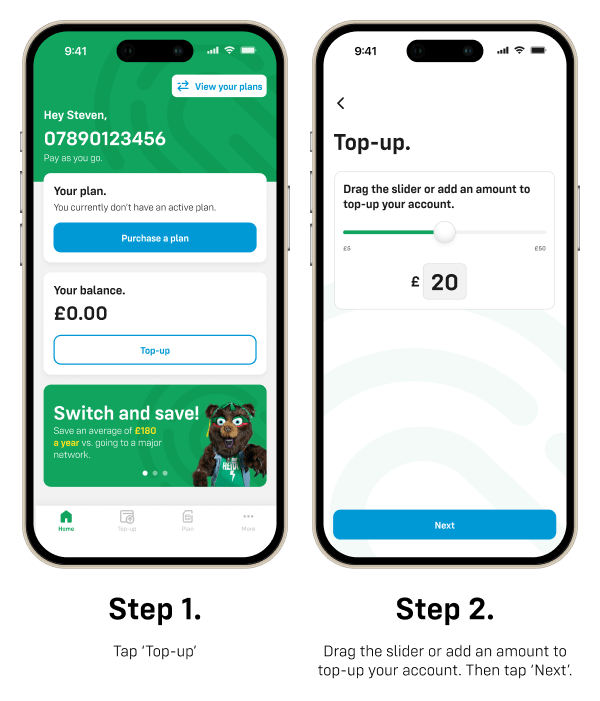
The Very Mobile app is a convenient way to top up your account. Here’s how to do it:
Step 1: Download And Install The App
Download the Very Mobile app from the Google Play Store (for Android devices) or the Apple App Store (for iOS devices).
Step 2: Launch The App
Once installed, launch the app and log in to your account.
Step 3: Top Up Your Account
Select the “Top Up” option and choose the amount you want to add to your balance. You can also set up recurring top-ups for added convenience.
Method 2: Using The Very Mobile Website
You can also top up your Very Mobile account using their official website:
Step 1: Visit The Website
Visit the Very Mobile website and log in to your account.
Step 2: Top Up Your Account
Select the “Top Up” option and choose the amount you want to add to your balance. You can also set up recurring top-ups for added convenience.
Method 3: Using Home Banking
If you have a home banking system, you can use it to top up your Very Mobile account:
Step 1: Log in to Your Home Banking System
Log in to your home banking system and navigate to the “Top Up” section.
Step 2: Select Very Mobile as The Operator
Select Very Mobile as the operator you want to recharge your SIM with.
Step 3: Choose The Amount And Payment Method
Choose the amount you want to add to your balance and select your preferred payment method (card or PayPal).
Method 4: Using Other Systems
There are other systems available that allow you to top up your Very Mobile account, such as:
- SisalPay
- Bancomat
To use these systems, simply follow the same steps as above and select the operator as “Very Mobile”.
Conclusion
Topping up your Very Mobile account is a straightforward process. Whether you choose to use the app, website, home banking system, or other methods, we’ve got you covered. Make sure to always check if your chosen method supports Very Mobile before proceeding.
Frequently Asked Questions (FAQs)
- Q: How do I Top up my Very Mobile Account?
A: You can top up your Very Mobile account using the app, website, home banking system, or other methods like SisalPay and Bancomat. - Q: What is The Minimum Amount to Top up my Account?
A: The minimum amount to top up your account varies depending on the method you choose. - Q: Can I Set up Recurring Top-ups?
A: Yes, you can set up recurring top-ups for added convenience.
We hope this guide has been helpful in answering any questions you may have had about topping up your Very Mobile account.


