
How to See Blocked Profiles on Facebook: A Step-by-step Guide
Are you wondering how to see blocked profiles on Facebook? Well, wonder no more! In this article, we’ll show you exactly how to do it.
Understanding Facebook’s Blocking Feature
Before we dive into the steps, let’s quickly understand how Facebook’s blocking feature works. When you block someone on Facebook, they won’t be able to see your posts or even know that you’ve blocked them. It’s a great way to maintain some digital distance from people who might be bothering you.
Seeing Blocked Profiles on Mobile Devices
To see blocked profiles on your mobile device, follow these steps:
Step 1: Open The Facebook App
Open the Facebook app on your smartphone or tablet. If you haven’t already logged in, do so by entering your credentials.
Step 2: Tap on The Menu Icon
Tap on the menu icon (☰) and select “Settings and Privacy” from the list of options.
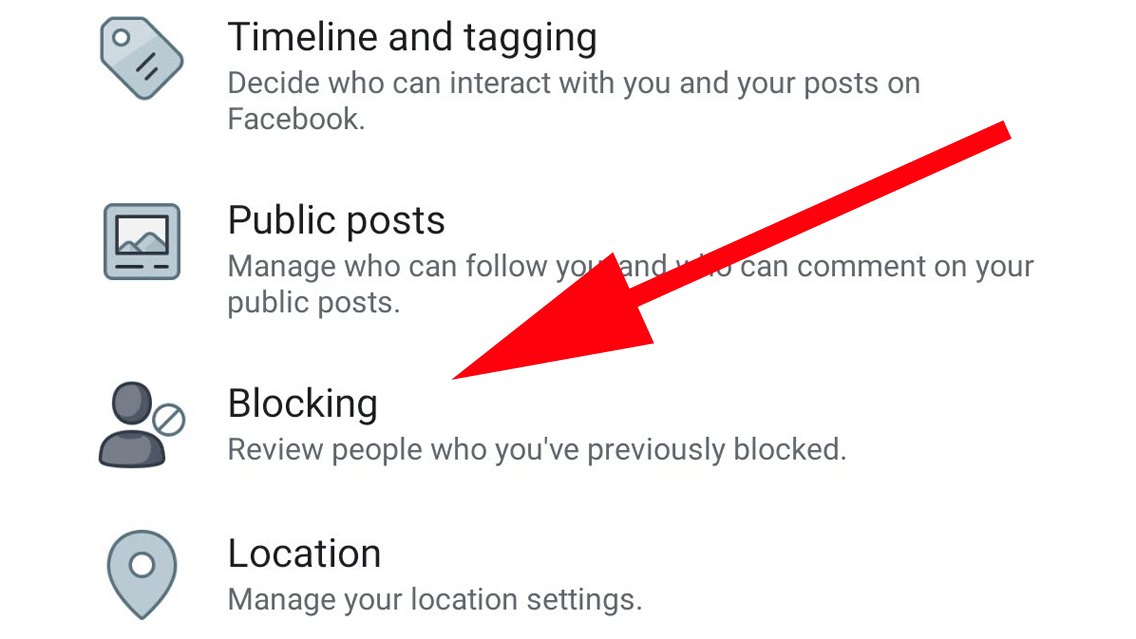
Step 3: Choose “Blocked Accounts”
In the Settings and Privacy section, choose “Blocked Accounts.”
Step 4: View Your Blocked List
On this page, you’ll see a list of people who have been blocked by you. To unblock someone, tap on their name and select “Unblock.”
Seeing Blocked Profiles on Computers
If you prefer using your computer to see blocked profiles, follow these steps:
Step 1: Log In to Your Facebook Account
Log in to your Facebook account using a web browser.
Step 2: Click on Your Profile Picture
Click on your profile picture in the top right corner of the screen. From the dropdown menu, select “Settings and Privacy.”
Step 3: Choose “Blocked Accounts”
In the Settings and Privacy section, choose “Blocked Accounts.”
Step 4: View Your Blocked List
On this page, you’ll see a list of people who have been blocked by you. To unblock someone, click on their name and select “Unblock.”
How to Unblock Someone
If you want to unblock someone, follow these steps:
- Tap or click on the person’s name.
- Select “Unblock” from the dropdown menu.
- Confirm that you want to unblock them by selecting “Confirm.”
What If I Can’t See My Blocked List?
If you’re having trouble seeing your blocked list, try accessing Facebook’s help center for assistance.
Tips For Seeing Private Profiles on Facebook
Want to see private profiles on Facebook without being friends with the person? Here are some tips:
- Create a Secondary Profile: If you want to see someone’s profile without revealing your identity, consider creating a secondary account.
- Use a Friend in Common: If you have a friend who is friends with the person whose profile you want to see, ask them to check the person’s profile for you.
Conclusion
In conclusion, seeing blocked profiles on Facebook is easier than you think! By following these simple steps, you can view your blocked list and unblock someone if needed. Remember, respect people’s boundaries, but also take care of yourself in this digital age.
Frequently Asked Questions (FAQs)
- Q: How do I See my Blocked List on Facebook?
A: To see your blocked list on Facebook, go to Settings and Privacy > Blocked Accounts. - Q: Can I Unblock Someone Without Waiting 48 Hours?
A: No, you cannot unblock someone within 48 hours of blocking them. You’ll have to wait 48 hours before being able to block them again. - Q: How do I See Private Profiles on Facebook?
A: To see private profiles on Facebook, consider creating a secondary account or using a friend in common to access the person’s profile. - Q: What Happens When I Block Someone on Facebook?
A: When you block someone on Facebook, they won’t be able to see your posts or even know that you’ve blocked them. - Q: Can I See my Blocked List on my Computer?
A: Yes, you can see your blocked list on your computer by going to Settings and Privacy > Blocked Accounts. - Q: How do I Unblock Someone on Facebook?
A: To unblock someone on Facebook, go to the blocked list, select “Unblock,” and confirm that you want to unblock them. - Q: What if I Can’t See my Blocked List?
A: If you’re having trouble seeing your blocked list, try accessing Facebook’s help center for assistance. - Q: Can I See Private Profiles on Facebook Without Being Friends With The Person?
A: Yes, you can see private profiles on Facebook without being friends with the person by creating a secondary account or using a friend in common to access the person’s profile.


