
How to Create a Facebook Avatar: A Step-by-step Guide
Are you curious about creating your very own Facebook avatar? Look no further! In this article, we’ll take you through the simple steps of creating a custom avatar on Facebook.
What is a Facebook Avatar?
A Facebook avatar is a digital representation of yourself that can be used as an image on your profile. It’s a fun and creative way to express yourself online. With Facebook avatars, you can customize your look, dress style, and even accessories!
Why Create a Facebook Avatar?
Creating a Facebook avatar is a great way to personalize your profile and stand out from the crowd. You can use it as an image on your profile, or even share it with friends and family.
How to Create a Facebook Avatar on Your Smartphone
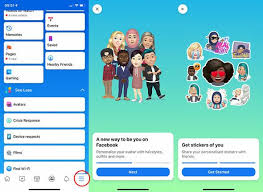
To create a Facebook avatar on your smartphone, follow these steps:
- Open The Facebook App: Open the Facebook app on your Android or iOS device.
- Tap on The Menu Icon: Tap on the menu icon (☰) in the top right corner of the screen.
- Select “Another”: Select “Another” from the menu options.
- Tap on “Avatar”: Tap on the “Avatar” option.
- Choose Your Complexion: Choose your complexion by selecting one of the available options.
- Select a Hair Style: Select a hair style that suits you best.
- Choose a Hair Color: Choose a hair color that matches your avatar’s personality.
- Pick a Face Profile: Pick a face profile that suits your avatar’s look.
- Customize Your Outfit: Customize your outfit by selecting one of the available options.
- Save And Share: Save and share your avatar with friends and family.
How to Create a Facebook Avatar on Your PC
Unfortunately, creating a Facebook avatar directly on your PC is not possible at this time. However, you can follow the same steps as above using the Facebook app on your smartphone or tablet.
Using Your Avatar on Facebook
Now that you’ve created your avatar, here’s how to use it on Facebook:
- Use it as an Image: Use your avatar as an image on your profile.
- Share it With Friends: Share your avatar with friends and family.
- Use it in Comments: Use your avatar in comments, just like a sticker!
Troubleshooting: Avatar Not Working?
If your avatar is not working, try the following:
- Wait a Bit: Wait a bit for the functionality to be restored.
- Update Facebook: Update Facebook on your smartphone or tablet.
- Reinstall The App: Reinstall the Facebook app if necessary.
How to Use Your Avatar on Messenger
Yes, you can use your Facebook avatar on Messenger! Here’s how:
- Open Messenger: Open Messenger on your Android or iOS device.
- Tap on The Menu Icon: Tap on the menu icon (☰) in the top right corner of the screen.
- Select “Create Avatar”: Select “Create Avatar” from the menu options.
- Follow The Same Steps: Follow the same steps as above to create your avatar.
Conclusion
Creating a Facebook avatar is a fun and creative way to personalize your profile. With these simple steps, you can create your very own avatar and use it on Facebook and Messenger. Don’t forget to troubleshoot any issues that may arise!
Frequently Asked Questions (FAQs)
- Q: Can I Create a Facebook Avatar Directly on my Pc?
A: Unfortunately, no. You can only create a Facebook avatar using the Facebook app on your smartphone or tablet. - Q: How do I Use my Avatar on Messenger?
A: To use your avatar on Messenger, open Messenger and follow the same steps as above to create your avatar. - Q: Why is my Avatar Not Working?
A: If your avatar is not working, try waiting a bit for the functionality to be restored or update Facebook on your smartphone or tablet. - Q: Can I Use my Avatar in Comments?
A: Yes! You can use your avatar in comments just like a sticker! - Q: How do I Share my Avatar With Friends And Family?
A: To share your avatar with friends and family, save it to your gallery or share it directly from Facebook. - Q: Can I Customize my Outfit on Messenger?
A: Unfortunately, no. You can only customize your outfit when creating a Facebook avatar.
Final Thoughts
Creating a Facebook avatar is a fun and creative way to personalize your profile. With these simple steps, you can create your very own avatar and use it on Facebook and Messenger!


