
Creating a Blogspot: A Step-by-step Guide
Are you eager to start your blogging journey but don’t know where to begin? Look no further! In this comprehensive guide, we will walk you through the process of creating a blog on Blogger, a free platform provided by Google.
Why Choose Blogger?
Blogger is an excellent choice for beginners and experienced bloggers alike. With its user-friendly interface and array of features, it’s easy to create a professional-looking blog without any prior knowledge of coding or web design.
Getting Started With Blogger
To start using Blogger, you’ll need to sign up for a Google account if you don’t already have one. Once you’ve created your account, follow these steps:
Step 1: Accessing Blogger
- Open your preferred browser and navigate to the Blogger website (www.Blogger.Com).
- Click on the “Create” button in the top-right corner of the page.
- Choose an existing Google account or create a new one.
Step 2: Creating Your Blog
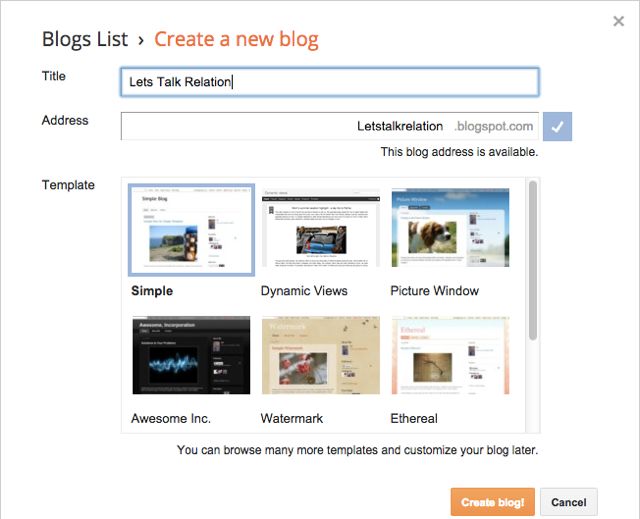
- Enter your desired blog title and choose a theme that suits your style.
- Select a custom domain name (optional) or stick with the default .Blogspot.Com address.
- Customize your blog’s layout, colors, and fonts to give it a unique look.
Step 3: Personalizing Your Blog
- Access your Blogger dashboard by clicking on the “Navigation menu” in the top-left corner of the page.
- Click on the “Settings” icon (gear icon) next to your blog’s title.
- Customize your blog’s appearance, add a favicon, and adjust other settings as desired.
Creating Content For Your Blog
Once you’ve set up your blog, it’s time to start creating content! Here are some tips:
- Writing Engaging Posts: Craft compelling articles that showcase your personality, expertise, or interests.
- Adding Visuals: Include high-quality images, videos, or infographics to break up text and enhance the reader experience.
- Utilizing Tags And Categories: Organize your posts using relevant tags and categories for easy navigation.
Managing Your Blog on a Smartphone or Tablet
Blogger offers a mobile app for Android devices that allows you to manage your blog on-the-go. Here’s how:
- Download and install the Blogger app from the Google Play Store.
- Log in with your Google account credentials.
- Access your blog, create new posts, edit existing ones, and manage comments.
Tips For Creating a Successful Blog
To make your blog stand out, follow these tips:
- Regularly Update Your Content: Post fresh content regularly to keep readers engaged.
- Engage With Your Audience: Respond to comments, ask questions, and encourage discussion.
- Promote Your Blog: Share your posts on social media, participate in blogging communities, and collaborate with other bloggers.
Conclusion
Creating a blog on Blogger is an exciting journey that requires minimal technical expertise. By following these steps and tips, you’ll be well on your way to establishing a successful online presence. Remember to stay engaged, adapt to changes, and continually improve your content to keep your readers coming back for more!
Frequently Asked Questions (FAQs)
- What is Blogger?
Blogger is a free blogging platform provided by Google that allows users to create custom blogs with various features.
- Do I Need a Google Account to Use Blogger?
Yes, you’ll need a Google account to sign up for Blogger and start creating your blog.
- Can I Change my Blog’s Theme or Layout?
Yes, you can customize your blog’s appearance, add a favicon, and adjust other settings as desired.
- How do I Create New Posts on Blogger?
To create new posts, click on the “New post” button in the top-right corner of the Blogger dashboard.
- Can I Manage my Blog on a Smartphone or Tablet?
Yes, you can access your blog and create new posts using the Blogger app for Android devices.
- How Often Should I Update my Content?
Regularly posting fresh content will keep readers engaged and interested in your blog.
- How do I Promote my Blog?
Share your posts on social media, participate in blogging communities, and collaborate with other bloggers to increase visibility and engagement.
- Can I Monetize my Blog Using Blogger?
Yes, you can enable advertising on your blog through Google AdSense, but be sure to follow their guidelines and policies.


