
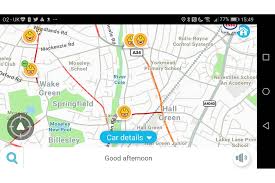
How it Functions: Waze – The Free Gps Navigation App For Smartphones
Are you tired of using a browser-based GPS navigation system that is cumbersome to use and often outdated? Look no further than Waze, the free GPS navigation app for smartphones that has taken the world by storm. With its user-friendly interface and real-time traffic updates, Waze is the perfect solution for anyone who needs to navigate through unfamiliar territories.
Registration And Configuration
To start using Waze, you’ll first need to register an account on the app. This is a straightforward process that requires you to provide some basic information about yourself. Once you’ve completed the registration process, you can start configuring your settings to get the most out of the app. One of the key features of Waze is its ability to learn your driving habits and preferences over time, so it’s essential to set up your configuration correctly from the outset.
Setting a Route With Waze
So, how does Waze work? The first step in using Waze is to set your destination. This can be done by typing in the address or name of the place you want to visit into the app’s search bar. Alternatively, you can use the microphone icon on the right-hand side of the screen to speak your destination aloud. Once you’ve entered your destination, Waze will calculate the best route for you based on real-time traffic data.
Using Waze Offline
One of the benefits of using Waze is that it can be used offline. This means that even when you don’t have a connection to the internet, you can still use the app to navigate through unfamiliar territories. To do this, simply download the map for your area before heading out and then disconnect from the internet.
Using Waze on Android Auto
If you’re an Android user, you may be interested in knowing that Waze is compatible with Android Auto. This means that you can use Waze to navigate through unfamiliar territories while driving a car equipped with Android Auto technology. To do this, simply connect your phone to the car’s infotainment system using a USB cable or Bluetooth.
Using Waze on Carplay
Similarly, if you’re an Apple user, you may be interested in knowing that Waze is compatible with CarPlay. This means that you can use Waze to navigate through unfamiliar territories while driving a car equipped with CarPlay technology. To do this, simply connect your iPhone to the car’s infotainment system using a USB cable or wirelessly.
How it Functions: Waze Autovelox
One of the features of Waze is its ability to alert you to the presence of speed cameras and traffic enforcement agents along your route. This can be done by reporting these locations to the app, which will then alert other users in real-time.
Key Features of Waze
So, what are some of the key features of Waze? Here are a few:
- Real-time Traffic Updates: Waze provides real-time traffic updates based on data from other users and sensors along your route.
- Route Planning: Waze can plan the best route for you based on real-time traffic data, taking into account factors such as traffic congestion, road closures, and accidents.
- Offline Capability: Waze can be used offline, allowing you to navigate through unfamiliar territories even when you don’t have a connection to the internet.
- Compatibility With Android Auto And Carplay: Waze is compatible with Android Auto and CarPlay, making it easy to use while driving.
Conclusion
In conclusion, Waze is an excellent GPS navigation app for smartphones that offers real-time traffic updates, route planning, offline capability, and compatibility with Android Auto and CarPlay. With its user-friendly interface and features such as speed camera alerts and traffic enforcement agent reporting, Waze is the perfect solution for anyone who needs to navigate through unfamiliar territories.
Frequently Asked Questions
Here are some frequently asked questions about Waze:
- What is Waze?
- Waze is a free GPS navigation app for smartphones that provides real-time traffic updates and route planning.
- How do I Use Waze?
- To use Waze, simply download the app on your smartphone, register an account, and configure your settings. You can then set your destination using the search bar or microphone icon.
- Can I Use Waze Offline?
- Yes, Waze can be used offline by downloading the map for your area before heading out and disconnecting from the internet.
- Is Waze Compatible With Android Auto And Carplay?
- Yes, Waze is compatible with Android Auto and CarPlay, making it easy to use while driving.
Contact Information
If you have any further questions about Waze or would like to know more about our services, please don’t hesitate to contact us.


