
Recovering Deleted Photos From Icloud: A Step-by-step Guide
Have you ever accidentally deleted a precious photo or video from your iPhone, iPad, or Mac? Don’t worry, it’s happened to the best of us! In this article, we’ll show you how to recover deleted photos from iCloud using various methods.
Understanding Icloud And Photo Recovery
ICloud is Apple’s cloud storage service that allows you to store and access your photos, videos, contacts, calendar events, and other data across all your devices. When you delete a photo or video from your device, it doesn’t disappear immediately; instead, it gets moved to the Recently Deleted album on iCloud.
Recovering Photos From Icloud Using Iphone
If you want to recover a deleted photo from iCloud using your iPhone, follow these steps:
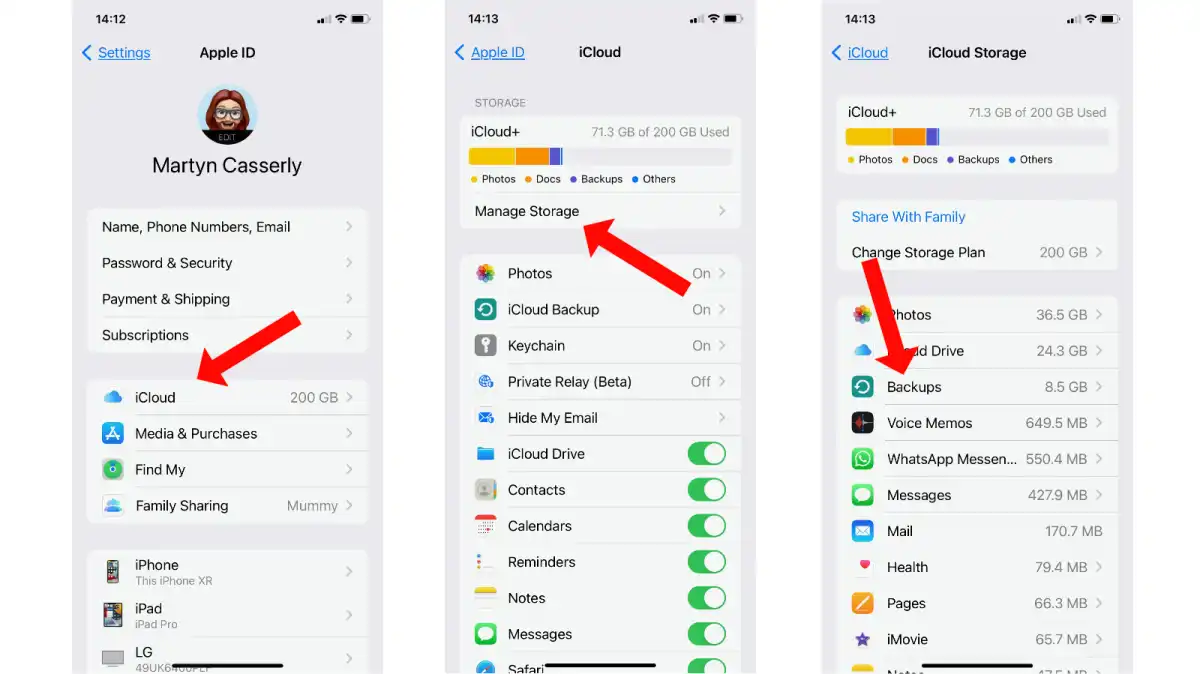
- Check if Icloud Photo Library is Enabled: Go to Settings > [Your Name] > iCloud > iCloud Photo Library.
- Access The Recently Deleted Album: Open the Photos app and go to the Albums tab. Tap on “Recently Deleted” at the bottom of the screen.
- Select The Photo You Want to Recover: Scroll through the list of deleted photos and tap on the one you want to recover.
- Tap “Recover”: In the top-right corner, tap the three dots next to the photo’s name and select “Recover”.
Recovering Photos From Icloud Using Ipad
The process is similar on an iPad:
- Check if Icloud Photo Library is Enabled: Go to Settings > [Your Name] > iCloud > iCloud Photo Library.
- Access The Recently Deleted Album: Open the Photos app and go to the Albums tab. Tap on “Recently Deleted” at the bottom of the screen.
- Select The Photo You Want to Recover: Scroll through the list of deleted photos and tap on the one you want to recover.
- Tap “Recover”: In the top-right corner, tap the three dots next to the photo’s name and select “Recover”.
Recovering Photos From Icloud Using Mac
To recover a deleted photo from iCloud using your Mac:
- Check if Icloud Photo Library is Enabled: Go to System Preferences > Apple ID > iCloud > iCloud Photo Library.
- Access The Recently Deleted Album: Open the Photos app on your Mac and go to the Albums tab. Select “Recently Deleted” at the bottom of the screen.
- Select The Photo You Want to Recover: Scroll through the list of deleted photos and select the one you want to recover.
- Click “Recover”: In the top-right corner, click the three dots next to the photo’s name and select “Recover”.
Recovering Photos From Icloud.Com
If you’re using a Windows PC or another non-Apple device:
- Visit Icloud.Com: Go to icloud.Com and sign in with your Apple ID.
- Access The Photo Library: Click on the Photos icon and select “Recently Deleted” at the bottom of the screen.
- Select The Photo You Want to Recover: Scroll through the list of deleted photos and click on the one you want to recover.
- Click “Recover”: In the top-right corner, click the three dots next to the photo’s name and select “Recover”.
Additional Tips
If you’re unable to recover a photo from iCloud using these methods:
- Check Your Backup: If you’ve backed up your photos to iCloud Drive or another external drive, you might be able to recover them.
- Use Third-party Recovery Software: There are several apps available that can help you recover deleted photos and other data.
Conclusion
Recovering deleted photos from iCloud is a relatively straightforward process. Remember to act quickly, as photos in the Recently Deleted album will disappear after 30 days. If you have any further questions or concerns, feel free to reach out!
Frequently Asked Questions (FAQs)
- How Long Does it Take to Recover a Deleted Photo From Icloud?
It usually takes only a few seconds to recover a deleted photo from iCloud. - Can I Recover Photos That Were Deleted More Than 30 Days Ago?
No, photos in the Recently Deleted album will disappear after 30 days. However, you might be able to recover them using third-party software or backups. - Do I Need an Internet Connection to Recover Photos From Icloud?
Yes, you’ll need a stable internet connection to access and recover your photos from iCloud. - Can I Recover Multiple Photos at Once?
Yes, you can select multiple photos and recover them simultaneously. - Will Recovering Deleted Photos From Icloud Affect my Data Storage Space?
No, recovering deleted photos from iCloud won’t use any additional storage space on your device or in iCloud. - Can I Recover Photos That Were Saved to Icloud Drive Instead of The Photos App?
Yes, you can recover photos saved to iCloud Drive by following the steps outlined above.
More Resources
- Check out our guide on how to backup and restore your iPhone using iTunes
- Learn about other ways to recover deleted data using third-party software
I hope this helps! If you have any further questions or concerns, don’t hesitate to reach out.


