
Understanding Airpods: A Guide to Charging And Battery Life
Are you tired of wondering how much battery life is left on your AirPods? Do you struggle to keep track of when they need to be charged? Look no further! In this comprehensive guide, we’ll walk you through everything you need to know about charging and maintaining your AirPods’ battery health.
The Importance of Understanding Your Airpods’ Battery Life
Your AirPods are a vital part of your daily routine, and it’s essential to keep them charged and healthy. A drained battery can leave you without music, podcasts, or important phone calls, making it difficult to stay connected. In this article, we’ll explore how to check the charge level of your AirPods on various devices, including iPhones, iPads, Android smartphones, PCs, and Macs.
How to Check The Charge Level of Your Airpods on Iphone And Ipad
If you have an iPhone or iPad, checking the charge level of your AirPods is a breeze. Simply:
- Open the Bluetooth settings on your device.
- Tap on the “i” icon next to the name of your AirPods.
- You’ll see the battery percentage displayed.
How to Check The Charge Level of Your Airpods on Android
Unfortunately, checking the charge level of your AirPods on an Android device is not as straightforward. However, there are some third-party apps available that can help you monitor your AirPods’ battery life. We recommend using the “PodsBattery” app (available on Google Play Store).
How to Check The Charge Level of Your Airpods on PC
If you’re using a Windows PC, you’ll need to download and install the MagicPods software from the Microsoft Store. This software allows you to monitor your AirPods’ battery life in real-time.
How to Check The Charge Level of Your Airpods on Mac
On a Mac, checking the charge level of your AirPods is similar to doing so on an iPhone or iPad. Simply:
- Open the Bluetooth settings on your device.
- Click on the “Bluetooth” icon next to the name of your AirPods.
- You’ll see the battery percentage displayed.
Understanding The Different Charge Indicators
Your AirPods have a LED light indicator that shows the charge level. Here’s what you need to know:
- Green: The battery is fully charged (100%).
- Yellow: The battery is partially charged (between 20-80%).
- Orange: The battery is charging.
- Red: The battery is critically low and needs to be charged immediately.
Tips For Maintaining Your Airpods’ Battery Health
To keep your AirPods in top condition, follow these tips:
- Keep them charged when not in use.
- Avoid letting the battery drain completely (try to charge them when they’re between 20-80%).
- Store them in a cool, dry place.
Conclusion
In conclusion, understanding how to check the charge level of your AirPods is crucial for maintaining their health and longevity. Whether you’re using an iPhone, iPad, Android smartphone, PC, or Mac, we’ve provided step-by-step guides to help you monitor your AirPods’ battery life. Remember to keep them charged when not in use, avoid letting the battery drain completely, and store them in a cool, dry place.
Frequently Asked Questions
- Q: How Often Should I Charge my Airpods?
A: Try to charge them when they’re between 20-80% battery level. - Q: Can I Use my Airpods While They’re Charging?
A: Yes, but be aware that the charging process may take longer. - Q: How Long Does it Take to Fully Charge my Airpods?
A: This depends on various factors, including the device and charger being used. - Q: Can I Use a Third-party App to Monitor my Airpods’ Battery Life?
A: Yes, but be sure to download apps from reputable sources to avoid any potential security risks. - Q: How do I Reset my Airpods?
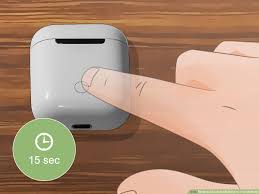
A: To reset your AirPods, place them in the charging case and press the setup button for 10 seconds. - Q: Can I Use my Airpods With Other Devices Besides Apple Products?
A: Yes, but you may need to download third-party apps or software to monitor their battery life. - Q: How do I Clean my Airpods?
A: Gently wipe them with a soft cloth and avoid using harsh chemicals or abrasive materials. - Q: Can I Use my Airpods in Extreme Temperatures?
A: No, it’s not recommended to use your AirPods in extremely hot or cold temperatures.
We hope this comprehensive guide has helped you understand how to check the charge level of your AirPods on various devices and maintain their battery health. If you have any further questions or concerns, feel free to ask!


