
Are Your Photos on Internet? A Step-by-step Guide to Reverse Image Search
Are you concerned that your photos might be circulating on the internet without your permission? You’re not alone. Many people are curious about how to check if their images are online, especially with the rise of social media and photo-sharing platforms.
What is Reverse Image Search?
Reverse image search is a process where you upload or enter an image URL into a search engine, and it tries to find similar images on the web. This can help you identify if someone has shared your photos without permission.
Why Should You Care About Reverse Image Search?
There are several reasons why you should care about reverse image search:
- Protect Your Privacy: If your photos are being shared without your consent, it’s a breach of your personal space.
- Detect Intellectual Property Theft: If someone is using your photos for commercial purposes without permission, it’s a form of intellectual property theft.
- Monitor Online Activity: By using reverse image search, you can keep track of how your photos are being used on the internet.
How to Use Google Images For Reverse Image Search
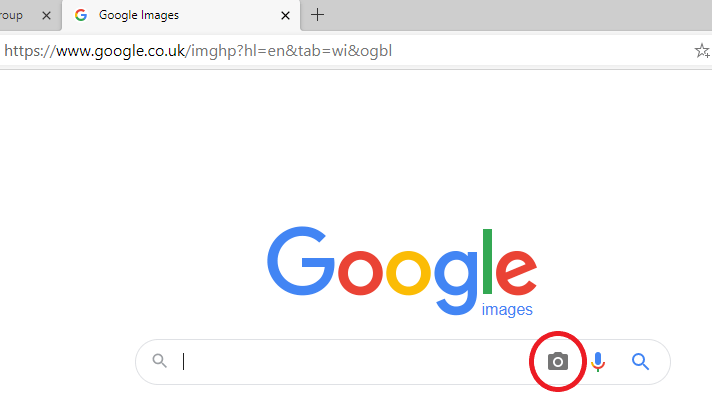
One of the most popular tools for reverse image search is Google Images. Here’s how to use it:
- Go to Google Images (https://Images.Google.Com/)
- Click on the camera icon and select “Upload an image” or enter the URL of the image you want to search.
- Wait for the results, which will show you similar images on the web.
Alternative Tools For Reverse Image Search
There are other tools available that can help you with reverse image search:
- Tineye: TinEye is another popular tool for reverse image search. You can upload an image or enter its URL to see if it’s being used elsewhere online.
- Pimeyes: PimEyes is a more advanced tool that uses AI to find similar images on the web. It also offers features like face detection and video analysis.
How to Use Google Lens For Reverse Image Search
Google Lens is a feature available on Android devices that allows you to take a photo of an image or object, and it will try to identify what it is. Here’s how to use it:
- Open the Google Photos app on your Android device.
- Select the photo you want to search for.
- Tap on the “Lens” button.
- Wait for the results, which will show you similar images on the web.
Conclusion
Reverse image search is a powerful tool that can help you protect your privacy and detect intellectual property theft. By using tools like Google Images, TinEye, and PimEyes, you can keep track of how your photos are being used online. Remember to always use these tools responsibly and within the bounds of the law.
Frequently Asked Questions (FAQs)
Here are some frequently asked questions about reverse image search:
- Q: What is Reverse Image Search?
A: Reverse image search is a process where you upload or enter an image URL into a search engine, and it tries to find similar images on the web. - Q: Why Should I Care About Reverse Image Search?
A: You should care about reverse image search because it can help you protect your privacy, detect intellectual property theft, and monitor online activity. - Q: How do I Use Google Images For Reverse Image Search?
A: To use Google Images for reverse image search, go to the website, click on the camera icon, select “Upload an image” or enter the URL of the image you want to search, and wait for the results. - Q: What Are Some Alternative Tools For Reverse Image Search?
A: Some alternative tools for reverse image search include TinEye and PimEyes.
References
- Google Images (https://Images.Google.Com/)
- TinEye (https://Www.Tineye.Com/)
- PimEyes (https://Pimeyes.Com/)
I hope this guide helps you navigate the world of reverse image search. Remember to always use these tools responsibly and within the bounds of the law.


