
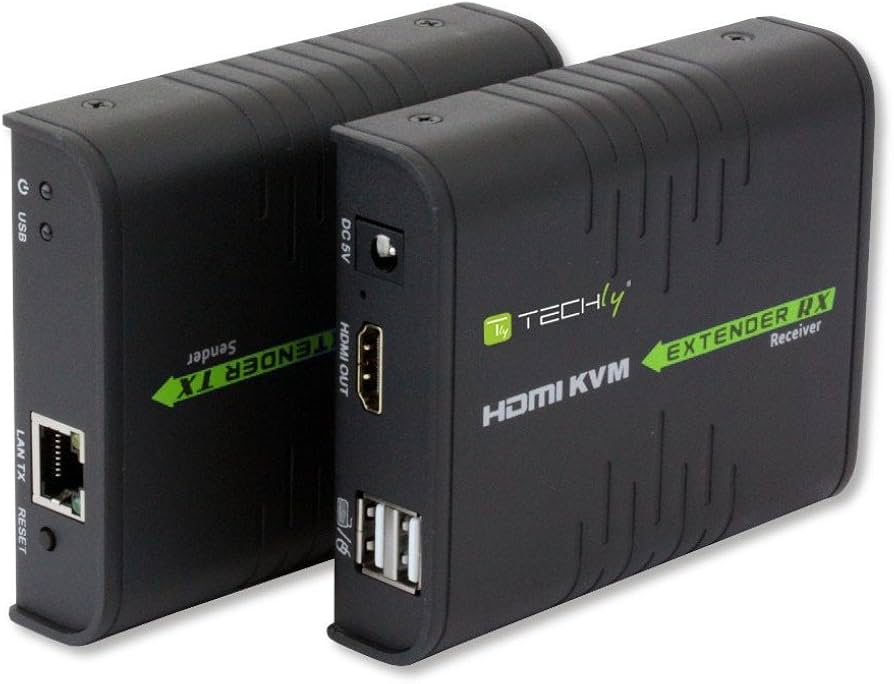
Reviewing The Techly Idata Hdmi-kvm3 Extender: A Comprehensive Analysis
Are you tired of dealing with HDMI signal loss, interference, or distance limitations? Do you struggle to connect devices at conferences, events, or in large settings? Look no further than the Techly IDATA HDMI-KVM3 extender. In this article, we’ll delve into the technical specifications, installation process, and benefits of this innovative device.
What is The Techly Idata Hdmi-kvm3 Extender?
The Techly IDATA HDMI-KVM3 extender is a two-unit system consisting of a transmitter and receiver. This device enables the transmission of HDMI signals up to 150 meters using a Cat6 cable, ensuring high-quality video and audio at resolutions of 1080p@60Hz.
Technical Characteristics
- Distance: Up to 150 meters (490 feet) with a Cat6 cable
- Resolution: 1080P@60Hz
- Hdmi Standard: HDMI 1.3
- Hdcp: HDCP 1.2
- Cable Type: Cat6
Installation And Use
The installation process is remarkably straightforward:
- Connect the source device (e.G., Computer) to the transmitter’s HDMI IN port using an HDMI cable.
- Connect a local monitor to the transmitter’s HDMI OUT port via an HDMI cable.
- Connect the receiver’s RJ45 ports to each other using a Cat6 cable.
- Connect your keyboard and mouse to the receiver’s USB ports.
Configuring The Extender
To configure the extender, simply connect it to a power source and wait for the LED lights to stabilize. This indicates that the device is ready for use. You can now connect devices up to 150 meters away without worrying about signal loss or interference.
Using The Extender in Different Scenarios
The Techly IDATA HDMI-KVM3 extender can be used in various scenarios, including:
- Point-to-point: Connect a source device to a monitor at distances of up to 100 meters.
- Point-to-multipoint: Use a switch to connect multiple receivers and extend the signal up to 150 meters.
- Long-distance Connectivity: Extend HDMI signals up to 150 meters without worrying about signal loss or interference.
Troubleshooting Common Issues
If you encounter any issues during installation or use, refer to the troubleshooting guide below:
- Check that all cables are securely connected and not damaged.
- Ensure that the power source is stable and sufficient for both the transmitter and receiver.
- Verify that the HDMI cables used meet the required specifications.
Conclusion
The Techly IDATA HDMI-KVM3 extender offers a reliable solution for extending HDMI signals over long distances. Its ease of use, high-quality video and audio transmission, and versatility make it an ideal choice for conferences, events, and other applications where signal extension is necessary.
Frequently Asked Questions (FAQs)
Here are some frequently asked questions about the Techly IDATA HDMI-KVM3 extender:
-
Q: What is The Maximum Distance I Can Extend Hdmi Signals With This Device?
A: Up to 150 meters using a Cat6 cable.
2. Q: Can I Use This Extender For Point-to-multipoint Connections?A: Yes, by using a switch to connect multiple receivers and extending the signal up to 150 meters.
3. Q: What is The Recommended Configuration For Long-distance Connectivity?A: Connect the transmitter’s HDMI IN port to the source device, connect a local monitor to the transmitter’s HDMI OUT port, and connect the receiver’s RJ45 ports to each other using a Cat6 cable.
Where Can I Buy The Techly Idata Hdmi-kvm3 Extender?
You can purchase the Techly IDATA HDMI-KVM3 extender from Manhattan Shop at 179 euros. For more information on this product and its technical specifications, please visit the Manhattan Shop website or contact their customer support team.


