
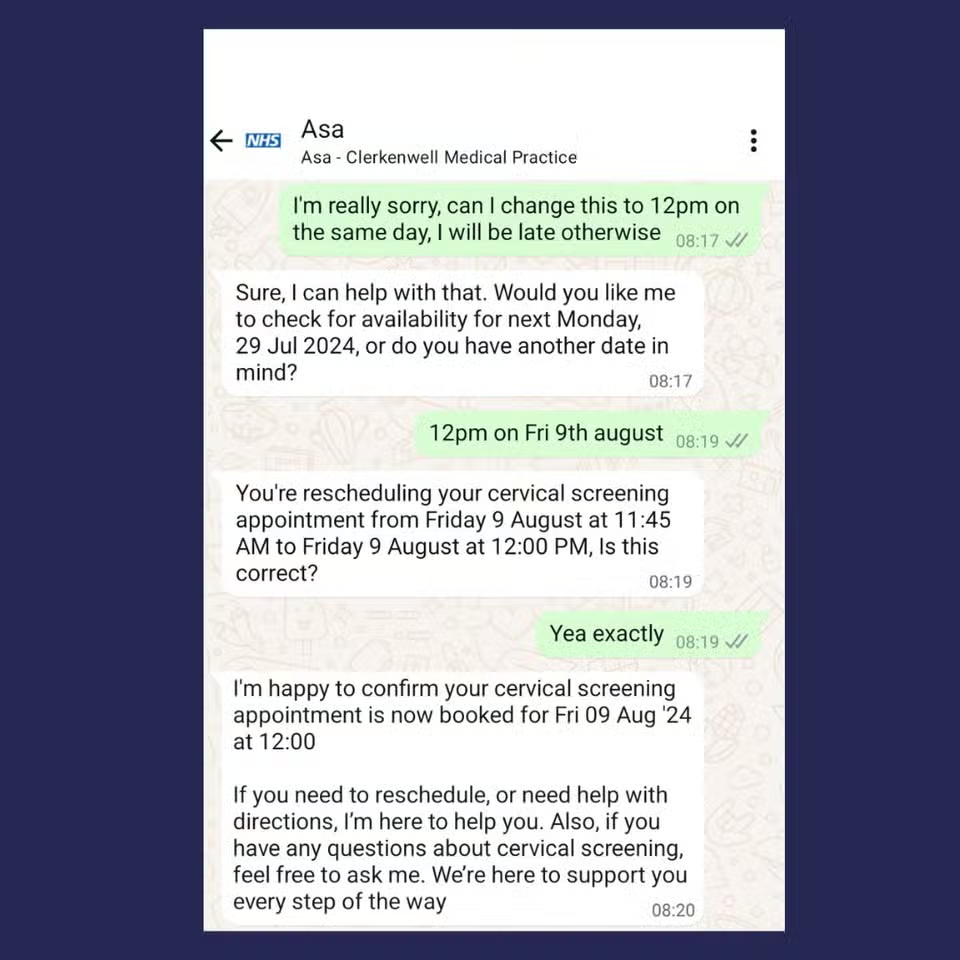
How to Ask an Appointment on Whatsapp: A Step-by-step Guide
Are you looking for ways to ask someone out on a date or schedule a meeting on WhatsApp? Look no further! In this article, we will provide you with a step-by-step guide on how to ask an appointment on WhatsApp.
Understanding The Basics of Asking an Appointment on Whatsapp
Before we dive into the details, it’s essential to understand the basics of asking an appointment on WhatsApp. The platform allows users to send text messages, make voice and video calls, and even share files. When it comes to asking an appointment, you can use these features to communicate with the person you’re interested in.
Starting With a Greeting
The first step in asking an appointment on WhatsApp is to start with a greeting. This sets the tone for the rest of the conversation and shows that you’re interested in getting to know the other person.
- Informal Settings: If you’re chatting with someone informally, such as a friend or acquaintance, you can use a casual greeting like “Hey” or “Hi.” For example: “Hey, how’s it going?”
- Formal Settings: If you’re communicating with someone in a more formal setting, such as a professional or authority figure, you should use a more formal greeting like “Hello” or “Good morning.”
Making The Proposal
After exchanging greetings, it’s time to make the proposal. This is where you ask the person if they’d be interested in meeting up or scheduling an appointment.
- Romantic Appointments: If you’re asking someone out on a date, use phrases like: “Hey [Name], I was wondering if you’d like to go out for coffee sometime?” or “Do you want to grab dinner with me this week?”
- Professional Appointments: If you’re scheduling an appointment with a professional, such as a doctor or lawyer, use more formal language. For example: “Hi [Name], I’m interested in discussing my options with you further. Can we schedule a meeting for next week?”
Showing Flexibility
When asking someone out on WhatsApp, it’s essential to show flexibility. This means giving the other person options and being open to different dates or times.
- Offering Choices: You can offer the person two or three choices for dates or times. For example: “Hey [Name], I was thinking we could grab dinner this Friday or Saturday night. Which day works better for you?”
- Being Open-minded: Be prepared to adjust your plans based on the other person’s preferences. If they decline one option, suggest another alternative.
Accepting The Response
After sending the proposal, it’s essential to be patient and accept the response.
- Responding Positively: If the person accepts your invitation or suggestion, respond positively and confirm the details.
- Responding Negatively: If the person declines your invitation or suggestion, don’t take it personally. Respond politely and show appreciation for their consideration.
Tips For Asking an Appointment on Whatsapp
Here are some additional tips to keep in mind when asking someone out on WhatsApp:
- Use Clear And Concise Language: Avoid using jargon or complicated terms that might confuse the other person.
- Be Respectful: Use formal language if you’re communicating with someone in a more formal setting, such as a professional or authority figure.
- Show Enthusiasm: Express your excitement and interest in meeting up or scheduling an appointment.
Example Messages For Asking an Appointment on Whatsapp
Here are some example messages to help you ask an appointment on WhatsApp:
- Romantic Appointment: “Hey [Name], I was wondering if you’d like to go out for coffee sometime?”
- Medical Appointment: “Hi [Name], I’m interested in discussing my options with you further. Can we schedule a meeting for next week?”
- Professional Appointment: “Hello [Name], I’ve forwarded my application for the position of [Job Title]. Can we discuss further details over the phone?”
Conclusion
Asking an appointment on WhatsApp can be intimidating, but it’s essential to remember that communication is key. By following these steps and tips, you’ll increase your chances of getting a positive response and scheduling a successful meeting.
Frequently Asked Questions (FAQs)
Here are some frequently asked questions related to asking an appointment on WhatsApp:
Q: What is the best way to ask someone out on a date on WhatsApp?
A: Start with a greeting, make a proposal, show flexibility, and accept the response.
Q: How can I schedule an appointment with a professional, such as a doctor or lawyer?
A: Use formal language and be clear about your intentions and expectations.
Q: What if the person declines my invitation or suggestion?
A: Respond politely and appreciate their consideration.
Table 1: Tips For Asking an Appointment on Whatsapp
| Tip | Description |
|---|---|
| 1. Start with a greeting | Begin the conversation with a friendly greeting. |
| 2. Make the proposal | Clearly state your intentions and ask the person to meet up or schedule an appointment. |
| 3. Show flexibility | Offer options and be open to different dates or times. |
| 4. Accept the response | Respond positively or negatively, depending on the other person’s decision. |
Table 2: Example Messages For Asking an Appointment on Whatsapp
| Message Type | Example Message |
|---|---|
| Romantic Appointment | “Hey [Name], I was wondering if you’d like to go out for coffee sometime?” |
| Medical Appointment | “Hi [Name], I’m interested in discussing my options with you further. Can we schedule a meeting for next week?” |
| Professional Appointment | “Hello [Name], I’ve forwarded my application for the position of [Job Title]. Can we discuss further details over the phone?” |
Table 3: Tips For Communicating Effectively on Whatsapp
| Tip | Description |
|---|---|
| 1. Use clear and concise language | Avoid using jargon or complicated terms that might confuse the other person. |
| 2. Be respectful | Use formal language if you’re communicating with someone in a more formal setting, such as a professional or authority figure. |
| 3. Show enthusiasm | Express your excitement and interest in meeting up or scheduling an appointment. |
I hope this article has provided you with the necessary guidance to ask an appointment on WhatsApp confidently and effectively!


