
How to Easily Disassociate Your Bluetooth Earphone From an Old Device
Are you tired of struggling to disassociate your Bluetooth earphone from your old device? Look no further! In this article, we will guide you through the simple steps to disconnect your earphone and get it ready for use with a new device.
Understanding The Problem
If you’ve recently acquired a new phone or device but are having trouble disassociating your Bluetooth earphone from your old one, don’t worry. This is a common issue that can be easily resolved. We’ll show you how to disconnect your earphone and get it ready for use with your new device.
Step-by-step Guide
To disassociate your Bluetooth earphone from an old device, follow these steps:
Windows
- First, delete the association between the earphone and the old device.
- To do this, go to Settings (Press Windows key + I) > Devices > Bluetooth & other devices.
- Find the name of your earphone in the list of devices and click on it.
- Click on the three dots next to the earphone’s name and select “Remove device.”
- Confirm that you want to remove the device.
Macos
- If you’re using macOS Catalina or later, go to System Preferences > Bluetooth.
- Find the name of your earphone in the list of devices and click on it.
- Click on the “X” next to the earphone’s name to remove it.
- Confirm that you want to remove the device.
Android
- Go to Settings > Bluetooth & other devices.
- Find the name of your earphone in the list of devices and click on it.
- Click on “Forget this device.”
- Confirm that you want to forget the device.
Iphone/ipad
- Go to Settings > Bluetooth.
- Find the name of your earphone in the list of devices and tap on it.
- Tap on “Forget This Device.”
- Confirm that you want to forget the device.
How to Reset Your Bluetooth Earphone
After disassociating your earphone from the old device, you’ll need to reset it so it can pair with a new device.
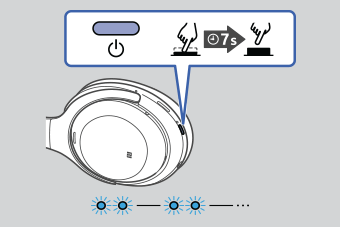
- Turn off your earphone and press and hold the power button for at least 4-5 seconds.
- Release the power button and turn on your earphone.
- Your earphone should now be in pairing mode, indicated by flashing lights or a voice message.
Tips And Tricks
- Some Bluetooth earphones may have specific procedures for resetting them. Be sure to check your earphone’s manual for instructions.
- If you’re having trouble disassociating your earphone from the old device, try restarting both devices and trying again.
- If you’re still experiencing issues, try resetting your earphone as described above.
Conclusion
Disassociating a Bluetooth earphone from an old device is a simple process that can be completed in just a few steps. By following these steps, you’ll be able to get your earphone ready for use with a new device and enjoy seamless connectivity.
Frequently Asked Questions (FAQs)
- Q: How do I disassociate my Bluetooth earphone from an old device?
A: To disassociate your Bluetooth earphone from an old device, follow the steps outlined in this article. - Q: Why can’t I disassociate my earphone from the old device?
A: If you’re having trouble disassociating your earphone from the old device, try restarting both devices and trying again. - Q: How do I reset my Bluetooth earphone?
A: To reset your Bluetooth earphone, turn off your earphone and press and hold the power button for at least 4-5 seconds. Release the power button and turn on your earphone. Your earphone should now be in pairing mode. - Q: Can I use my earphone with a new device after disassociating it from the old one?
A: Yes, you can use your earphone with a new device after disassociating it from the old one. Simply follow the steps outlined above to get your earphone ready for use. - Q: Why is my earphone not pairing with my new device?
A: If your earphone is not pairing with your new device, try restarting both devices and trying again. If you’re still experiencing issues, try resetting your earphone as described above.
Related Posts
- How to Pair Your Bluetooth Earphone
- Troubleshooting Common Issues with Your Bluetooth Earphone


