
How to Silence Your Ps4: Tips And Tricks
Are you tired of the constant rumble of your PlayStation 4? Do you feel like it’s getting too hot, even when you’re just browsing through menus or watching videos? You’re not alone! Many gamers have experienced this issue, but don’t worry, we’ve got some tips and tricks to help you silence your PS4.
The Problem: Why Does My Ps4 Rumble So Much?
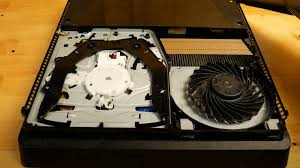
Before we dive into the solutions, let’s understand why your PS4 might be rumbling excessively. The main reason is heat buildup inside the console. When your PS4 is working hard, whether it’s running games or processing complex tasks, it generates a lot of heat. If this heat isn’t properly dissipated, it can cause the fans to spin faster and louder, leading to that annoying rumble.
Tip 1: Clean The Air Vents
One simple yet effective way to reduce the rumble is to clean the air vents on your PS4. Over time, dust and debris can accumulate in these vents, blocking airflow and causing the heat to build up. Use a compressed air spray to blow out any loose powder or dirt from the vents.
Tip 2: Change The Position of Your Ps4
Where you place your PS4 can also affect its cooling performance. Try moving it away from any obstacles that might be obstructing airflow, such as books or boxes. Also, avoid placing it near windows or in direct sunlight, as this can cause the heat to build up quickly.
Tip 3: Use a Cooling Base
Consider investing in a cooling base for your PS4. These specialized bases come equipped with additional fans that help dissipate heat more efficiently. They’re designed specifically for the PS4 and are relatively easy to install.
Tip 4: Clean And Replace The Thermal Paste
This is a more advanced solution, but if you’re comfortable opening up your PS4 (and voiding its warranty), cleaning and replacing the thermal paste can make a big difference. Over time, this paste can dry out and lose its effectiveness, causing heat buildup.
Tip 5: Use a High-quality Cooling Kit
If you’re not comfortable with DIY repairs or want a more comprehensive solution, consider investing in a high-quality cooling kit specifically designed for the PS4. These kits usually include a new thermal paste, improved fans, and other components to enhance airflow and heat dissipation.
Conclusion
Silencing your PS4 is definitely possible with these tips and tricks! Remember to clean the air vents regularly, change the position of your console, and consider using a cooling base or replacing the thermal paste. By following these steps, you should be able to reduce the rumble and keep your PS4 running smoothly.
Frequently Asked Questions
- Why is my Ps4 Getting so Hot?
Your PS4 generates heat when it’s working hard, whether it’s running games or processing complex tasks. If this heat isn’t properly dissipated, it can cause the fans to spin faster and louder, leading to that annoying rumble.
- How Often Should I Clean The Air Vents on my Ps4?
It’s a good idea to clean the air vents every 1-3 months, depending on how frequently you use your console.
- Can I Silence my Ps4 Completely?
While it’s possible to reduce the rumble significantly, completely silencing your PS4 might not be feasible. However, by following these tips and tricks, you should be able to keep the noise level down to a minimum.
- Are There Any Risks Involved in Cleaning or Replacing Parts on my Ps4?
Yes, if you’re not comfortable with DIY repairs, it’s recommended that you avoid opening up your console or using specialized tools. This can void the warranty and potentially cause further damage to your PS4.
- Can I Use These Tips on Other Gaming Consoles as Well?
While the specific solutions mentioned might be tailored for the PS4, the principles of good airflow, heat dissipation, and regular maintenance apply to most gaming consoles. However, it’s essential to research and ensure that any modifications or repairs are compatible with your console.
- How Much Does a Cooling Base or High-quality Cooling Kit Cost?
Prices vary depending on the specific product and brand you choose. On average, a basic cooling base can range from $20-$50, while more advanced kits might cost upwards of $100.
- Are There Any Other Ways to Reduce Heat Buildup in my Ps4?
Yes, aside from the tips mentioned above, consider using a console with built-in cooling features or investing in a more powerful power supply unit (PSU) for your gaming setup.
- Can I Prevent Overheating by Upgrading my Ps4’s Hardware?
While upgrading individual components might improve performance, it’s essential to remember that these changes can also affect the overall lifespan and reliability of your console.


