
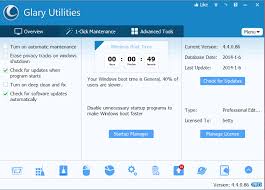
Optimizing Your Computer’s Performance: A Guide to Glary Utilities
Are you tired of dealing with a slow computer? Do you want to keep your system running smoothly without breaking the bank? Look no further than Glary Utilities, a powerful software tool that can help you optimize your computer’s performance.
What is Glary Utilities?
Glary Utilities is a free, user-friendly software program that helps you clean, maintain, and repair your Windows-based computer. With its intuitive interface and comprehensive features, Glary Utilities makes it easy to identify and fix problems, freeing up space on your hard drive and speeding up your system.
Benefits of Using Glary Utilities
Using Glary Utilities can bring numerous benefits to your computer experience:
- Improved Performance: By cleaning unnecessary files and programs, optimizing disk space, and repairing errors in the Windows registry, you can significantly boost your computer’s speed and responsiveness.
- Enhanced Security: Glary Utilities’ anti-malware features help protect your system from threats like spyware and adware.
- Convenience: With its one-click maintenance options, Glary Utilities makes it easy to keep your computer running smoothly without requiring extensive technical knowledge.
Key Features of Glary Utilities
Some of the key features that make Glary Utilities stand out include:
- Disk Cleanup: Quickly deletes temporary files, system logs, and other unnecessary data to free up space on your hard drive.
- Registry Repair: Identifies and fixes errors in the Windows registry to prevent crashes and improve overall system stability.
- Error Scanning: Scans your system for errors, providing detailed reports on issues found.
- Program Management: Helps you manage startup programs, delete unnecessary files, and optimize disk space.
Using Glary Utilities: A Step-by-step Guide
To get started with Glary Utilities, follow these simple steps:
- Download And Install: Download the software from the official website and install it on your computer.
- Launch Glary Utilities: Run the program and select your preferred language (Italian is available).
- Access Maintenance Options: Click on the “Maintenance” tab to access various cleaning, optimization, and repair tools.
- Run a Scan: Select the options you want to run and click “Scan” to identify issues with your system.
- Repair Errors: Once scanning is complete, review the results and choose which errors to fix.
Glary Utilities For Android
Don’t forget that Glary Utilities also has an Android version! If you’re using a smartphone or tablet running Android 2.2 Or higher, you can download the app from the Play Store to clean up unnecessary files, disable unused apps, and optimize your device’s performance.
Conclusion
Glary Utilities is a powerful tool that can help you keep your Windows-based computer running smoothly. With its intuitive interface and comprehensive features, it’s easy to use and provides numerous benefits for your system’s performance and security. Give Glary Utilities a try today and see the difference for yourself!
Frequently Asked Questions (FAQs)
- Is Glary Utilities Free?
Glary Utilities offers a free version with basic features. However, the Pro version requires a one-time purchase. - What Are The System Requirements For Glary Utilities?
The minimum system requirements include Windows XP or later, 133 MHz processor, 32 MB RAM, and 20 MB free disk space. - Can I Use Glary Utilities on my Android Device?
Yes! Glary Utilities has an Android version that can be downloaded from the Play Store. - Is Glary Utilities Compatible With All Windows Versions?
Glary Utilities is compatible with Windows XP to Windows 10. - What Kind of Technical Support Does Glary Utilities Offer?
The official website provides extensive documentation, FAQs, and a contact form for technical support inquiries. - Can I Use Glary Utilities on my Tablet or Smartphone?
Yes! Glary Utilities has versions for Android devices (smartphones and tablets). - Does Glary Utilities Have Any Limitations?
While Glary Utilities offers an impressive range of features, some advanced options may require the Pro version. - Is Glary Utilities Safe to Use?
Glary Utilities is a reputable software program that has been tested for malware and viruses. However, always exercise caution when downloading and installing software from external sources.


