
Finding The Source of an Image: A Guide to Online Tools
Are you curious about where a particular image originated from? Perhaps you’ve come across an interesting photo on social media, but can’t seem to find its source. Don’t worry; you’re not alone! In this article, we’ll explore various online tools that can help you track down the origin of an image.
Why Find The Source of an Image?
Before we dive into the tools, let’s quickly discuss why finding the source of an image is important. Knowing where a photo came from can be crucial in several situations:
- Intellectual Property Rights: If you’re using someone else’s work without permission, you might infringe on their copyright.
- Verifying Information: Finding the source of an image can help you verify the accuracy of the information it conveys.
Online Tools to Find The Source of an Image
1. Google Images
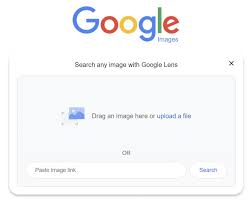
Google Images is one of the most popular search engines for images, with billions of indexed images across the web.
- Using Google Images: To find the source of an image on Google Images, follow these steps:
- Go to images.Google.Com.
- Click on the camera icon and select “upload a file” or enter the URL of the image.
- Click on the search button.
Google Images Will Display Similar Images. To Find The Source, Click on The Button Labeled “Find Source of This Image.”
2. Tineye
TinEye is another powerful tool for reverse image search, with a focus on identifying duplicates and copies of an original image.
- Using Tineye: To find the source of an image on TinEye, follow these steps:
- Go to tineye.Com.
- Click on the “Upload” button or enter the URL of the image.
- Click on the search button.
Tineye Will Display Possible Sources of The Image.
3. Pimeyes
PimEyes is a specialized tool for identifying human faces in images, with a focus on facial recognition and verification.
- Using Pimeyes: To find the source of an image on PimEyes, follow these steps:
- Go to pimeyes.Com.
- Click on the “Search” button.
- Select the image you want to search for.
Pimeyes Will Display Similar Images And Possible Sources.
4. Google Photos (Android)
If you’re using an Android device, you can use Google Photos to find the source of an image.
- Using Google Photos: To find the source of an image on Google Photos, follow these steps:
- Open Google Photos.
- Select the image you want to search for.
- Tap on the “Lens” button and select the “Search images on Google” option.
Google Photos Will Display Possible Sources of The Image.
5. Google (iOS)
If you’re using an iOS device, you can use the built-in Google app to find the source of an image.
- Using Google: To find the source of an image on Google, follow these steps:
- Open the Google app.
- Select the image you want to search for.
- Tap on the “All images” button and select the image from your gallery.
Google Will Display Possible Sources of The Image.
6. Pimeyes (iOS)
PimEyes also has a mobile app for iOS devices, which can be used to find the source of an image.
- Using Pimeyes: To find the source of an image on PimEyes, follow these steps:
- Open the PimEyes app.
- Select the image you want to search for.
- Tap on the “Start Search” button.
Pimeyes Will Display Similar Images And Possible Sources.
7. Huwei (Android)
If you’re using a Huawei device, you can use the built-in Petal Search app to find the source of an image.
- Using Petal Search: To find the source of an image on Petal Search, follow these steps:
- Open Petal Search.
- Select the image you want to search for.
- Tap on the “Search” button.
Petal Search Will Display Possible Sources of The Image.
8. Google (Android)
If you’re using an Android device without Google services, you can use the built-in Google app to find the source of an image.
- Using Google: To find the source of an image on Google, follow these steps:
- Open the Google app.
- Select the image you want to search for.
- Tap on the “Search” button.
Google Will Display Possible Sources of The Image.
9. Alternative Search Engines (Android)
There are several alternative search engines available for Android devices, which can be used to find the source of an image.
- Using Alternative Search Engines: To find the source of an image on a alternative search engine, follow these steps:
- Open the alternative search engine app.
- Select the image you want to search for.
- Tap on the “Search” button.
The Alternative Search Engine Will Display Possible Sources of The Image.
10. Pimeyes (Android)
PimEyes also has a mobile app for Android devices, which can be used to find the source of an image.
- Using Pimeyes: To find the source of an image on PimEyes, follow these steps:
- Open the PimEyes app.
- Select the image you want to search for.
- Tap on the “Start Search” button.
Pimeyes Will Display Similar Images And Possible Sources.
In conclusion, finding the source of an image can be a useful tool in various situations. The online tools mentioned above can help you track down the origin of an image, whether it’s for intellectual property rights, verifying information, or simply satisfying your curiosity.


