
How to Identify a Genuine Ipad: A Comprehensive Guide
Are you wondering how to identify a genuine iPad? Look no further! In this article, we will guide you through the various ways to determine if your iPad is authentic or not.
The Challenges of Identifying a Fake Ipad
With the growing demand for iPads and other Apple devices, counterfeiters have started to create fake iPads that can be difficult to distinguish from the real thing. These fake iPads may look and feel like the genuine article, but they often lack important features and can cause harm to your device or even put you at risk.
How to Identify a Genuine Ipad: Methods 1-3
There are several ways to identify a genuine iPad, including:
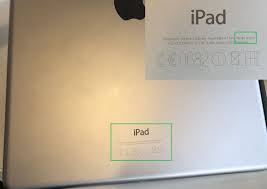
- Checking The Appearance: Take a closer look at your iPad’s design and build quality. A genuine iPad has a premium feel and appearance that is hard to replicate.
- Looking For The Serial Number (IMEI): Check the packaging or settings app on your device to find the serial number. If you’re unsure, contact Apple directly to verify the authenticity of your device.
- Checking The Code Model: Look for the code model printed on the back of your iPad or in the settings app. This will give you an idea of the specific model and generation of your device.
Method 4: Checking The Serial Number (IMEI) on Apple’s Website
To verify the authenticity of your iPad, follow these steps:
- Visit Apple’s website and click on “Support.”
- Click on “Identify Your Device” and enter your serial number (IMEI).
- If your device is genuine, you’ll see its details and specifications.
Method 5: Checking The Code Model on Apple’s Website
To verify the authenticity of your iPad, follow these steps:
- Visit Apple’s website and click on “Support.”
- Click on “Identify Your Device” and enter your code model.
- If your device is genuine, you’ll see its details and specifications.
What to Do if You Suspect a Fake Ipad
If you suspect that your iPad is fake or stolen, here are some steps to take:
- Contact Apple: Reach out to Apple’s support team directly to report the issue.
- Verify The Serial Number (IMEI): Use the methods above to verify the authenticity of your device.
- Check With Your Carrier: If you purchased your iPad from a carrier, contact them to see if they can assist in verifying its authenticity.
Conclusion
Identifying a genuine iPad can be challenging, but by following these steps and methods, you can ensure that your device is authentic and safe to use. Remember to always purchase from authorized retailers and verify the serial number (IMEI) or code model on Apple’s website before making a purchase.
Faqs
Q: How do I identify a genuine iPad?
A: Check the appearance, look for the serial number (IMEI), and check the code model.
Q: What if I suspect my iPad is fake or stolen?
A: Contact Apple directly to report the issue and verify the authenticity of your device using the methods above.
Q: Can I still use an iPad that has a faulty battery?
A: While it may be tempting to continue using an iPad with a faulty battery, it’s not recommended. Instead, contact Apple for assistance or consider replacing the battery.
Q: How do I know if my iPad is stolen?
A: Check the serial number (IMEI) and report any suspicious activity to the authorities.
Q: Can I still use an iPad that has been refurbished?
A: Refurbished iPads can be a cost-effective option, but ensure that they have been properly certified by Apple or an authorized reseller.
Q: What if my iPad is no longer under warranty?
A: Contact Apple’s support team to see if you’re eligible for extended warranty coverage.


