
How to Achieve 120 Fps on Ps5: A Comprehensive Guide
Are you eager to unlock the full potential of your PlayStation 5? Do you want to experience seamless gaming with 120 frames per second (FPS)? Look no further! In this article, we’ll guide you through the steps to achieve 120 FPS on your PS5, ensuring a smoother and more immersive gaming experience.
System Requirements For 120 Fps
Before diving into the settings, ensure that your system meets the minimum requirements:
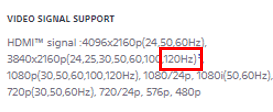
- A TV with a refresh rate of 120 Hz
- A cable HDMI 2.1 (8K or higher)
- A compatible PS5 game
Step 1: Connect Your TV And Ps5 Correctly
Connect your PS5 to the TV using a high-quality HDMI 2.1 Cable. Ensure that the cable is securely connected to both the TV and the console.
Step 2: Set Up Your TV For 120 Fps
- Turn on your TV and navigate to its settings menu.
- Look for the “Refresh Rate” or “HDMI Settings” option.
- Select “120 Hz” as the refresh rate.
- Save your changes.
Step 3: Adjust Ps5 Settings For 120 Fps
- Turn off your PS5 and unplug it from the TV.
- Plug in a monitor that supports 120 FPS (if you don’t have one, you can use a separate display).
- Connect your PS5 to the monitor using an HDMI cable (preferably HDMI 2.1).
- Power on your PS5 and navigate to its settings menu.
Step 4: Configure Ps5 Settings For 120 Fps
- Select “Data saved and game settings” from the menu.
- Scroll down and choose “Performance Mode” or “Resolution” settings.
- Select “Automatic” as the output setting.
- Save your changes.
Games That Support 120 Fps on Ps5
While not all PS5 games support 120 FPS, here are some titles that do:
- Apex Legends
- Atomic Heart
- Borderlands 3
- Bright Memory: Infinite
- Call of Duty: Black Ops Cold War
- Call of Duty: Modern Warfare 2
- Call of Duty: Vanguard
- Call of Duty: Warzone 2.0
- Cyber Shadow
- Destiny 2
- Devil May Cry 5: Special Edition
- Dirt 5
- Doom Eternal
- F1 2021
- F1 22
- Fortnite
- Ghostrunner
- Ghostwire: Tokyo
- God of War Ragnarok
- Hogwarts Legacy
Tips And Tricks For Achieving 120 Fps
- Ensure that your game is updated to the latest version.
- Check the game’s settings menu for a “Performance” or “Resolution” option.
- If you experience any issues, try restarting your console or updating your drivers.
- Consider using a separate monitor if you’re experiencing issues with your TV.
Conclusion
Achieving 120 FPS on your PS5 is now within reach. By following these steps and ensuring that your system meets the minimum requirements, you’ll be able to enjoy seamless gaming with this impressive frame rate. Remember to check the game’s settings menu for any specific requirements or adjustments needed for optimal performance. Happy gaming!


