
The Ultimate Guide to Creating Custom Labels: Top 8 Programs For Your Needs
Are you tired of using generic labels that don’t quite fit your brand or style? Do you want to create professional-looking labels without breaking the bank? Look no further! In this comprehensive guide, we’ll explore the top 8 programs for creating custom labels that cater to various needs and preferences.
Table 1: Top Programs For Creating Custom Labels
| Program | Platform | Features |
|---|---|---|
| Avery Online | Web-based | Personalizable templates, online printing, and easy design interface |
| CoverXP Free | Windows | Easy-to-use interface, automatic calibration, and drag-and-drop functionality |
| ExPressIt | Windows | Professional-level design capabilities, automatic alignment, and built-in image editor |
| Paper Laber Maker | Windows | User-friendly interface, database support, and advanced modification features |
| Pages | Mac | Seamless integration with Apple ecosystem, intuitive design interface, and extensive template library |
The Benefits of Creating Custom Labels
Custom labels offer numerous benefits for businesses, individuals, and organizations. Some of the advantages include:
- Professional Branding: Create labels that reflect your brand’s image and style.
- Personalization: Tailor labels to specific needs, such as product names, dates, or special instructions.
- Efficiency: Use custom labels to streamline processes, reduce errors, and save time.
How to Choose The Right Program For Your Needs
With so many programs available, selecting the right one can be overwhelming. Here are some factors to consider:
- Platform: Ensure the program is compatible with your operating system (Windows or Mac).
- Features: Consider the specific features you need, such as design capabilities, automatic alignment, and database support.
- Ease of Use: Choose a program with an intuitive interface that suits your skill level.
Programs For Creating Custom Labels
Now, let’s dive into the top 8 programs for creating custom labels:
1. Avery Online
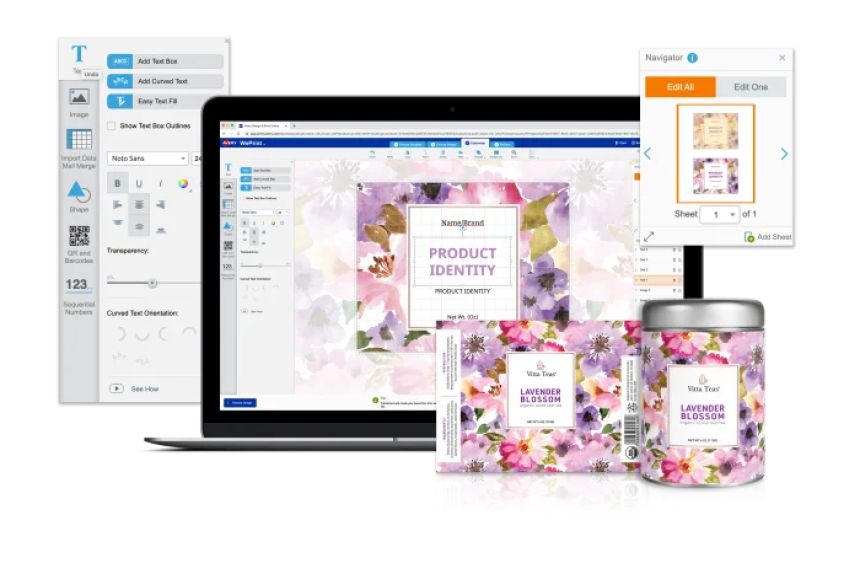
Avery is a web-based platform that offers personalizable templates, online printing, and easy design interfaces. Create labels in minutes with their extensive template library.
- Features: Personalizable templates, online printing, easy design interface
- Platform: Web-based (Windows, Mac)
- Cost: Free (basic features), subscription-based for premium services
2. Coverxp Free
CoverXP is a free Windows program that offers an easy-to-use interface, automatic calibration, and drag-and-drop functionality. Ideal for creating covers and labels for CDs, DVDs, and Blu-ray discs.
- Features: Easy-to-use interface, automatic calibration, drag-and-drop functionality
- Platform: Windows
- Cost: Free
3. Expressit
ExPressIt is a professional-level design program for Windows that offers automatic alignment, built-in image editing, and extensive design capabilities. Perfect for creating labels and covers for various products.
- Features: Professional-level design capabilities, automatic alignment, built-in image editor
- Platform: Windows
- Cost: Free (basic features), subscription-based for premium services
4. Paper Laber Maker
Paper Laber Maker is a free Windows program that offers an easy-to-use interface, database support, and advanced modification features. Ideal for creating custom labels, brochures, and other printed materials.
- Features: User-friendly interface, database support, advanced modification features
- Platform: Windows
- Cost: Free
5. Pages
Pages is a Mac program that offers seamless integration with the Apple ecosystem, an intuitive design interface, and extensive template libraries. Perfect for creating custom labels, tickets, and other printed materials.
- Features: Seamless integration with Apple ecosystem, intuitive design interface, extensive template library
- Platform: Mac
- Cost: Built-in (no additional cost)
6. Canva
Canva is a web-based platform that offers easy-to-use interfaces, extensive design capabilities, and seamless integration with various social media platforms. Ideal for creating custom labels, logos, and other visual content.
- Features: Easy-to-use interface, extensive design capabilities, seamless integration with social media
- Platform: Web-based (Windows, Mac)
- Cost: Free (basic features), subscription-based for premium services
7. Label Maker
Label Maker is a free Windows program that offers an easy-to-use interface, database support, and advanced modification features. Ideal for creating custom labels, stickers, and other printed materials.
- Features: User-friendly interface, database support, advanced modification features
- Platform: Windows
- Cost: Free
8. Label Designer
Label Designer is a free Windows program that offers an easy-to-use interface, automatic calibration, and drag-and-drop functionality. Ideal for creating custom labels, covers, and other printed materials.
- Features: Easy-to-use interface, automatic calibration, drag-and-drop functionality
- Platform: Windows
- Cost: Free
Conclusion
Creating custom labels has never been easier or more accessible. With the top 8 programs listed above, you can create professional-looking labels that reflect your brand’s image and style. Remember to consider factors such as platform compatibility, features, and ease of use when selecting the right program for your needs.
Frequently Asked Questions (FAQs)
- What Are The Benefits of Creating Custom Labels?
Custom labels offer numerous benefits, including professional branding, personalization, efficiency, and streamlining processes.
- How do I Choose The Right Program For my Needs?
Consider factors such as platform compatibility, features, and ease of use when selecting the right program for your needs.
- What Are Some Popular Programs For Creating Custom Labels?
Some popular programs include Avery Online, CoverXP Free, exPressIt, Paper Laber Maker, Pages, Canva, Label Maker, and Label Designer.
- Can I Create Custom Labels With a Mac?
Yes, you can create custom labels using various programs available on the Mac platform, such as Pages.
- Are There Any Free Programs For Creating Custom Labels?
Yes, several free programs are available, including CoverXP Free, Paper Laber Maker, Label Maker, and Label Designer.
- Can I Use a Web-based Platform to Create Custom Labels?
Yes, various web-based platforms offer easy-to-use interfaces, extensive design capabilities, and seamless integration with social media platforms.
- How do I Print my Custom Labels?
Printing your custom labels is usually straightforward, depending on the program you’re using. Some programs allow online printing, while others require a physical printer.
- Can I Use a Database to Store And Organize my Label Templates?
Yes, some programs offer database support for storing and organizing label templates, making it easy to access and edit them as needed.


