
Unlocking The Power of Bim: The Best Software Programs For Architectural Design
In today’s fast-paced world, architects and engineers are constantly seeking innovative ways to streamline their design processes and improve collaboration with clients and stakeholders. Building Information Modeling (BIM) has emerged as a game-changer in this space, offering a range of software programs that enable users to create detailed 3D models and manage project data more efficiently.
In this article, we’ll delve into the world of BIM software, exploring the best programs for architectural design, MEP (mechanical, electrical, and plumbing) systems, and other related disciplines. Whether you’re a seasoned professional or just starting out, our guide will help you navigate the complex landscape of BIM software and find the perfect solution for your needs.
What is Bim?
Before we dive into the software programs, let’s quickly define what BIM is. Building Information Modeling (BIM) is a digital representation of physical and functional characteristics of a building or infrastructure project. It’s a collaborative process that involves creating, sharing, and using building information to design, construct, and manage buildings.
The Benefits of Bim
Using BIM software offers numerous benefits for architects, engineers, and contractors. Some of the key advantages include:
- Improved collaboration: BIM enables multiple stakeholders to work together on a single project platform.
- Enhanced accuracy: By creating detailed 3D models, users can identify errors and discrepancies more easily.
- Increased productivity: Automating tasks such as data management and clash detection saves time and reduces manual labor.
- Better decision-making: Access to accurate and up-to-date information facilitates informed decision-making throughout the project lifecycle.
The Best Bim Software For Architectural Design
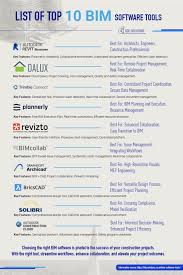
- Autodesk Revit: A powerful tool for architects, engineers, and contractors, Autodesk Revit is a BIM software that allows users to create detailed 3D models and manage project data.
- Archicad: Developed by Graphisoft, Archicad is another popular BIM software that’s specifically designed for architectural design and construction projects.
- Autodesk Civil 3D: A high-end BIM software developed by Autodesk, Civil 3D is ideal for civil infrastructure projects such as roads, bridges, and buildings.
Other Notable Bim Software Programs
- Bricsys Bricscad Bim: A powerful tool that offers advanced features for architects, engineers, and contractors.
- Allplan Aec: A comprehensive software program that integrates all phases of the design and construction process.
- Edificius Mep: A dedicated BIM software for mechanical, electrical, and plumbing (MEP) systems.
Choosing The Right Bim Software
With so many options available, selecting the best BIM software can be overwhelming. Here are some factors to consider:
- Ease of Use: Choose a software program that’s intuitive and easy to learn.
- Compatibility: Ensure the software is compatible with your operating system (Windows or macOS).
- Collaboration Features: Select a software that offers seamless collaboration and data management capabilities.
- Scalability: Opt for a software program that can grow with your business needs.
Conclusion
BIM software has revolutionized the way architects, engineers, and contractors work on design projects. By choosing the right BIM software, you can streamline your workflow, improve collaboration, and increase productivity. In this article, we’ve explored some of the best BIM software programs for architectural design, MEP systems, and other related disciplines. Whether you’re a seasoned professional or just starting out, we hope our guide has been informative and helpful.
Faqs
- Q: What is The Cost of Autodesk Revit?
A: The price of Autodesk Revit varies depending on your subscription plan (421 euros/month or 3,386 euros/year). - Q: Can I Try Out Archicad For Free?
A: Yes, you can download a free trial version of Archicad and test its features. - Q: What is The Best Bim Software For Mep Systems?
A: Edificius MEP and AutoCAD MEP are two popular options for mechanical, electrical, and plumbing (MEP) systems. - Q: Is Bricsys Bricscad Bim Compatible With Macos?
A: Yes, Bricsys BricsCAD BIM is compatible with both Windows and macOS operating systems. - Q: Can I Customize The Interface of Edificius Mep?
A: Yes, Edificius MEP allows users to personalize the interface according to their preferences. - Q: What is The Cost of Autopipe?
A: The price of AutoPIPE varies depending on your subscription plan (3,060 euros/year). - Q: Can I Use Solidworks Flow Simulation For Bim Projects?
A: Yes, SOLIDWORKS Flow Simulation can be used for BIM projects, but it’s essential to consult the official documentation. - Q: What is The Cost of Edificius Mep?
A: The price of Edificius MEP varies depending on your subscription plan (24.92 Euros/month).


