
How to Replace a Toner Cartridge in Your HP Laser Printer
Are you tired of dealing with a low or empty toner cartridge in your HP laser printer? Look no further! Replacing the toner cartridge is a relatively simple process that can help get your printer up and running again. In this article, we’ll guide you through the steps to replace the toner cartridge in your HP laser printer.
What You Need to Know
Before we dive into the instructions, it’s essential to understand a few things:
- The toner cartridge is a consumable part that needs to be replaced periodically.
- The type of toner cartridge you need will depend on the specific model of your HP laser printer.
- Replacing the toner cartridge can help improve print quality and prevent damage to your printer.
Choosing The Right Toner Cartridge
The first step in replacing a toner cartridge is to choose the right one for your printer. Here’s how:
- Check Your Printer Model: Look for the printer model number on the back or bottom of your HP laser printer.
- Visit The HP Website: Go to the HP website and enter your printer model number into the search bar.
- Find The Toner Cartridge: Once you’re on the HP website, navigate to the “Supplies” or “Toner Cartridges” section.
- Choose The Correct Toner Cartridge: Select the toner cartridge that matches your printer’s specifications.
Replacing The Toner Cartridge
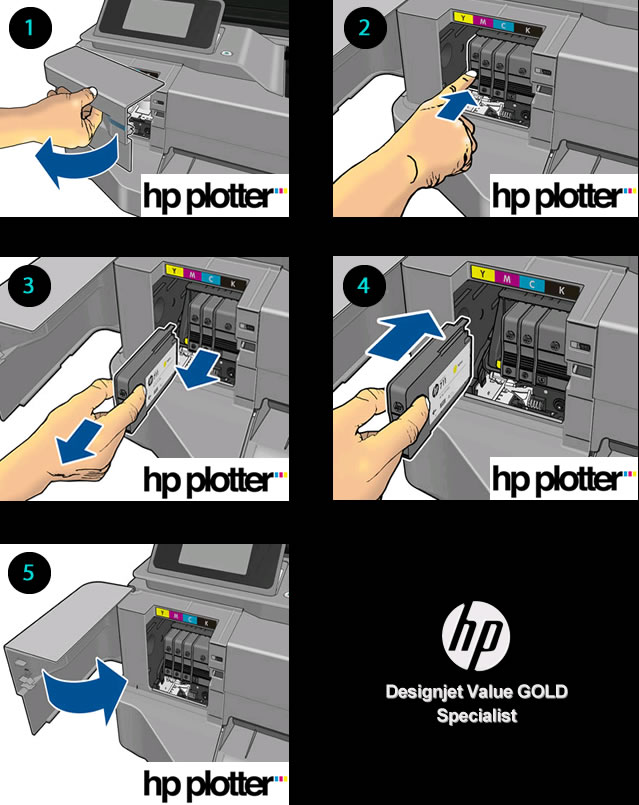
Now that you have the correct toner cartridge, it’s time to replace the old one with the new one. Here’s a step-by-step guide:
- Turn Off Your Printer: Make sure your HP laser printer is turned off and unplugged from the power source.
- Open The Printer Cover: Open the printer cover or top plate to access the toner cartridge.
- Remove The Old Toner Cartridge: Carefully remove the old toner cartridge from its holder.
- Insert The New Toner Cartridge: Place the new toner cartridge into its holder and make sure it’s securely seated.
- Replace The Printer Cover: Close the printer cover or top plate to secure the new toner cartridge.
Tips For Replacing a Toner Cartridge
Here are some additional tips to keep in mind:
- Always unplug your printer before attempting to replace the toner cartridge.
- Make sure you choose the correct toner cartridge for your printer model.
- Handle the toner cartridges with care, as they can be fragile and prone to damage.
What to Do With an Old Toner Cartridge
Now that you’ve replaced the old toner cartridge with a new one, what do you do with the old one? Here are some options:
- Recycle It: Many printer manufacturers, including HP, have recycling programs for used toner cartridges.
- Dispose of It Properly: Make sure to dispose of the old toner cartridge in an environmentally friendly way.
Conclusion
Replacing a toner cartridge in your HP laser printer is a relatively simple process that can help improve print quality and prevent damage to your printer. By following these steps, you should be able to replace the toner cartridge with ease. Remember to always choose the correct toner cartridge for your printer model and handle the toner cartridges with care.
Frequently Asked Questions (FAQs)
Here are some frequently asked questions about replacing a toner cartridge in your HP laser printer:
- Q: How Often do I Need to Replace my Toner Cartridge?
A: The frequency of replacing the toner cartridge depends on how often you use your printer. - Q: What Happens if I Choose The Wrong Toner Cartridge For my Printer?
A: Choosing the wrong toner cartridge can cause print quality issues and potentially damage your printer. - Q: Can I Recycle my Old Toner Cartridge?
A: Yes, many printer manufacturers have recycling programs for used toner cartridges. - Q: How do I Know When my Toner Cartridge is Empty?
A: Your HP laser printer will usually indicate when the toner cartridge is low or empty. - Q: Can I Use a Compatible Toner Cartridge Instead of an Original One?
A: Yes, you can use a compatible toner cartridge, but make sure it’s designed for your specific printer model.
Additional Resources
For more information on replacing a toner cartridge in your HP laser printer, check out these additional resources:
- HP Website: Visit the HP website for detailed instructions and troubleshooting guides.
- Printer Manufacturer Website: Check with your printer manufacturer for specific instructions and guidelines.
- Online Forums: Join online forums and communities to connect with other printer users and get advice on replacing toner cartridges.


